


The CM12 Unofficial build lets you discover Android 5 on the One! Discover the OnePlus One toolbox and become a super user (root).
Real-world use case
You want to discover Android 5 on your OnePlus One before the official release: here's how to install CM12 Unofficial.
CyanogenMod
CyanogenMod 12 is an alternative, free system running on Android. It is released under the GPL license, by the company Cyanogen Inc. Its alternative OS owes part of its success to respecting private data. It can be used on smartphones and tablets (70 models available):
For more information, check out CyanogenMod's community site. The device used for this article is a OnePlus One on the unofficial version 5.
Steps to get CyanogenMod 12:
Before you start, be aware your phone will lose all of its data! Take note of the necessary steps before getting the CM 12 ROM:
- Unlock the bootloader and install a recovery with the OnePlus One Toolbox tool.
- Download CyanogenMod 12 20141122-UNOFFICIAL and Google Apps.
- Boot into recovery mode, then install CyanogenMod and the Google Apps with TWRP.
- Reboot your OnePlus One smartphone to discover Android 5 running CyanogenMod.
OnePlus One Toolbox
Download the OnePlus One Toolbox or from the official site and install it on your computer, it's very easy to use:
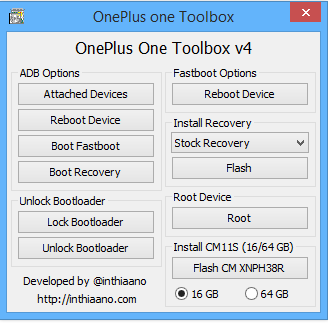
For the rest of the process, follow these steps:
- Turn off your One, without the USB cable connected to your computer.
- Press the UP and POWER buttons on the One to enter Fastboot mode (an icon will appear).
- Then connect your One to your PC (your Windows system may proceed to install the Android drivers).
- Via the Toolbox, click the Unlock Bootloader button, then dismiss the message.
- The One will fully reset, click next/dismiss, then unplug the phone and turn it off.
- A second step is to put it back into fastboot mode (UP+POWER).
- Then connect your One to your PC.
- From your Toolbox, select the "Install Recovery" software (TWRP in my case), then "FLASH".
- Reboot your phone into recovery mode using the following key combination: DOWN + POWER
You now have a recovery installed on your One, let's see how to proceed with rooting the One with SuperSu!
Root access with SuperSu on the One
I recommend downloading the latest version 2.02 available at the following link and adding it to the root of your One: (A0001 internal storage memory)

You'll then just need to reboot your One into recovery mode (DOWN + POWER) and go into TWRP:
- INSTALL/sdcard/UPDATE-SuperSU-v2.16.zip
After clicking on your UPDATE-SuperSU-v2.16.zip, swipe to confirm flash, then reboot system.
SuperSu is now installed on your system, you can now do whatever you want.
Installing CyanogenMod 12 Unofficial
Will we finally be able to enjoy Android version 5 in the Unofficial build? Well, yes, with these 2 prerequisites:
- Download the CM 12 Unofficial ROM at the following link: ROM CM 12.
- Download the Google Apps for Android 5: Gapp.
The source comes from an active developer in the XDA community: official topic.
Connect your One to your PC and repeat the same steps as with SuperSu.
- Add the two files you downloaded above (CM12 and Gapp), then restart the smartphone in recovery mode
- Run the installation of cm-12-20141122-UNOFFICIAL-bacon.zip and gapps-lp-20141107-signed.zip.
- Reboot and enjoy!
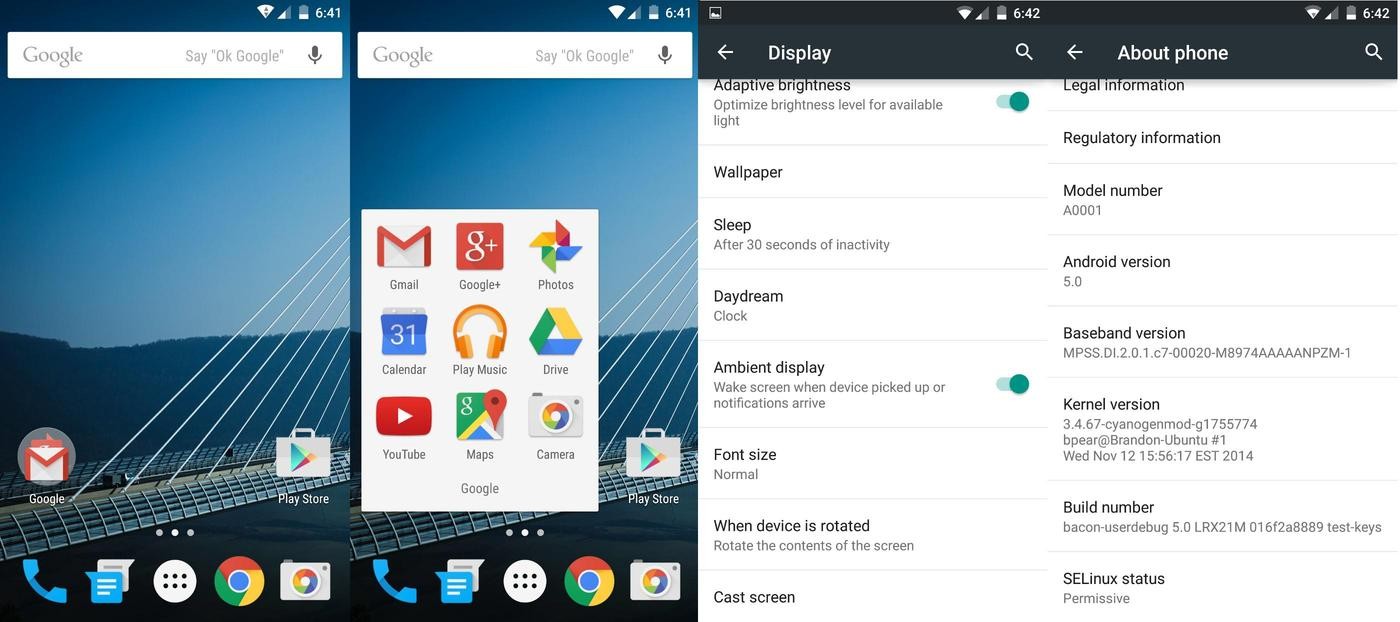
Congratulations, your One is now running Android 5 with Google Apps! Send me your email for a chance to win an invite for the One (first come, first served)!