


Configure a virtual private network (VLAN). Integrate Vyatta into an ESXi networking setup. Prerequisite: master ESXi and Vyatta networking.
Table of contents
Real-world use case
You need to isolate traffic on the same switch: here's how to configure a VLAN with Vyatta.
Vyatta: Virtual Local Area Network (VLAN)
A virtual local area network (VLAN) is an independent "logical" computer network. VLANs are essential because they allow:
- better network management.
- optimizing bandwidth.
- reducing collision domains.
- strengthening security.
The following example covers networking with VLAN IDs on VMware ESXi 5. I removed the IP addresses since they belonged to a small production server*.*
ESXi networking diagram with Vyatta (vlan):
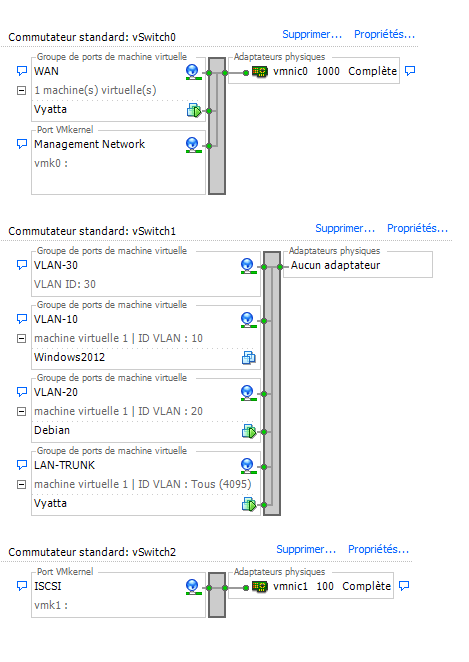
Vyatta uses two network adapters: WAN and LAN-TRUNK. LAN-TRUNK uses VLAN ID 4095 to reach the other VLAN IDs. Windows Server 2012 uses VLAN ID 10 (RDP server). Debian uses VLAN ID 20 (Rsyslog server). VLAN ID 30, meanwhile, is empty.
Configuring the WAN and LAN-TRUNK interfaces:
set interfaces ethernet eth0 address X.X.X.X/X
set interfaces ethernet eth0 description WAN
set interfaces ethernet eth1 address 192.168.0.1/24
set interfaces ethernet eth1 description LAN-TRUNK
Configuring VLANs on the LAN-TRUNK interface:
set interfaces ethernet eth1 vif 10 address 192.168.10.1/24
set interfaces ethernet eth1 vif 10 description VLAN-10
set interfaces ethernet eth1 vif 20 address 192.168.20.1/24
set interfaces ethernet eth1 vif 20 description VLAN-20
set interfaces ethernet eth1 vif 30 address 192.168.30.1/24
set interfaces ethernet eth1 vif 30 description VLAN-30
On the 3 VLANs above, you can enable your DHCP servers, NAT rules, etc. For anyone who may have forgotten the steps to follow: previous article.
Conclusion
This configuration sets up tagged VLANs on Vyatta within a virtualized VMware ESXi environment, with a dedicated LAN-TRUNK interface for carrying the different VLAN IDs. Each VLAN can then receive its own DHCP configuration or NAT rules, as detailed in the previous article on basic configuration. It's a simple way to logically segment a virtualized network without multiplying physical interfaces.