


Add a MAC address to an interface with "peth". Vyatta optimizes interfaces with Pseudo-Ethernet.
Table of contents
Real-world use case
You need to add a virtual MAC address to a Vyatta interface: here's how to configure a Pseudo-Ethernet Interface (peth).
Vyatta: Pseudo Ethernet Interface (Peth)
A Pseudo-Ethernet Interface in Vyatta lets you save and optimize your network cards. A network card generally only accepts a single IP address, but with a Pseudo-Ethernet Interface that constraint no longer exists! The Pseudo-Ethernet interface lets you add another IP to the interface, up to 4095 IPs. How does it work? The principle is to specify the MAC address of the corresponding IP.
Diagram with one network card and 3 peth0 interfaces:
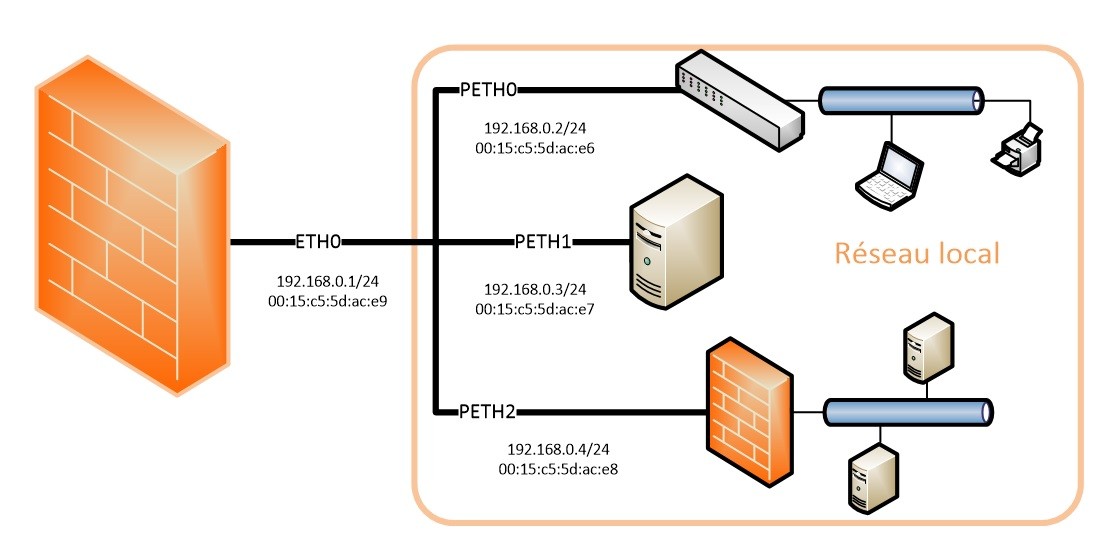
Configuring the ETH0 HARDWARE interface:
set interfaces ethernet eth0 addresse 192.168.0.1/24
set interfaces ethernet eth0 description interface1
Configuring Pseudo-Ethernet on interface ETH0:
set interfaces pseudo-ethernet peth0 addresse 192.168.0.2/24
set interfaces pseudo-ethernet peth0 description lan1
set interfaces pseudo-ethernet peth0 link eth0
set interfaces pseudo-ethernet peth0 mac 00:15:C5:2d:AC:E6

set interfaces pseudo-ethernet peth1 addresse 192.168.0.3/24
set interfaces pseudo-ethernet peth1 description serveur1
set interfaces pseudo-ethernet peth1 link eth0
set interfaces pseudo-ethernet peth1 mac 00:15:C5:2d:AC:E7

set interfaces pseudo-ethernet peth2 addresse 192.168.0.4/24
set interfaces pseudo-ethernet peth2 description lan2
set interfaces pseudo-ethernet peth2 link eth0
set interfaces pseudo-ethernet peth2 mac 00:15:C5:2d:AC:E8
Nothing stops you from creating VLANs inside your Pseudo-Ethernet Interfaces. You now know how to save and optimize a network interface on Vyatta.
Conclusion
Pseudo-Ethernet (peth) interfaces on Vyatta let you associate several virtual IP and MAC addresses with a single physical network card, up to 4095 IPs per interface. This technique avoids multiplying physical network cards while keeping a clear logical separation between uses (LAN, server, etc.). It can also be combined with VLANs to further refine network segmentation.