


Easily update different versions of ESXi 5.x. Close a security hole in ESXi with VIBs.
Real-world use case
You need to keep several ESXi 5.x hosts up to date on the security side: here's how to apply patches easily.
VMware ESXi and IT security
IT systems are prone to security holes, not surprising, is it?
VMware ESXi is also affected by vulnerabilities, which are later fixed by the vendor.
Today, it's important to follow a product's evolution in order to close its holes.
We'll take the example of an ESXi 5.1 template: OVH. We're going to patch the vulnerabilities.
The system will then become a bit more reliable and make things harder for potential attackers.
The discovery of the Heartbleed vulnerability also affected version 5.5 of ESXi: vulnerability example.
Understanding what's at stake:
Before diving into fixing vulnerabilities on an infrastructure, it's important to know a few steps and keep certain points in mind:
- Fixing vulnerabilities is a multi-step process, and the steps need to be done in order.
- Before performing them, you need to understand the process as a whole.
- The steps are reversible, a patch can be uninstalled.
- If you use plugins, check their compatibility with future updates.
- You also need to master the technical language (VIB, image profile, software repository, etc…).
- Take precautions (you can never repeat this enough): back up your VMs!
- Understand the esxcli command and its parameters.
- Check your VIB checksums: run a test before deploying.
- Apply the patch or update to your host.
The problem at hand:
Our task is to patch a hypervisor running VMware ESXi 5.1 to 5.1U1, then U2.
For the update process (ESXi 5.1 to 5.1U1), you need to ask yourself certain questions:
- Is my ESXi server currently in production? Can it go into maintenance mode?
- What are the components that make up my server? Are they compatible with ESXi 5.1?
- Are the drivers available for the future ESXi 5.1 system I want to deploy?
This kind of question is essential before starting any kind of migration.
Adjust your updates according to your server, in my case, I use a dedicated mSP 2013 server.
Listing CVEs
There are quite a few CVE websites, such as: CVE.mitre and CERT SSI gouv fr.
When a CVE is publicly disclosed, there's usually a patch to close the hole.
VMware has a public portal for its vulnerabilities, available at this address: VMware portal.
In our case, we're going to list the publicly known CVEs after August 29, 2012 (release date of VMware ESXi 5.1) from the CVEdetails website, available at this address: vulnerability.
The list of known CVEs for vendor VMware and product ESXi is at the following address.
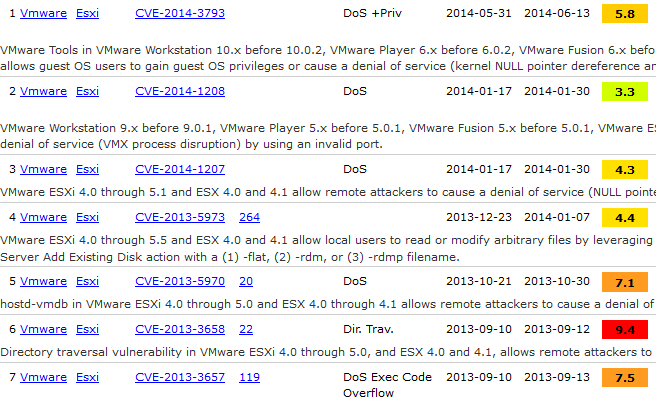
We can see that our hypervisor, currently in production, has significant security holes, so it's time to close the gaps!
VMware ESXi 5.1 Patches
As we saw earlier, VMware's portal lets us download patches.
We'll start using this service in CLI mode in our ESXi busybox.
For my part, I'll reach my ESXi via SSH, shut down my VMs, and put it into maintenance.
vim-cmd hostsvc/maintenance_mode_enter
Now let's head to the VMware portal to patch ESXi 5.1.
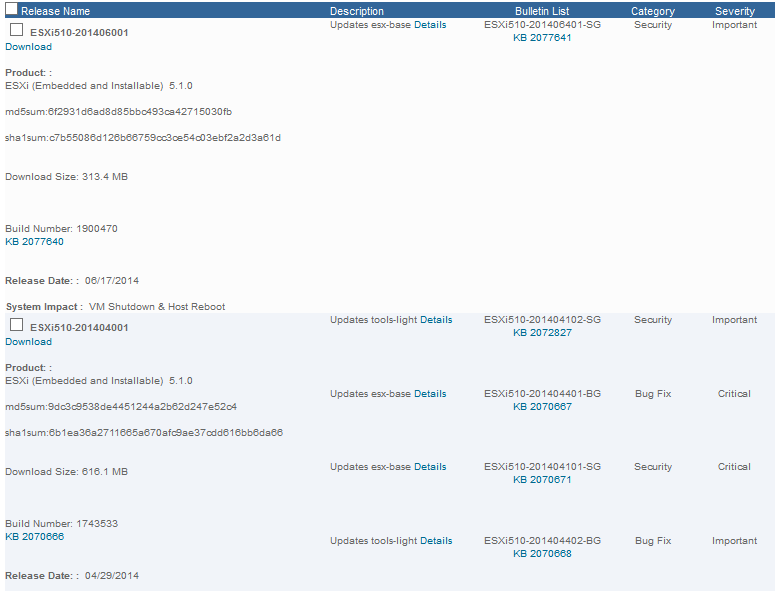
Now click "Search," and a dropdown list appears:

Here you have the last two releases that close vulnerabilities or bugs in ESXi 5.1.
You need to check all the patches released after your version. My system's Build Number is "799733" and dates from 08/29/2012. So I check all the available updates and click the "Download now" button.
Once you've downloaded the file, you have all the patches in your archive.
If you run into problems, download them one by one.
To start, I recommend transferring them via SFTP (with software like FileZilla, for example).
Be sure to note down your archive's md5sum in order to check its integrity after the transfer!
The command to check the md5sum in VMware ESXi is as follows:
md5sum /path/ESXi510-201406001.zip
6f2931d6ad8d85bbc493ca42715030fb  /path/ESXi510-201406001.zip
Let's check the md5 against the original source (VMware):
md5sum:6f2931d6ad8d85bbc493ca42715030fb
Build Number: 1900470
KB 2077640
The MD5 matches perfectly, let's move on to the last step.
Patching with esxcli software vib
To patch our VMware hypervisor from version 5.1 to 5.1U1, we'll use the esxcli command. Let's navigate to the following command hierarchy:
esxcli software vib
Which gives us the available commands:
 Available Commands:
  get                   Displays detailed information about one or more installed VIBs
  install               Installs VIB packages from a URL or depot. VIBs may be installed, upgraded, or
                        downgraded. WARNING: If your installation requires a reboot, you need to disable HA
                        first.
  list                  Lists the installed VIB packages
  remove                Removes VIB packages from the host. WARNING: If your installation requires a reboot, you
                        need to disable HA first.
  update                Update installed VIBs to newer VIB packages. No new VIBs will be installed, only updates.
                        WARNING: If your installation requires a reboot, you need to disable HA first.
The command details are very well explained, in my case I use the update option.
Checking the ESXi version (optional):
Before getting started, you can check your hypervisor's version at any time:
esxcli system version get
Product: VMware ESXi
Version: 5.1.0
Build: Releasebuild-799733
Update: 0
There's an equivalent to the above command, such as:
vmware -l
VMware ESXi 5.1.0 Update 0
We can now apply our first patch! As a first command, I recommend using the following parameter: --dry-run, since it lets you know what changes will take effect after the update. It's very handy to make sure you're not removing a custom VIB, like a network card driver for example.
Here's how to apply a patch in simulation mode with the --dry-run argument at the end:
esxcli software vib update -d "/vmfs/volumes/datastore1/ESXi550-201407001.zip" --dry-run
Dryrun only, host not changed. The following installers will be applied
I won't show the full list, but there are 3 categories: update, remove, and skip, if everything looks right to you, we can move on to updating our ESXi:
esxcli software vib update -d "/vmfs/volumes/datastore1/ESXi550-201407001.zip"
You can now disable maintenance mode on the server:
vim-cmd hostsvc/maintenance_mode_exit
Reboot the server:
reboot
Once the server has finished rebooting, your vSphere client will update itself.
Once connected to the hypervisor via SSH, here's the new update build:
esxcli system version get
Product: VMware ESXi
Version: 5.1.0
Build: Releasebuild-1065491
Update: 1
Just repeat the same steps to move to 5.1U2, which gives, once applied:
esxcli system version get
Product: VMware ESXi
Version: 5.1.0
Build: Releasebuild-1483097
Update: 2
I'll admit the process is fairly tedious, this is a method for a single host.
There's a simpler method with VMware vCenter Update Manager (paid).
You now know how to close a hole in your ESXi hypervisor!
I encourage you to close security holes, stay informed, subscribe to the CVE RSS feed!
Conclusion
This article showed how to identify and apply security patches to a VMware ESXi 5.1 hypervisor, relying on public CVE databases and VMware's patch portal, then using the esxcli software vib update command (with the --dry-run option to validate changes before applying them). This approach, while tedious on a standalone host, lets you close known vulnerabilities and reduce the infrastructure's attack surface. For larger-scale management, VMware vCenter Update Manager remains a more suitable, paid alternative.