

Get to grips with installing an SSL certificate. Understand how to create a Gandi.net SSL certificate. Deployment on a Debian 7 server with Pound 2.6.
Real-world use case
You need to encrypt traffic behind your Pound reverse proxy: here's how to install a Gandi SSL certificate.
The SSL certificate
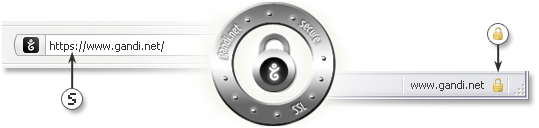
Secure Sockets Layer, abbreviated SSL, is used to secure information traffic on the internet.
The standard is standardized and works based on the principle of public-key cryptography.
We'll be working with the free version of SSL, called OpenSSL.
The SSL certificate establishes trust between you (your website) and your visitors.
You can spot it via the active padlock icon and the https protocol in the browser.
There are several types of SSL certificates, representing different levels of trust.
For reference, each browser uses a different icon and colors, see the FAQ:
- Firefox's FAQ: how can I tell if my connection to a website is secure?
- Chrome's FAQ: check the security of a site's connection.
An example: my website
My website, for example, uses a verified certificate, signed by the authority: gandi.net.
A gray padlock therefore appears at the top left of my website's URL, which proves that:
- The domain has been verified, and it proves that I own the domain name and that it hasn't been forged.
- It also assures you that the connection is encrypted, meaning no malicious person can spy on it and steal your login information.
- The gray padlock tells us: currently connected to the site: kassianoff.fr
If you'd like a valid SSL certificate from Gandi, head here: Gandi SSL.
I've been using a standard SSL certificate for €14.40 a year on kassianoff.fr since August 12, 2014.
Why does my blog use an SSL certificate?
Today, several factors motivated me to buy an annual certificate from Gandi.
Of course, there are the reasons mentioned above, as well as my desire to keep blogging on the site.
The site is largely visited by internet users passionate about the Tech world, people who understand the internet and today's encryption needs.
As part of my ongoing work, it would be unthinkable not to thank you for your visits (growing every month!), and buying an SSL certificate is my way of saying: thank you! Gandi is a mark of trust I selected for us because they're at the heart of the French web and stand out for the quality of their services related to the global internet, as well as for their various missions.
Second, I want to optimize my ranking on Google's search engine, which will penalize poorly secured sites. Now you know everything!
It's now time to move on to installing a Gandi SSL certificate on Pound 2.6.
Purchasing a Gandi SSL certificate
The steps below explain how to get a Gandi SSL certificate for "a single address."
Gandi offers an extremely well-designed wiki at this address: Gandi Wiki SSL (use it).
The important step is to properly generate the RSA private key (.key) and the certificate request (.csr):
openssl req -nodes -newkey rsa:2048 -keyout www.kassianoff.key -out www.kassianoff.csr
Some questions appear for generating our ".csr", such as:
Country Name (2 letter code) [AU]:FR
State or Province Name (full name) [Some-State]:Rhone-Alpes
Locality Name (eg, city) []: VALENCE
Organization Name (eg, company) [Internet Widgits Pty Ltd]:kassianoff
Organizational Unit Name (eg, section) []:IT
Common Name (eg, YOUR name) []: kassianoff.fr
Email Address [] [email protected]
Important: the Common Name corresponds to my domain or subdomain to protect.
You'll notice that "www" is always protected with Gandi, and the certificate is free the first year!
Now let's display the ".csr" in order to copy/paste it into Gandi when creating the certificate:
cat www.kassianoff.csr
-----BEGIN CERTIFICATE REQUEST-----
...encrypted text...
-----END CERTIFICATE REQUEST-----
Now go to the Gandi interface and order your "single address" SSL certificate.
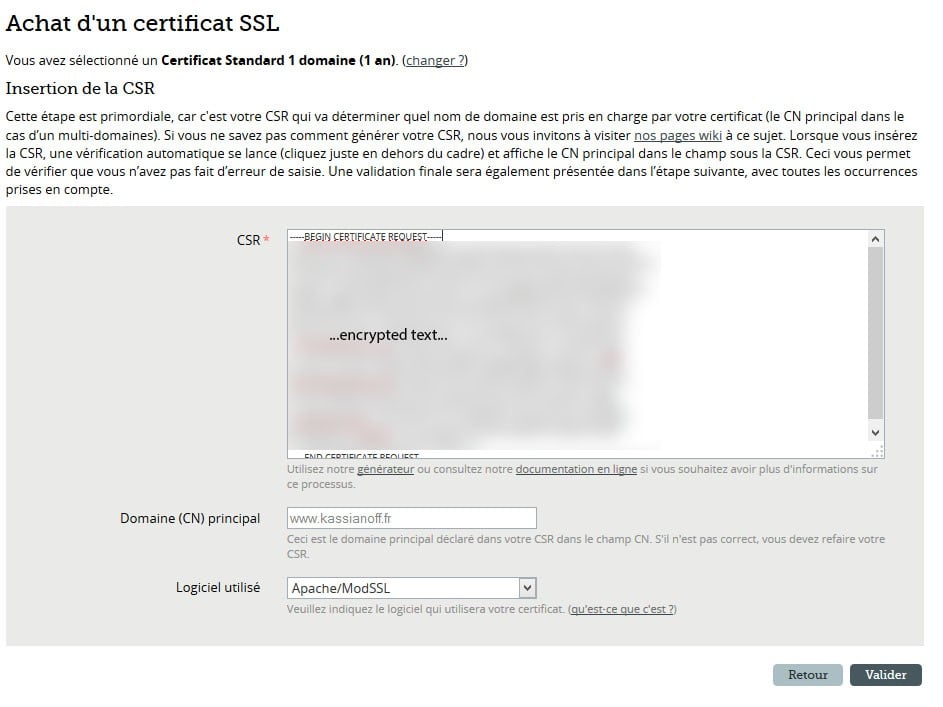
Simply click Confirm, then follow the next steps, which are very simple.
Several verification methods are available; I used the email method.
You need an active email address at "admin@your_domain.tld" to verify.
Then, the email contains a link that redirects to Comodo, with a character key to provide.
Then you need to wait ~1 hour for the creation of our certificate, so it can be used and retrieved.
Go to the Gandi client interface under SSL > www.kassianoff.fr, then retrieve it as described.
Viewing the certificate
Here's the currently active certificate:
- Download the certificate
- Download the intermediate
I encourage you to grab both files and transfer them to your Linux server.
Configuring the Gandi certificate on Pound 2.6
Configuring a certificate on Pound seems interesting to me because everything's stored in a single ".pem".
On top of that, the flexibility of managing certificates with a reverse proxy is really nice.
I covered Pound in the following article: Installing the Pound and Varnish reverse proxies.
So on our server, there are three important files for creating the certificate:
- www.kassianoff.key: the private key.
- certificate-62460.crt: the certificate provided by Gandi.
- GandiStandardSSLCA.pem: the intermediate certificate provided by Gandi.
Pound doesn't directly handle ".key", ".crt", and ".pem" formats separately.
Everything needs to be combined into a single ".pem" file, which we'll call: "**www.kassianoff**.pem"
- nano /etc/pound/ssl/www/www.kassianoff.Pem
- -----BEGIN RSA PRIVATE KEY---- ...encrypted text: www.kassianoff.key... -----END RSA PRIVATE KEY----- -----BEGIN CERTIFICATE----- ...encrypted text: certificate-62460.crt... -----END CERTIFICATE----- -----BEGIN CERTIFICATE----- ...encrypted text: GandiStandardSSLCA.pem... -----END CERTIFICATE-----
- We save the Gandi certificate.
- We configure Pound from the path: "nano /etc/pound/pound.cfg".
- ListenHTTPS Address 192.168.0.2 Port 443 Cert "/etc/pound/ssl/www/www.kassianoff.pem" AddHeader "X-Forwarded-Proto: https" ## allow PUT and DELETE also (by default only GET, POST and HEAD)?: xHTTP 2 Service BackEnd Address 127.0.0.1 Port 80 End End End
- Restart Pound:bash
/etc/init.d/pound restart
The SSL certificate is now properly configured on Pound, and your site is accessible over https!
You now know how to configure and install your Gandi SSL certificate on Pound.
For any other remarks about migrating my site to https, leave a comment!
Conclusion
I've detailed here the whole process of getting and installing a Gandi SSL certificate, from generating the private key and certificate request to configuring it on a Pound 2.6 reverse proxy. This type of certificate guarantees my visitors domain verification and traffic encryption, while also improving the site's search ranking. Pound's flexibility, which consolidates the key, certificate, and intermediate into a single .pem file, greatly simplifies HTTPS management.