

How I maximized the security of my Microsoft 365 environment with exposure management. Concrete feedback and risk management.
Real-world use case
Ahead of a client audit, my CISO asks me for a reliable status report on our Microsoft 365 exposure. Rather than compiling scattered screenshots, I use Microsoft Defender Exposure Management to get a scored, justified breakdown, initiative by initiative, that I can present as-is to the security committee.
Risk management is essential in organizations. The main challenge is to accurately map exposure risks against today's threats.
Microsoft 365, via Microsoft Defender Exposure Management, provides a full view of your security projects that share similar resources and workloads. The goal is to assess and fix your security posture by reducing your risk areas. Measuring these "initiatives" offers a centralized overview of your security landscape. More information.
And if, like me, you care about defense in depth across the four fundamental pillars, then you're on the right track to get the best possible score and try to reach 100% on every initiative.
Explanation of the included initiatives
The score is based on the recommendations deployed as part of the Secure Score, presented as performance metrics. It's essential to understand that certain factors can affect how percentages are assigned:
- Unavailable (or missing) licenses
- The workload isn't properly connected or configured.
Each initiative view lets you see aggregated data across your tenant, providing a consolidated view of your security posture.
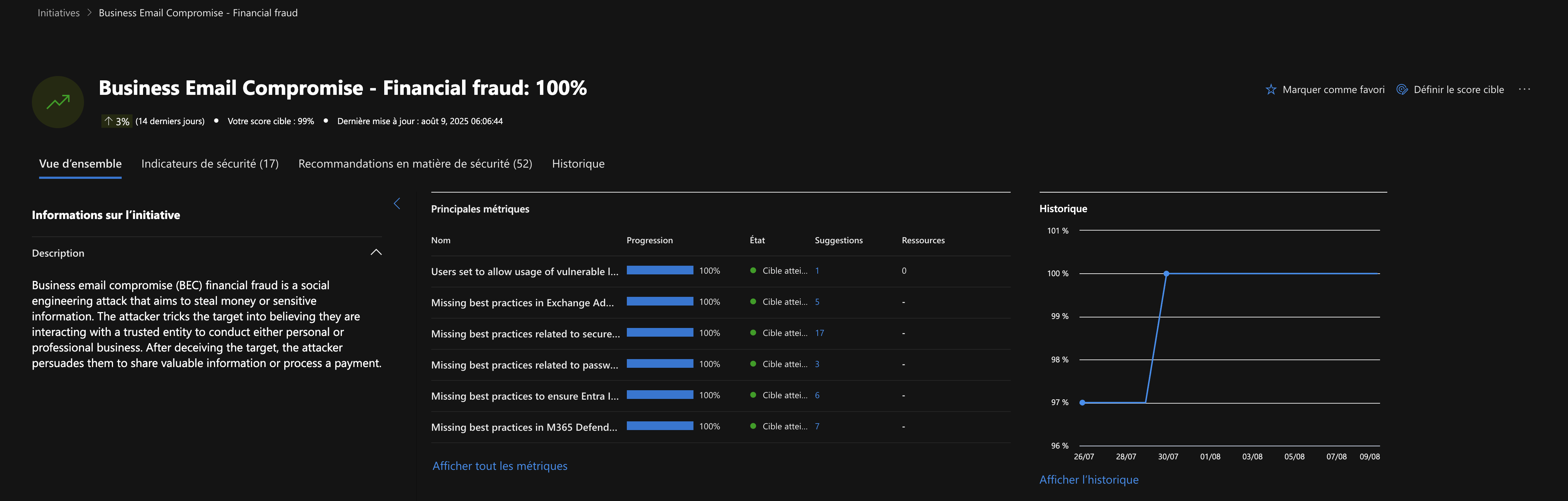
Business Email Compromise - Financial fraud
Business Email Compromise (BEC) financial fraud is a social engineering attack aimed at stealing money or sensitive information. The attacker makes the target believe they're interacting with a trusted entity in order to conduct personal or business dealings. After deceiving the target, the attacker convinces them to share valuable information or to make a payment.
- Goal: reduce exposure to the risk of email account compromise leading to financial fraud (vendor bank detail changes, invoice fraud, payroll redirection, CEO fraud).
- Scope: cross-cutting signals and recommendations (notably Entra ID/Azure AD, Exchange Online/Defender for Office 365).
Our score as of August 9, 2025 (100%):
CIS M365 Foundations Benchmark
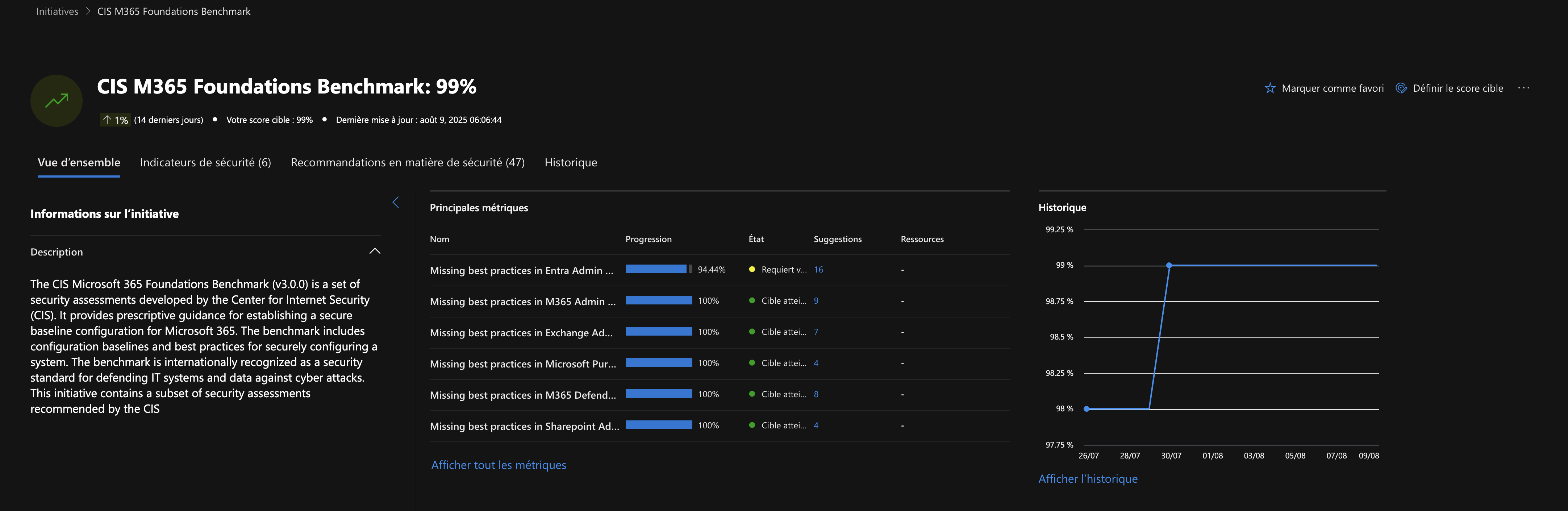
The CIS Microsoft 365 Foundations Benchmark (v3.0.0) is a set of security assessments developed by the Center for Internet Security (CIS). It provides prescriptive guidance for establishing a secure baseline configuration for Microsoft 365. The benchmark includes configuration baselines and best practices for securely configuring a system. The benchmark is internationally recognized as a security standard for defending IT systems and data against cyberattacks. This initiative contains a subset of security assessments recommended by CIS.
- Goal: ensure that the Microsoft 365 environment's configuration follows the security best practices recognized by CIS (Center for Internet Security), in order to reduce exposure to common threats (phishing, identity compromise, data leaks, device attacks, etc.). Provide a measurable, prioritized compliance framework, making audits and continuous remediation easier.
- Scope: Security controls across the main M365 services: Azure/Entra ID (identity, MFA, access management, privileged roles), Exchange Online (email, anti-phishing, anti-spam, forwarding, transport rules), SharePoint/OneDrive (sharing, external access, link management), Teams (collaboration settings, guest access), overall posture (auditing, alerting, logs, application configuration).
Our score as of August 9, 2025 (99%):
Cloud Security Preview
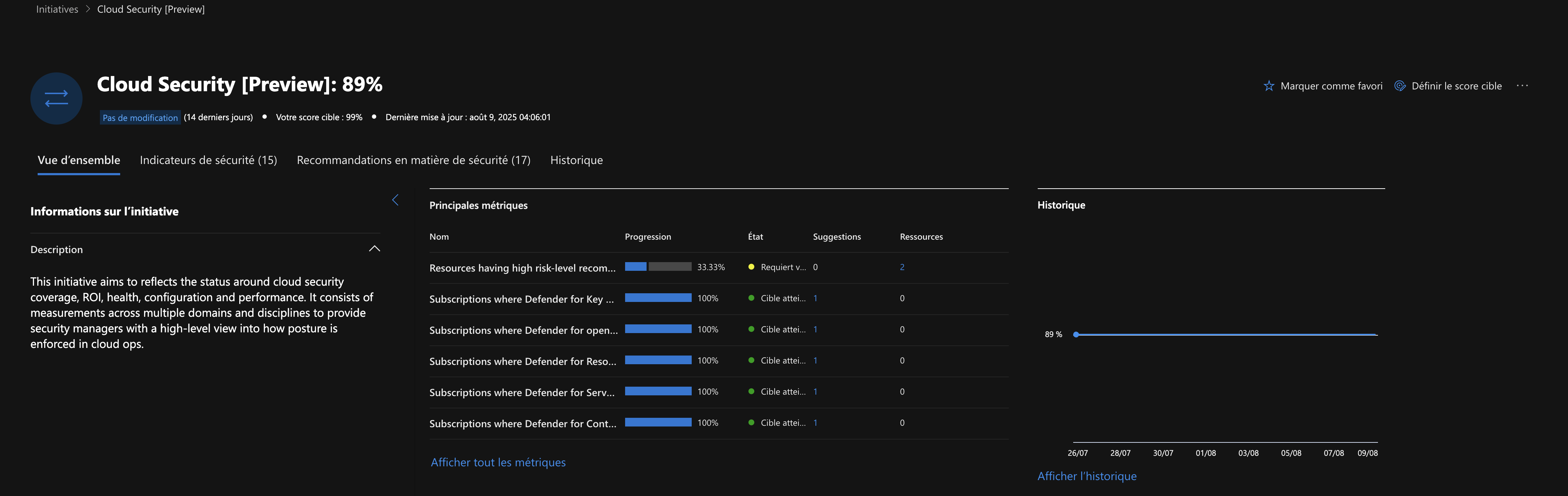
This initiative aims to reflect the state of cloud security coverage, return on investment, integrity, configuration, and performance. It involves measurements across several areas and disciplines to give security leaders an overview of how the posture is enforced across cloud operations.
- Goal: Strengthen the security of Azure resources.
- Scope: Cross-cutting assessment of Microsoft Azure cloud services (resource hardening).
Our score as of August 9, 2025 (89%):
Endpoint Security:
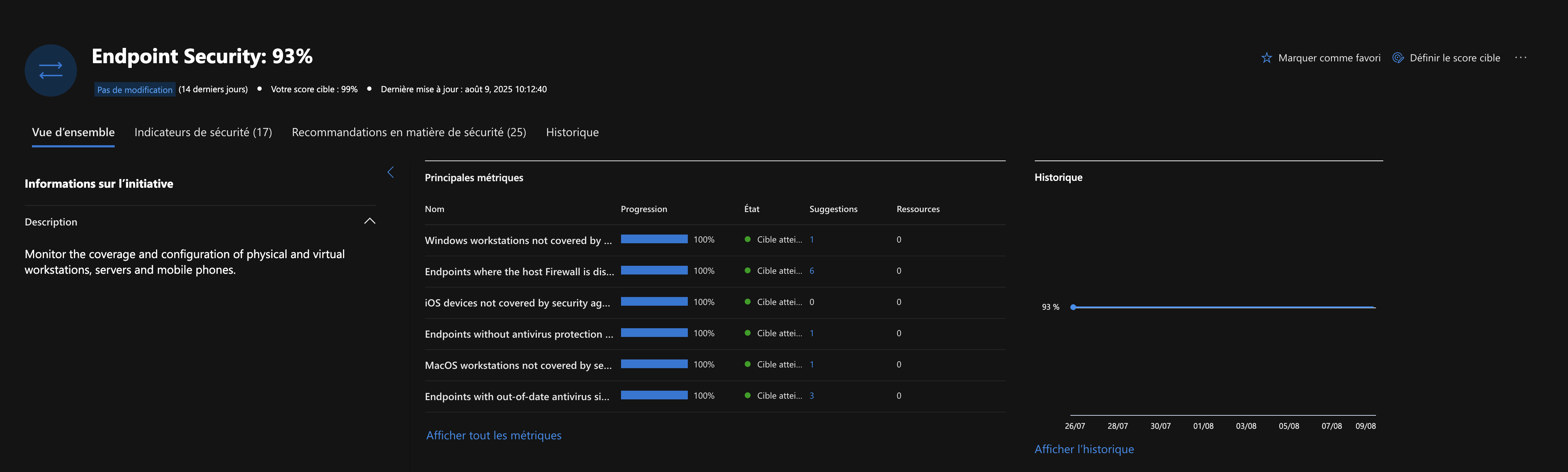
Monitor the coverage and configuration of physical and virtual workstations, servers, and mobile phones.
- Goal: Strengthen the security of workstations, servers, and mobile devices by identifying and fixing vulnerabilities, misconfigurations, and exposures that attackers could exploit. Reduce the endpoint attack surface and improve resilience against threats (malware, ransomware, fileless attacks, lateral movement, etc.).
- Scope: Analysis of endpoint security posture: Windows, macOS, Linux, mobile (iOS/Android).
Detection of software vulnerabilities, outdated or insecure applications.
Verification of critical configurations: antivirus/EDR protection, encryption (BitLocker/FileVault), firewall, device control, privileged account management.
Monitoring of security patch application and policy compliance.
Remediation recommendations prioritized by their impact on risk reduction.
Integration with Defender for Endpoint for detection, response, and centralized incident management.
Our score as of August 9, 2025 (93%):
Identity Security
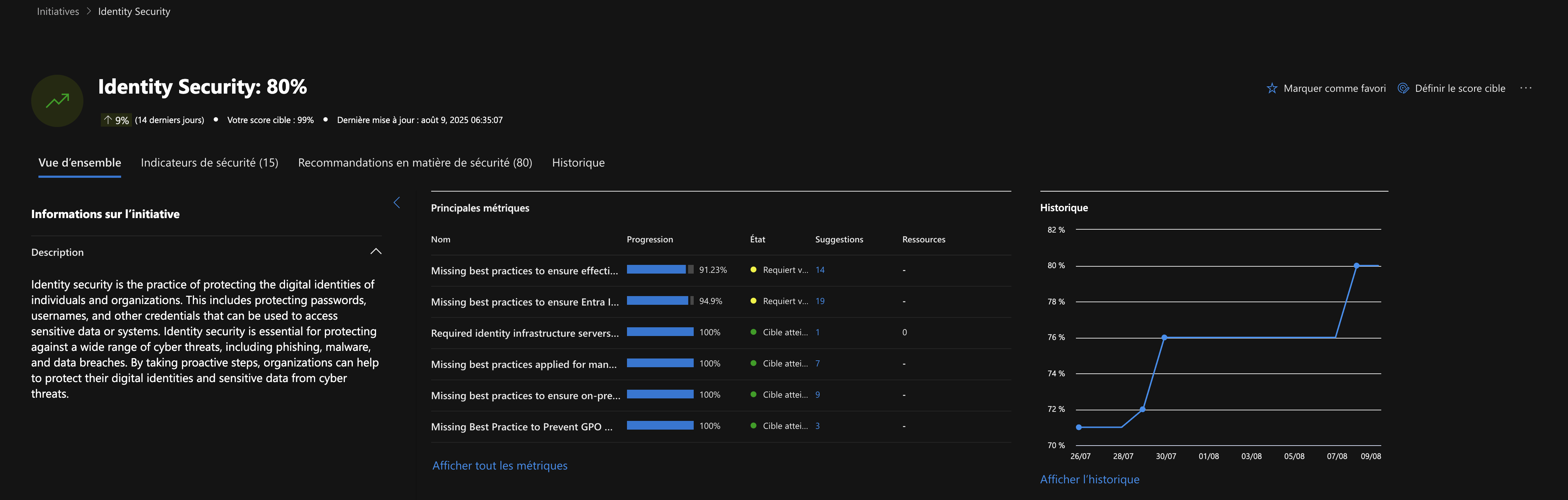
Identity security is the practice of protecting the digital identity of individuals and organizations. This includes protecting passwords, usernames, and other credentials that can be used to access sensitive data or systems. Identity security is essential to protect against a wide range of cyberthreats, including phishing, malware, and data breaches. By taking proactive measures, organizations can help protect their digital identities and sensitive data from cyberthreats.
- Goal: Protect identities (user accounts, administrators, services) against compromise, impersonation, and lateral movement, by identifying and fixing exposures and misconfigurations. Reduce the risk of unauthorized access, phishing, privilege escalation, and attacker persistence via identity.
- Scope: Analysis of identity security posture: Entra ID/Azure AD accounts, local accounts, privileged accounts, service accounts. Verification of MFA enablement, conditional access policies, privileged role management (PIM), and protection of sensitive accounts. Detection of bad practices: lack of MFA, weak or reused passwords, legacy access, excessive delegations, risky OAuth applications. Monitoring of risky sign-ins, abnormal activity, and application consents. Remediation recommendations prioritized by their impact on risk reduction. Integration with Defender for Identity, Entra ID Protection, and other XDR modules for detection and response to identity-related incidents.
Our score as of August 9, 2025 (80%):
Ransomware Protection
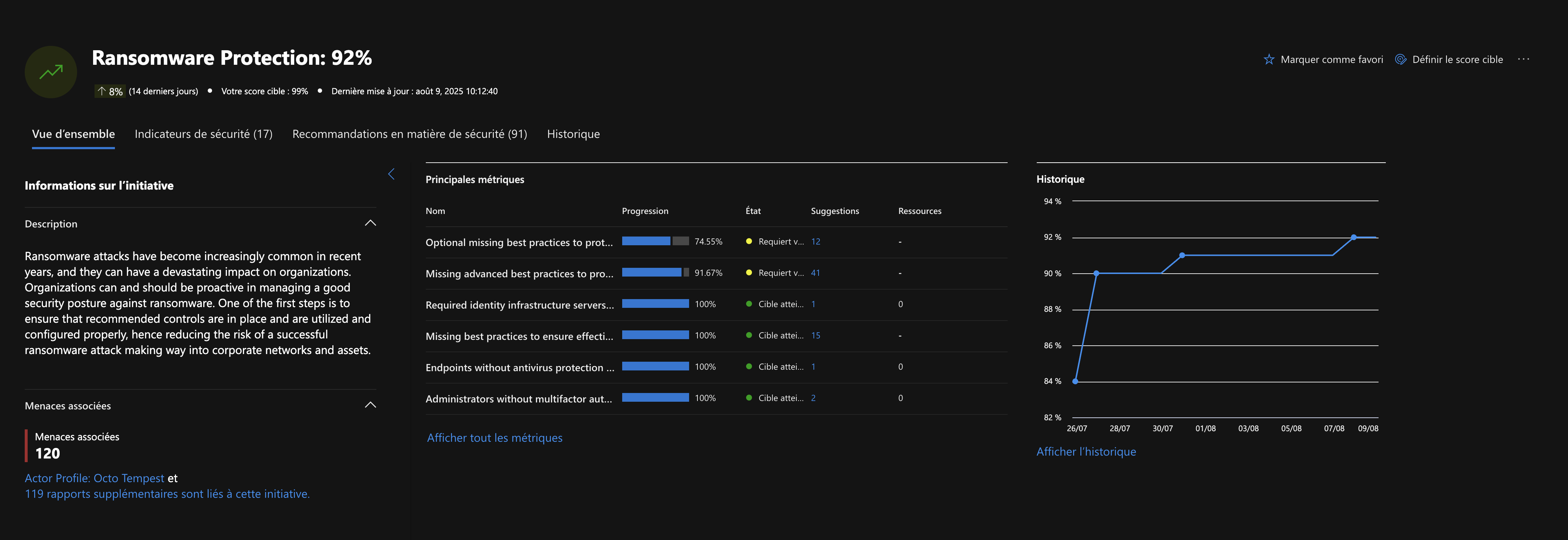
Ransomware attacks have become increasingly common in recent years, and they can have a devastating impact on organizations. Organizations can and should be proactive in managing a strong security posture against ransomware. One of the first steps is to make sure the recommended controls are in place and correctly used and configured, thereby reducing the risk that a successful ransomware attack spreads through corporate networks and assets.
- Goal: Reduce the organization's exposure and vulnerability to ransomware attacks, by identifying and fixing exploitable weaknesses at each stage of the attack chain. Strengthen resilience, early detection, and response capability to limit the impact of a ransomware attack.
- Scope: Analysis of the security posture across all surfaces: endpoints (workstations, servers), identities, cloud, email, storage. Verification of critical controls: EDR/antivirus protection, MFA, backups, network segmentation, macro blocking, email/attachment filtering, privileged access management. Detection of exposures: software vulnerabilities, insecure protocols, open ports, weak configurations, lack of isolated backups. Monitoring of suspicious behavior: lateral movement, execution of encrypting files, mass file modifications, attempts to disable security. Remediation recommendations prioritized by their impact on reducing ransomware risk. Integration with Defender for Endpoint, Defender for Identity, Defender for Office 365, and Defender for Cloud, for coordinated defense and centralized incident management.
Our score as of August 9, 2025 (92%):
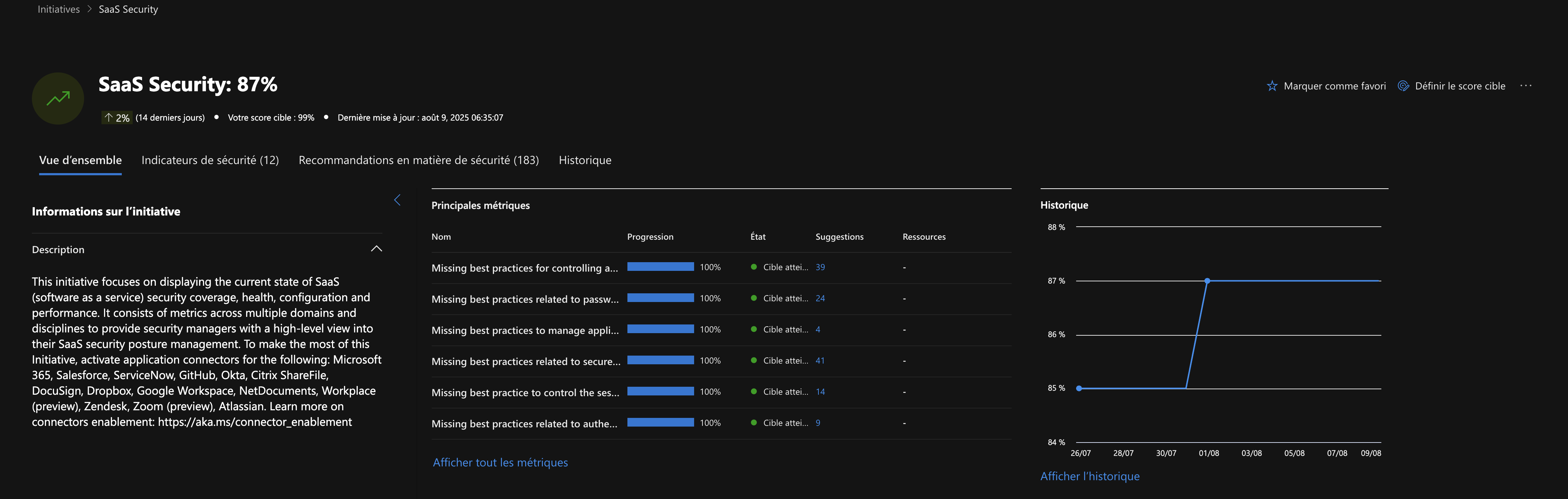
SaaS Security
This initiative focuses on showing the current state of SaaS (Software as a Service) security coverage, status, configuration, and performance. It consists of measurements covering several areas and disciplines to give security leaders an overview of managing their SaaS security posture. To get the most out of this initiative, enable the following app connectors: Microsoft 365, Salesforce, ServiceNow, GitHub, Okta, Citrix ShareFile, DocuSign, Dropbox, Google Workspace, NetDocuments, Workplace (preview), Zendesk, Zoom (preview), Atlassian.
- Goal: Secure the organization's use of SaaS (Software as a Service) applications by identifying and fixing exposures, misconfigurations, and risks related to these services. Reduce the attack surface and prevent data leaks, unauthorized access, and third-party application abuse.
- Scope: Analysis of the security posture of the main SaaS applications used (Microsoft 365, Salesforce, ServiceNow, Google Workspace, etc.). Detection of misconfigurations: excessive sharing, uncontrolled external access, third-party application permissions, lack of MFA, guest account management. Monitoring of risky activity: data exfiltration, suspicious OAuth consents, abnormal user or application behavior. Remediation recommendations prioritized by their impact on reducing SaaS risk. Integration with Defender for Cloud Apps (MCAS) and other XDR modules for SaaS visibility, detection, and incident response.
Our score as of August 9, 2025 (87%):
Zero Trust (Foundational)
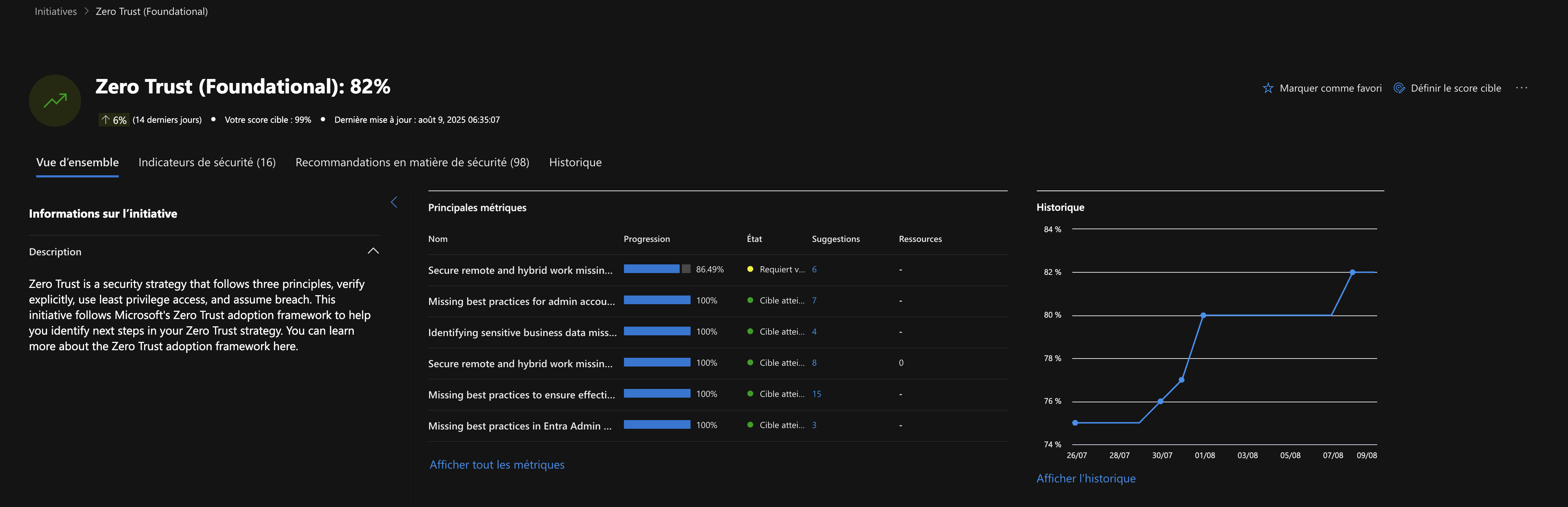
Zero Trust is a security strategy that follows three principles: verify explicitly, use least-privilege access, and assume breach. This initiative follows Microsoft's Zero Trust adoption framework to help you identify the next steps in your Zero Trust strategy. To learn more about the Zero Trust adoption framework, click here.
- Goal: Lay the foundations of the Zero Trust model, ensuring that access to resources is strictly controlled, continuously verified, and limited to what's strictly necessary, in order to reduce the risks of unauthorized access, lateral movement, and compromise. Provide a modern, adaptable security framework centered on identity, device posture, and resource sensitivity.
- Scope: Application of Zero Trust principles across the following areas: identity, endpoints, applications, data, network, and infrastructure. Fundamental controls: widespread MFA, conditional access, network segmentation, privilege management, device compliance verification, continuous monitoring of access and behavior. Verification of access policy configuration, protection of identities and critical resources. Remediation recommendations prioritized to close gaps with Zero Trust requirements. Integration with all Defender modules (Endpoint, Identity, Cloud, SaaS) for a unified, centralized approach.
Our score as of August 9, 2025 (82%):
The other initiatives
As for the additional initiatives, we can find: Critical Asset Protection, Enterprise IoT Security, External Attack Surface Protection, OT Security, and Vulnerability Assessment. For my part, I'll soon be integrating External Attack Surface Protection since we've been using it for a while now; for the others, I don't have the required licenses or the need to implement them.
Why isn't the score 100% on every initiative?
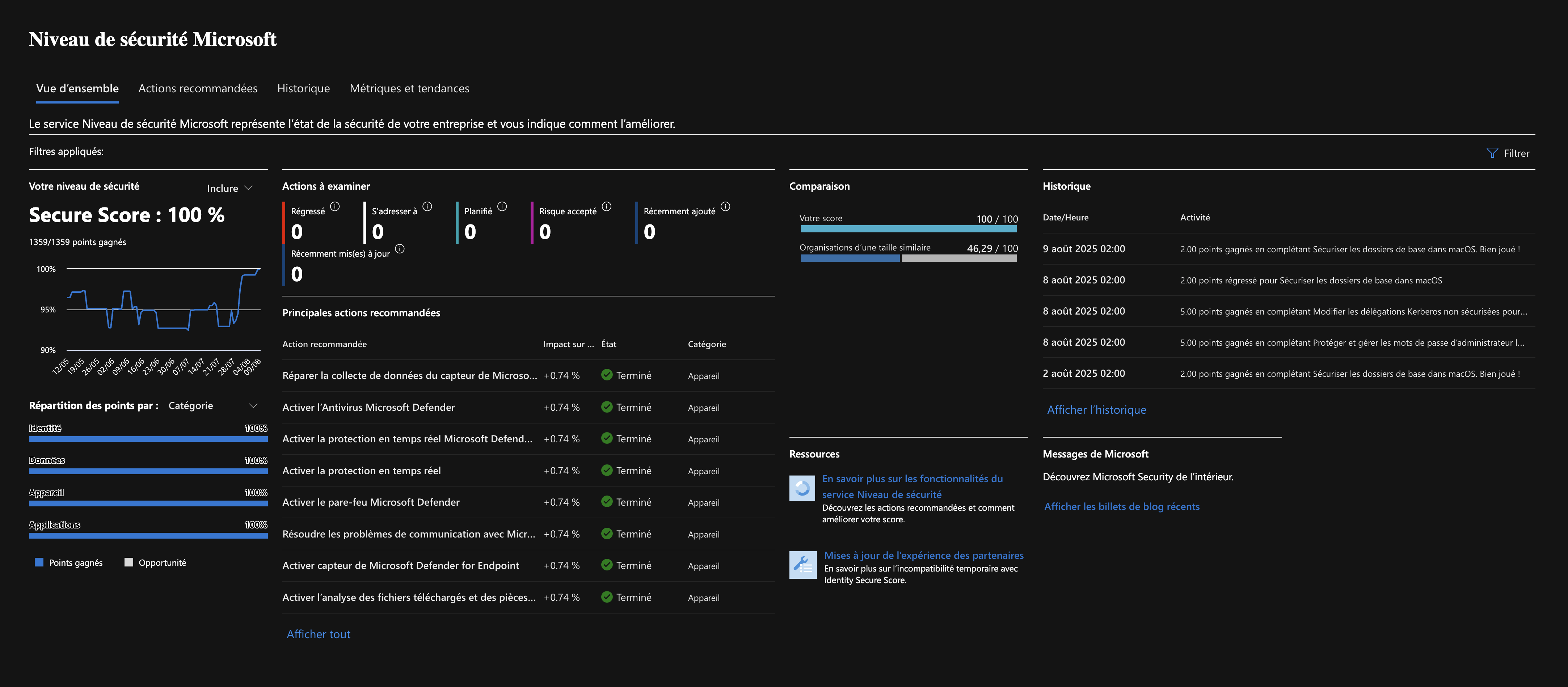
Despite a 100% secure score, what do our performance metrics say in detail?
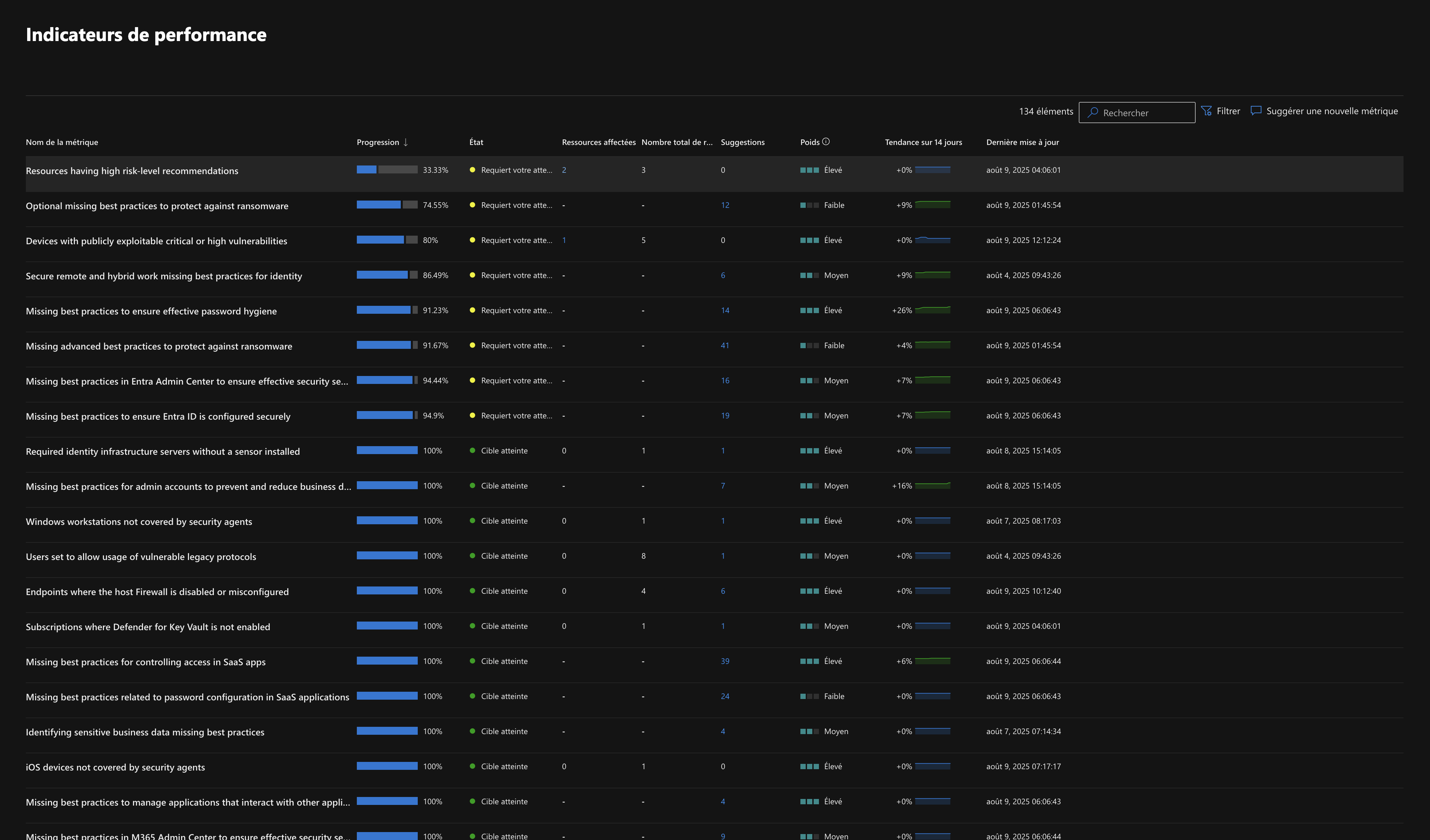
When I look in depth at the recommendations for each performance metric:
- Resources having high risk-level recommendations: it states, "full cloud data is available for environments where Defender CSPM is enabled. If it's missing, only partial cloud data is shown.Learn more". I don't use Microsoft's CSPM tool but Datadog's instead.
- Optional missing best practices to protect against ransomware: it states I need to "add Microsoft Defender for Linux, then fix the Microsoft Defender for Linux collector". I don't use any Linux instances.
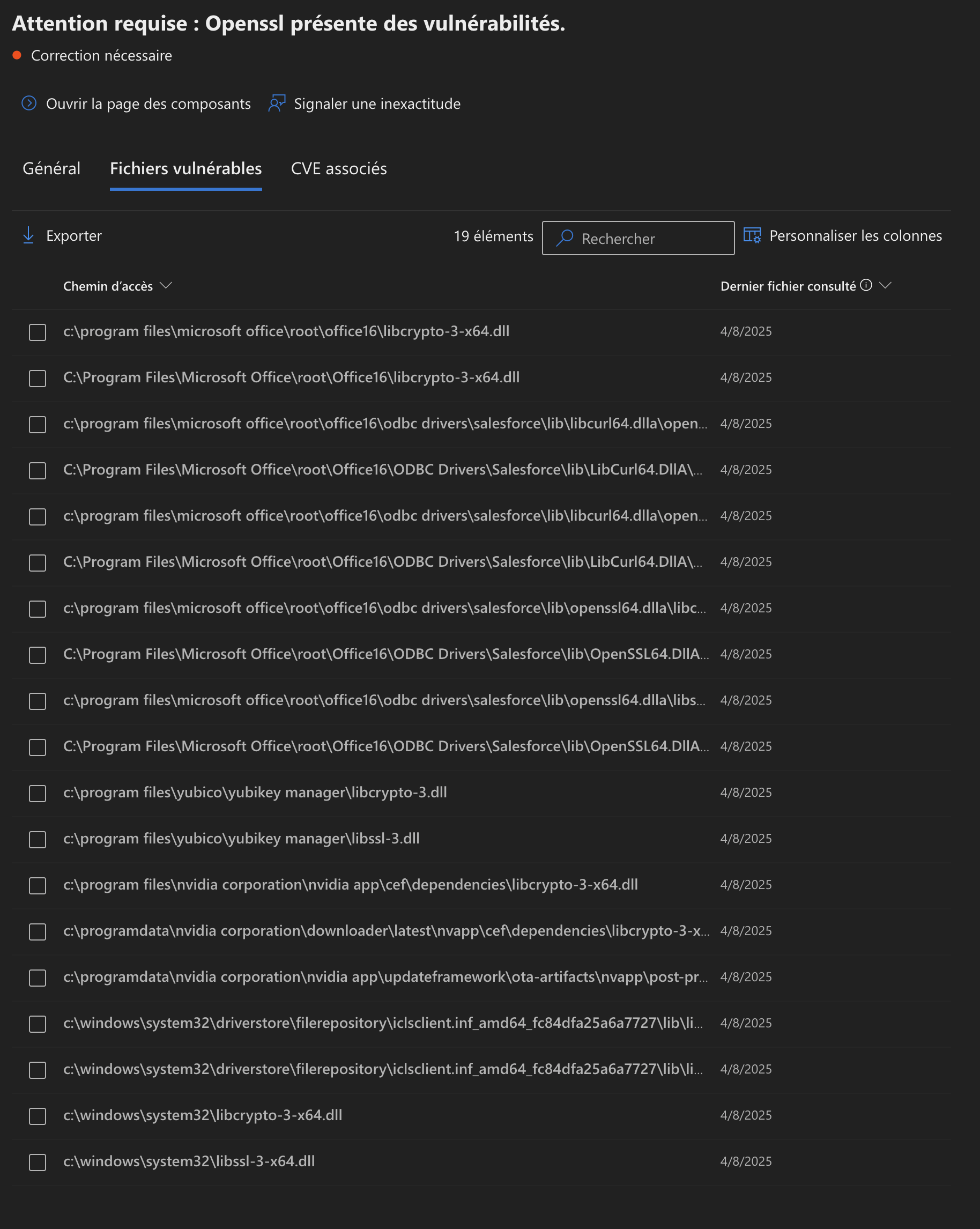
- Devices with publicly exploitable critical or high vulnerabilities: it flags a vulnerability (not exploitable on one of our Windows 11 Enterprise machines), that's true, and we've been aware of it for years. I tried to fix it with no success, vulnerable openssl dependencies baked into Windows 11 itself… Office 365, YubiKey, and Nvidia:
- Secure remote and hybrid work missing best practices for identity: it tells me to "check that password hash synchronization is enabled for hybrid deployments," but we have no hybrid setup with Entra Connect.
- Missing best practices to ensure effective password hygiene: it once again tells me to strengthen my posture with Entra Connect, "Change password for Entra seamless SSO account", "Rotate password for Entra Connect AD DS Connector account," "Check that password hash synchronization is enabled for hybrid deployments," then mentions the Zendesk app: "Prevent admins from setting passwords (Zendesk)." I don't use Zendesk, but Intercom.
- Missing advanced best practices to protect against ransomware: I'm missing licenses to harden Windows, "Enable 'Local Security Authority (LSA) Protection'," "Enable Microsoft Defender Credential Guard," "Disable running or installing downloaded software with invalid signature." It then talks about Google Chrome, which we don't use, "Disable the password manager."
- Missing best practices in Entra Admin Center to ensure effective security settings: it once again brings up Entra Connect for hybrid setups, "Check that password hash synchronization is enabled for hybrid deployments."
- Missing best practices to ensure Entra ID is configured securely: once again, it brings up Entra Connect for hybrid setups, "Check that password hash synchronization is enabled for hybrid deployments."
Conclusion
In practice, we could consider that the score is very close to 100%. In reality, to be perfect, we'd need a Defender P2 license, set up hybrid sync between our Active Directory and Entra ID, and then drop Intercom in favor of Zendesk…
- Defender P2 could clearly be an asset, particularly to protect our user workstations within the AD domain, but that's not our case. https://learn.microsoft.com/fr-fr/windows-server/security/credentials-protection-and-management/configuring-additional-lsa-protection
- We don't use AD for accessing data and devices from client machines, only for on-premises management.
- Decommissioning Intercom isn't feasible, since at the time we chose Intercom over Zendesk for various reasons.