

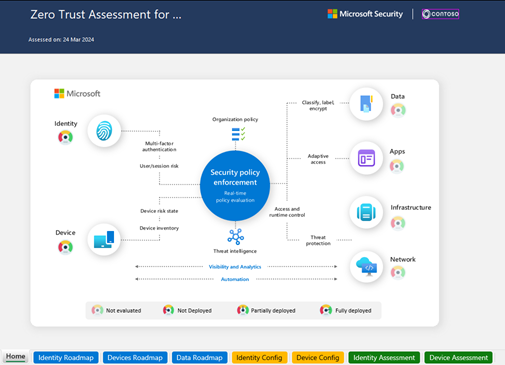
Feedback on implementing the Zero Trust model in Microsoft 365: assessing your posture, following best practices, and managing risk.
Real-world use case
Your management asks you to secure Microsoft 365 according to Zero Trust standards: I'm sharing my full feedback, from recommendations to operational implementation.
Faced with the constant evolution of cyber threats, the Zero Trust approach stands out as a fundamental pillar of modern cybersecurity. The principle is simple but radical: never trust, always verify, assume breach. Microsoft 365, with its suite of integrated tools, enables an effective, gradual implementation of this model. A self-assessment questionnaire is available to help you, here is the link.
I started this process with Microsoft Defender in the exposure management module. The Exposure Insights tool offers a specific initiative: Zero Trust (Foundational), which currently shows me a score of 82%, although in reality we've reached 100%. This score reflects a basic implementation that can still be improved, particularly on certain critical points related to privileged identities and conditional access policy configuration.
Beyond the fundamentals
A full implementation of the Zero Trust model requires going well beyond these basic criteria. Microsoft provides detailed resources for a comprehensive application of the model.
Official resources
- Zero Trust implementation guide for Microsoft 365: Full technical documentation
- Business overview of Microsoft Zero Trust: Strategic overview
- Zero Trust assessment tool: Interactive assessment
The goal is indeed to implement the advanced components of the Zero Trust model to achieve optimal security in our Microsoft 365 environment.
Starting the assessment phase - Microsoft Zero Trust Workshop
The guide's explanations are very detailed: https://microsoft.github.io/zerotrustassessment/guide
Since I'm on macOS (with Homebrew), here are the installation steps:
- Install PowerShell (link):
brew install --cask powershell
- Run PowerShell:
pwsh
- Install the "ZeroTrustAssessment" module;
Install-Module ZeroTrustAssessment
Untrusted repository
You are installing the modules from an untrusted repository. If you trust this repository, change its InstallationPolicy
value by running the Set-PSRepository cmdlet. Are you sure you want to install the modules from 'PSGallery'?
[Y] Yes  [A] Yes to All  [N] No  [L] No to All  [S] Suspend  [?] Help (default is "N"): Y
- Run the command for the assessment phase:
Invoke-ZTAssessment
- Authenticate with a global admin account and grant the tool the required permissions.
- Wait a few seconds to see your assessment result: "ZeroTrustAssessment-2025-08-10T125143.xslsx".
Result of the Zero Trust model assessment in Microsoft 365
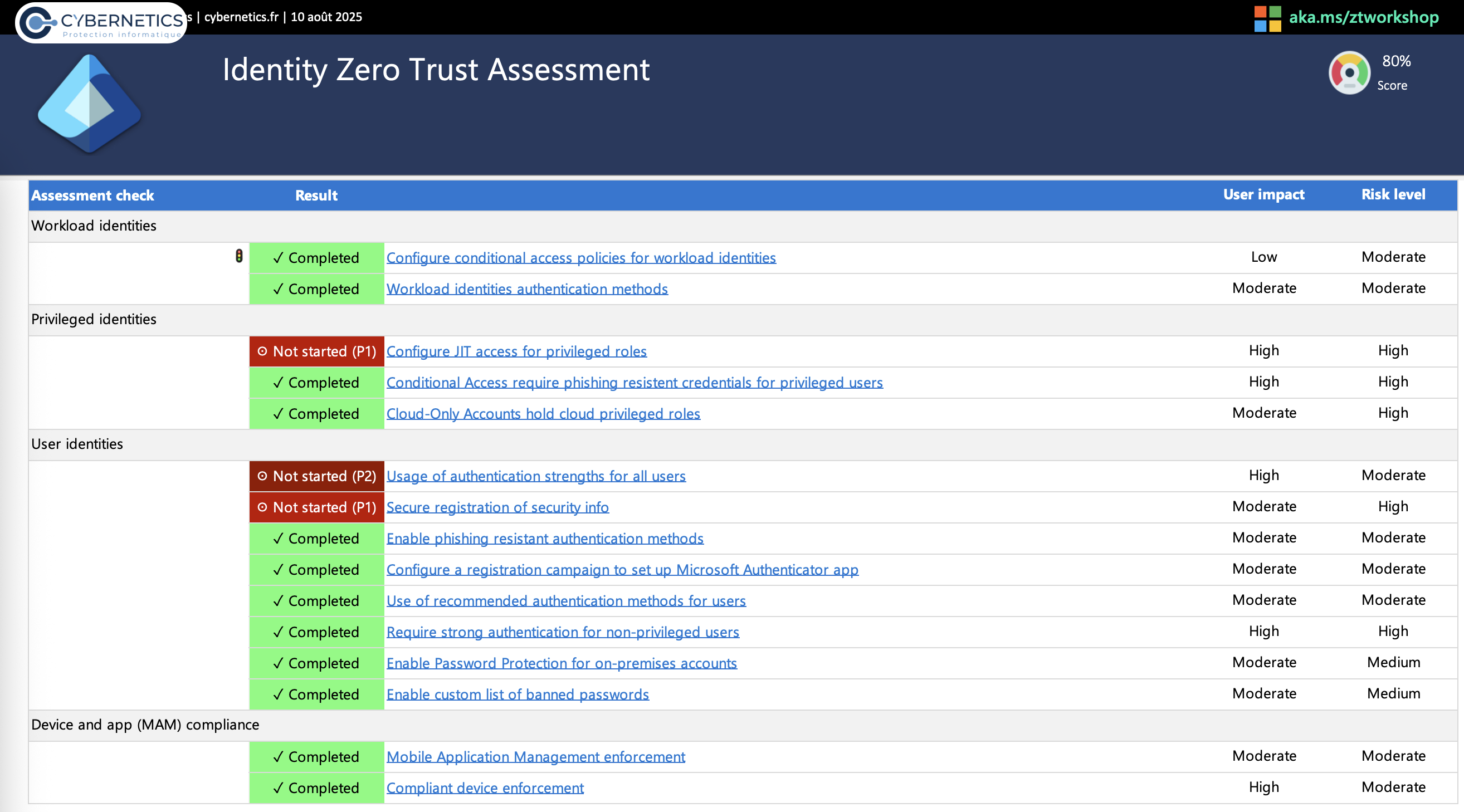
Identity
The score is 80%; we're missing JIT configuration, strong authentication for all users (not everyone has a P2 license), and a conditional access rule for security info registration. We'll fix the P1 issues quickly.
Device
The score is 91%; we're missing the implementation on our AD server, since Defender for Identity detects the server but it doesn't use Microsoft Defender (rather a different third-party solution). As for Windows Bitlocker, we don't understand why, the policy is in place but shown as not started. We'll investigate and contact Microsoft if needed.
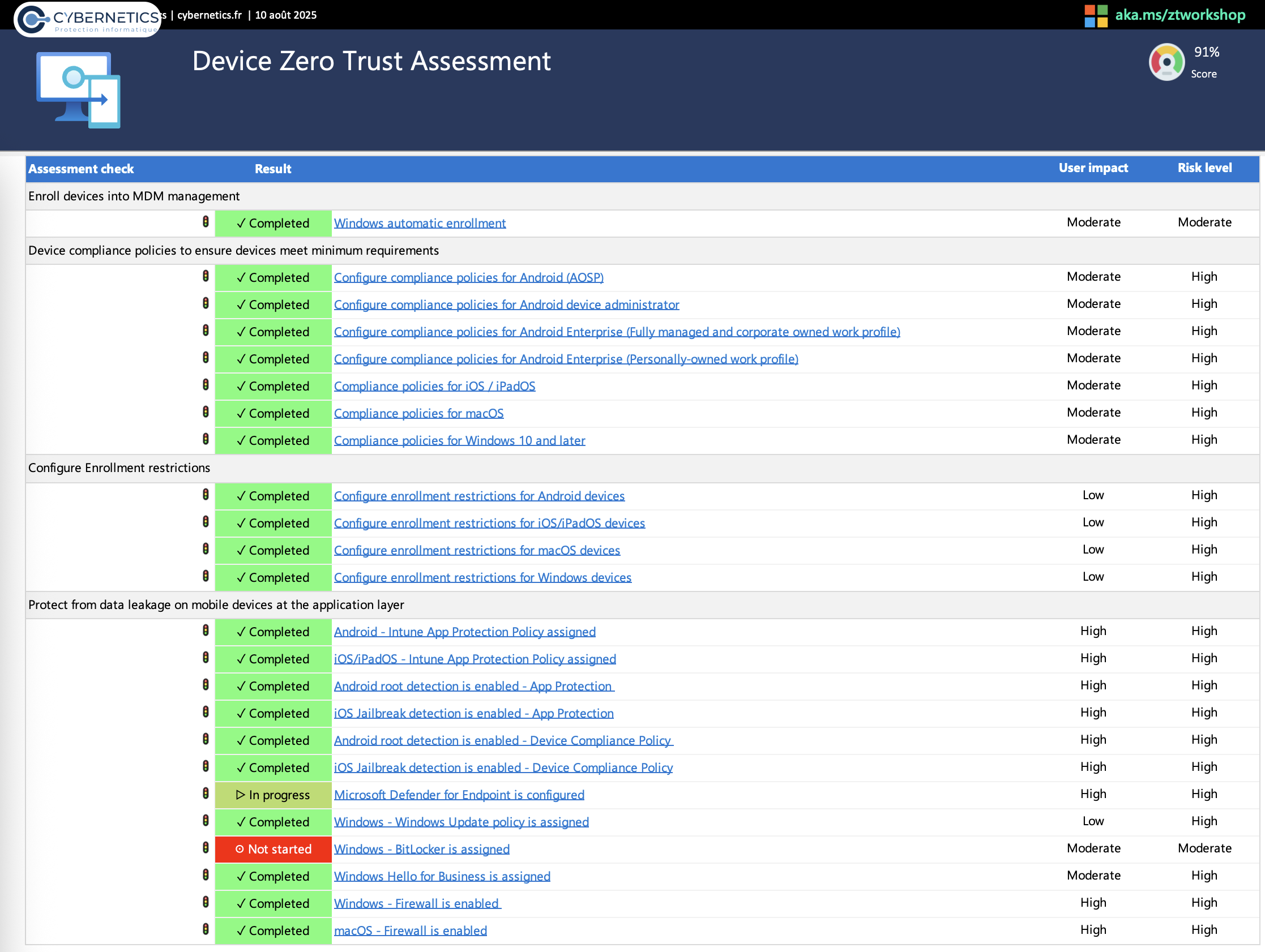
You'll find your entire device configuration on the first sheet; it shows your Intune configurations (not visible here, for confidentiality reasons).
Conclusion
Implementing the Zero Trust model with Microsoft 365 is a strategic project that requires a gradual but rigorous approach. Our results show we've made significant progress, while also identifying priority areas for improvement.
From there, the "ZeroTrustTemplate.xlsx" template (different from the assessment) is greatly appreciated. As an organization, we'll continue to:
- Regularly assess our Zero Trust maturity level.
- Prioritize identities and conditional access.
- Automate device enrollment and compliance.
- Guide users toward good security practices.