


How I secured my Microsoft 365 environment using Secure Score recommendations. Feedback combining best practices with a Zero Trust vision.
Real-world use case
You want to reach a maximum Secure Score on Microsoft 365: here's my concrete feedback, combining best practices with a Zero Trust vision.
In 2020, when setting up my Microsoft 365 tenant, I immediately implemented several recommendations from Microsoft Secure Score. But my goal went beyond simply following best practices: I wanted to aim for excellence and guarantee a maximum level of protection. That's what pushed me to deepen my skills, both technically and organizationally.
Microsoft Secure Score is a cybersecurity maturity gauge for the Microsoft 365 environment. It measures the implementation of security best practices across identities, devices, applications, and data. This feedback is set in a simple but representative production context: about ten devices, around twenty identity accounts (on-premises and cloud included), and several cloud applications used daily.
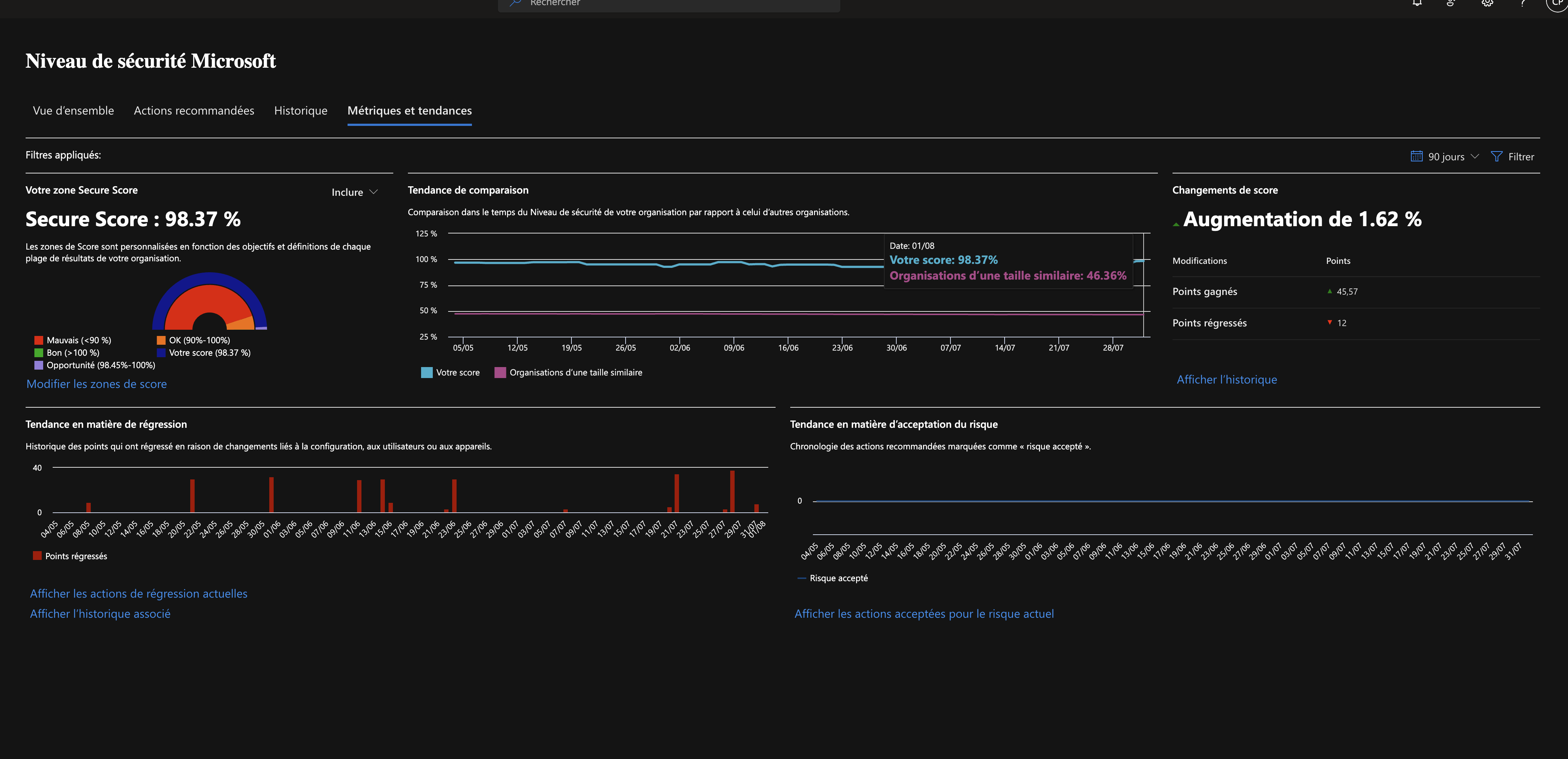
- Our secure score as of August 1, 2025:
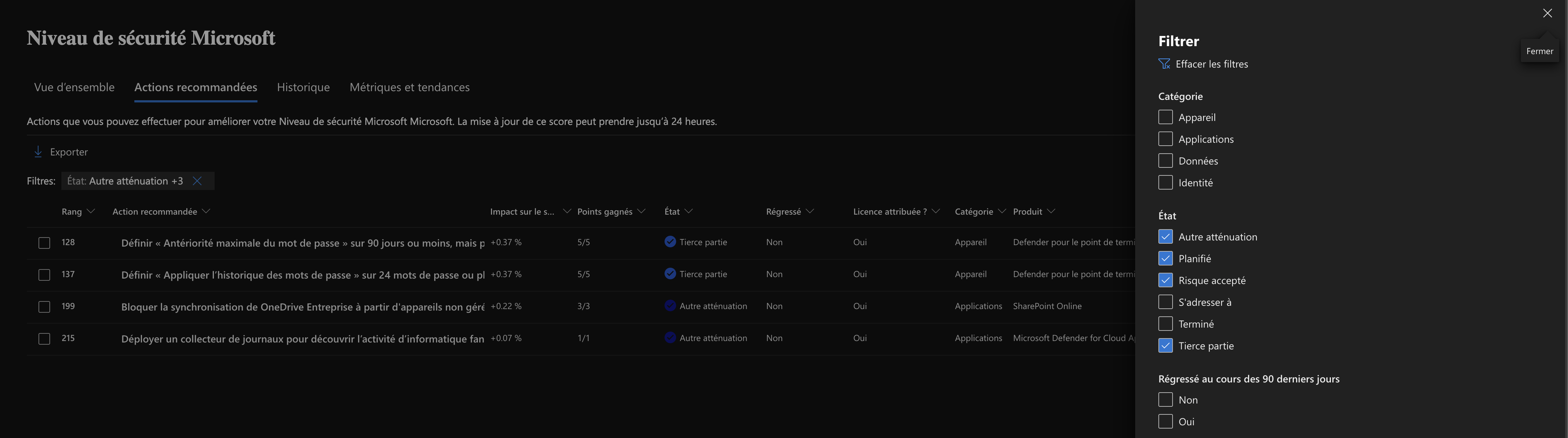
- Our 4 justified exceptions as of August 1, 2025:
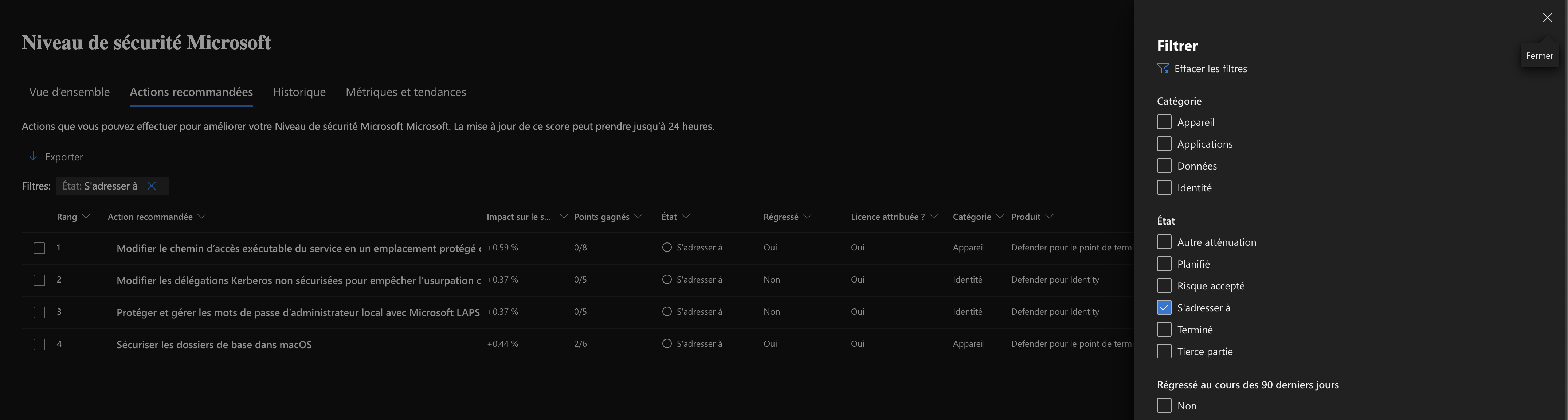
- Our remaining actions to implement as of August 1, 2025:
A matter of choice, not size
You might think my approach only applies to an organization with little technical debt, well-managed interoperability, and applications compatible with modern security standards. That's partly true: I made the choice, from the start, to rigorously select my vendors and document my business processes before deploying all the Microsoft 365 building blocks.
Some will say these security measures hurt the user experience. Yes, partly, strengthening controls and implementing protections does require internal adjustments. But it's not a hindrance: it's an opportunity. Thanks to a well-designed single identity, we found a balance between security and smoothness. What may seem paradoxical actually becomes a lever for simplification and trust.
Our security measures
1. Securing identities, the first line of defense
Protecting user accounts is at the heart of any cybersecurity strategy. Enabling (strong) MFA for everyone considerably strengthened access security by adding an essential verification layer. This measure, combined with fine-grained privilege management via PIM, limits elevated rights over time and reduces risks tied to privileged accounts.
2. Hardening devices without complicating usage
Endpoint security is ensured through rigorous configuration: encryption, antivirus, automatic updates. Thanks to Intune, we control device compliance and block access from unmanaged or non-compliant devices. This hardening doesn't slow users down, it guarantees that only trusted devices can access resources.
3. Securing cloud applications without difficulty
Access to cloud applications is secured via SSO and Conditional Access, allowing smooth yet controlled authentication. By centralizing access, we reduced Shadow IT and gained visibility into usage. Data within applications is protected through DLP policies and sensitivity labels, ensuring fine-grained management of information based on its criticality.
4. Protecting data wherever it lives
The classification and protection of sensitive data is handled via Microsoft Purview, which identifies, tags, and secures critical content. DLP policies apply to email, SharePoint, OneDrive, and more, to prevent data leaks. Encryption and granular access control ensure only authorized people can view or edit documents.
The pros
A single identity, toward simplification and security
Adopting a single identity has transformed the user experience. Fewer passwords to remember, less risk of reuse, and fewer entry points to monitor. Users log in once, access everything they need, and enjoy a smooth experience that encourages the adoption of secure tools.
Reducing invisible risks
By centralizing access, we reduced Shadow IT: users can't use unapproved tools or weak, personal passwords. This improves traceability, with a single activity log per user, making audits and detection of abnormal behavior easier.
Automation and adaptability
Security policies are automated: MFA, conditional access, session expiration… everything is applied consistently, without manual intervention. Thanks to centralized identity, we've put in place adaptive security, able to react dynamically depending on the access context (e.g., blocking or enforced MFA from a non-compliant device).
Finally ready for the Zero Trust model
This approach prepares us to take a new step: moving from a defense-in-depth model to a Zero Trust model. The latter relies on continuous verification, least privilege, and conditional trust. Single identity, constant monitoring, and dynamic controls are already in place... we're ready to move toward the most mature security model.
The cons
Increased maintenance
While automation allows for consistent policy enforcement, it still requires ongoing maintenance to stay effective against evolving threats. It's therefore essential to keep a regular watch, apply security updates, and adjust settings based on usage feedback and new recommendations. This requirement is the price to pay for a robust, sustainable security posture.
Alert and incident management
A secure environment naturally generates more security signals. To avoid the "noise" effect, we connected Microsoft 365 Defender to our external SIEM, to centralize alert management, correlate them with other sources, and make incident handling easier. This requires rigorous organization, but it's essential to keep control over critical events.
Organizational complexity
Some policies, such as PIM (Privileged Identity Management) or DLP (Data Loss Prevention), require close coordination between IT teams and business units. You need to understand operational needs, anticipate impacts, and sometimes adjust rules so as not to slow down processes. This complexity is manageable, but it requires dialogue and clear governance.
Heightened sensitivity to user experience
Every security measure can affect daily usage. Stronger authentication, access restrictions, or an overly strict classification policy can create friction. It's therefore crucial to anticipate impacts, test configurations, and above all support users through the change. Security shouldn't be experienced as a constraint, but as a new framework of trust.
Rigorous documentation
For certain recommendations that aren't applied or that are adapted to our context, clear, well-reasoned documentation is essential. It helps justify choices, keep a record of decisions, and make audits or security reviews easier. It's also a knowledge-transfer tool for teams, ensuring consistency over time.
Conclusion
Reaching a score of 98.37% is possible, just like 100%, provided you know what you're doing and can justify the recommendations you haven't applied. Of course, you need the right licenses, technical and organizational knowledge of the scope, but standardizing your security management practices lets us aim for the maximum score in the coming days. This isn't an end in itself, but an important milestone in an ongoing effort to move toward the Zero Trust model.