


Real-world use case
You need to monitor an infrastructure without surprises: here's how to install and configure Icinga2 and Icinga2web.
Monitoring an infrastructure
The place of monitoring in an infrastructure is essential, especially with the growing number of servers, their services, as well as active network components.
There are many open-source monitoring solutions; a few years ago the most used was Nagios. It inspired many projects (forks of Nagios), for example version 1 of Icinga was a fork born out of user dissatisfaction.
Over time, Icinga2 has become a unique, independent project, and that's the one I want to introduce you to.
Icinga2
Launched in 2014, the version was rewritten; it's no longer a fork of Nagios but is entirely independent. It can still implement Nagios plugins and has a very modern web interface called Icinga2web:
//www.youtube.com/embed/pPuVuf3hHPs
In this article, we'll discover how to install Icinga2 and Icinga2web, then we'll monitor a Debian server, a Windows 2012 r2 server, and use the SNMP protocol on a VyOS router.
Installation: Icinga2 and Icinga2web
The installation process is straightforward; it's explained in the official documentation or on Github.
In our case, the installation takes place on Debian 8 x64.
Icinga2
- Let's add the Icinga2 repository and the key:bash
echo 'deb http://packages.icinga.org/debian icinga-jessie main' >>/etc/apt/sources.list echo 'deb-src http://packages.icinga.org/debian icinga-jessie main' >>/etc/apt/sources.list wget -O - http://packages.icinga.com/icinga.key | apt-key add - - An update of the repositories is required:bash
apt-get update - Let's install the Icinga2 packagebash
apt-get install icinga2 - Installing the MySQL database:bash
apt-get install mysql-server mysql-client - Installing the package: Let's not forget, during the installation, to enable the features "yes"bash
apt-get install icinga2-ido-mysql - Once done, the configuration file is present in:bash
/etc/icinga2/features-available/ido-mysql.conf - Let's start the Icinga2 servicebash
service icinga2 start - Then let's enable the ido-mysql feature in Icinga2bash
icinga2 feature enable ido-mysql command
Icinga2web
- Installing the Apache2 web server:bash
apt-get install apache2 - Installing PHP5 dependencies:bash
apt-get install php5-intl php5-imagick - Let's change the timezone in Apache in the following file:bash
nano /etc/php5/apache2/php.ini date.timezone = europe/paris - Let's restart the web service:bash
/etc/init.d/apache2 restart - Then let's install the Icinga2web package:bash
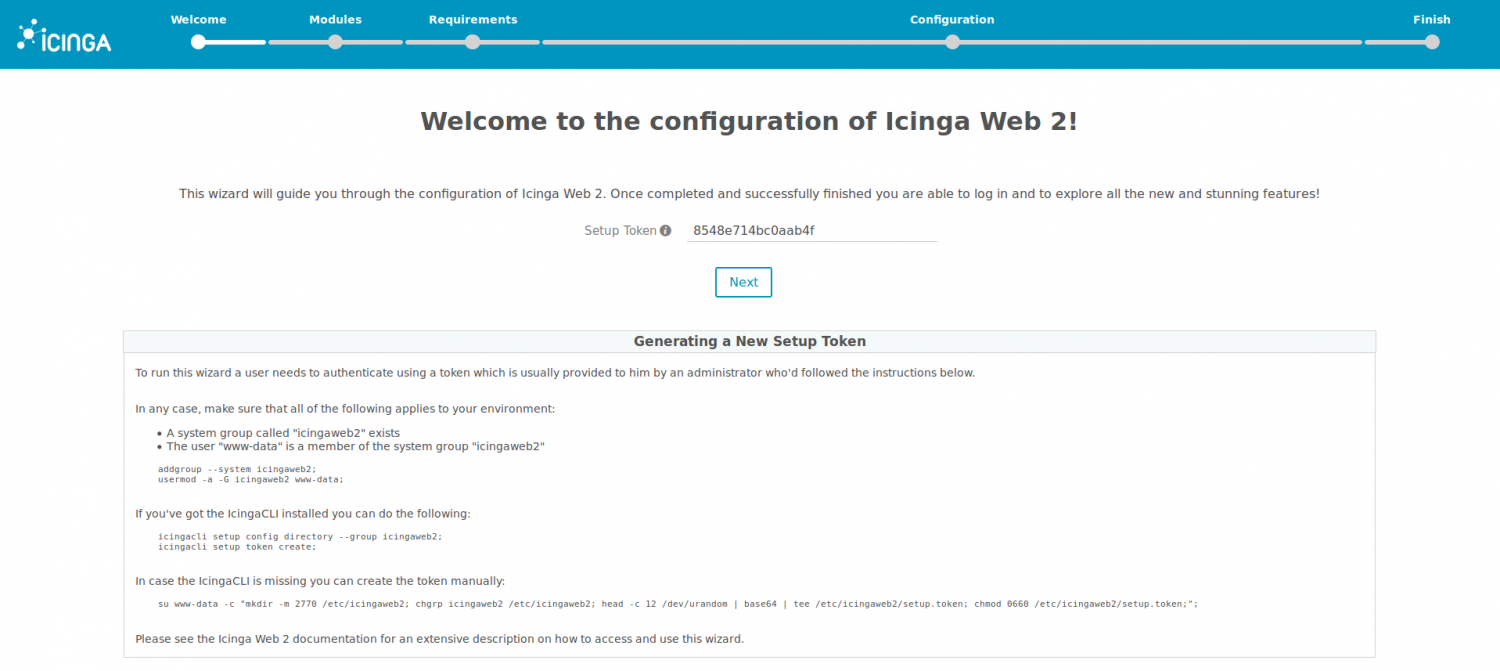
apt-get install icingaweb2 - Before proceeding with the configuration, we generate a token:bash
icingacli setup token create
Configuration: Icinga2web and Icinga2
We're now ready to go to the Icinga2web interface via https://127.0.0.1/icingaweb2/setup
Let's use the token generated earlier:
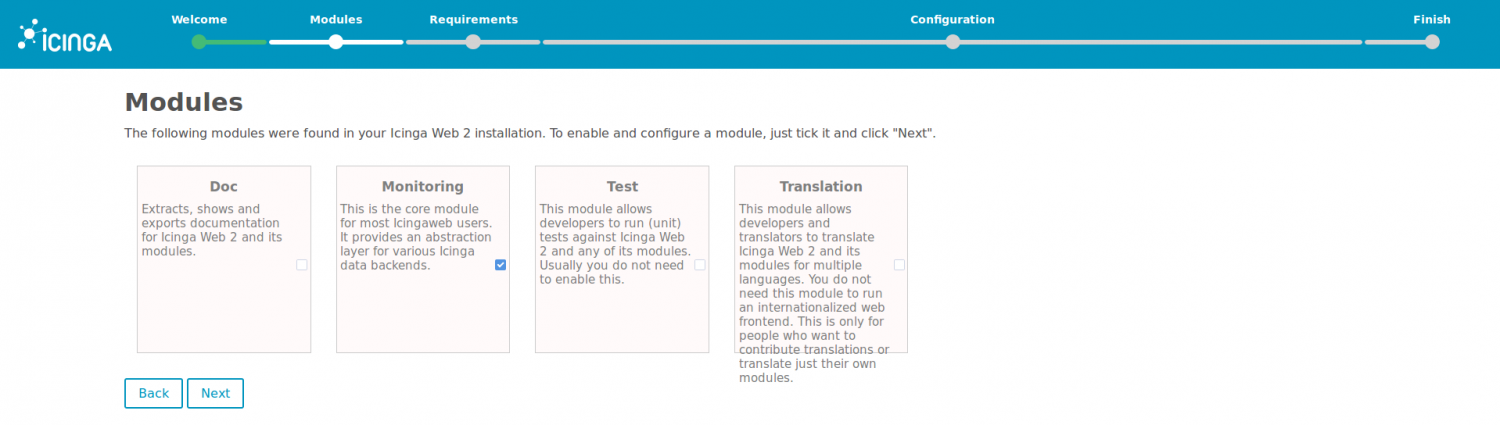
The selection mode for certain modules:
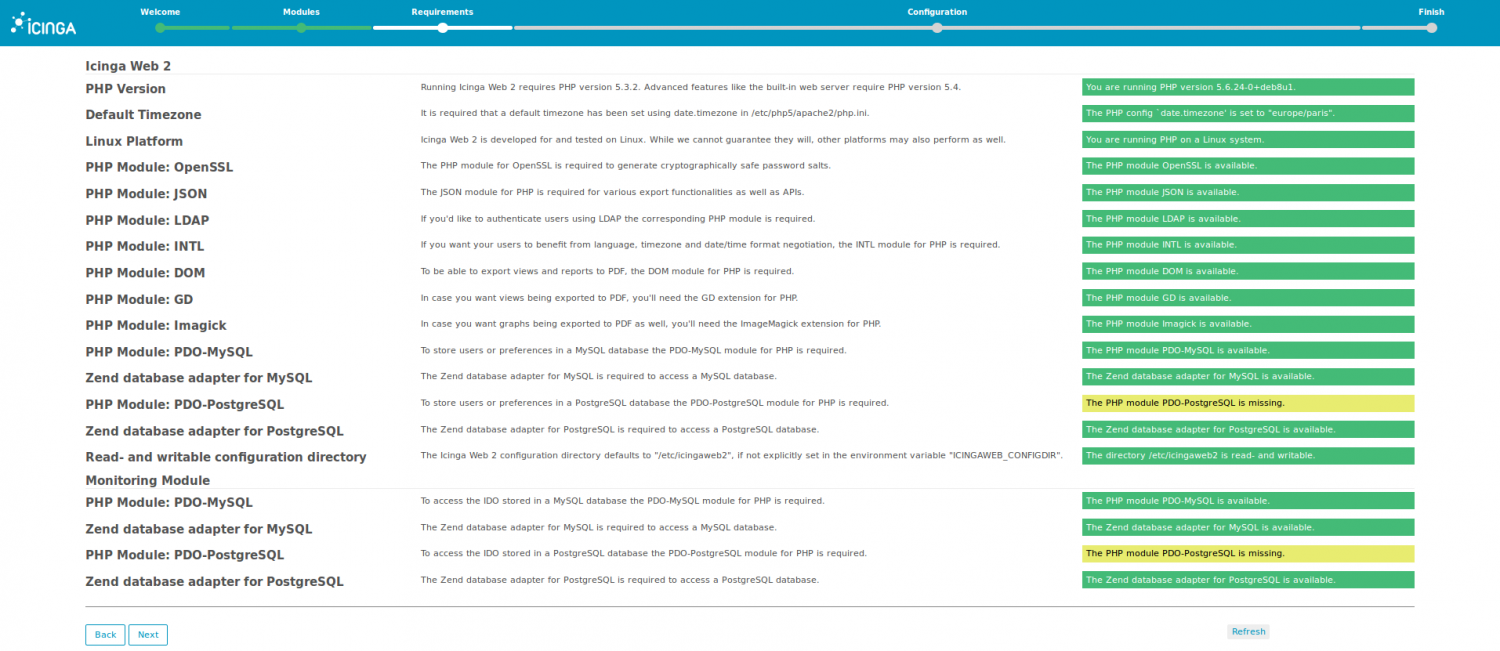
The summary of the requirements:
The database authentication type:

The connection to the database with the mysql credentials:
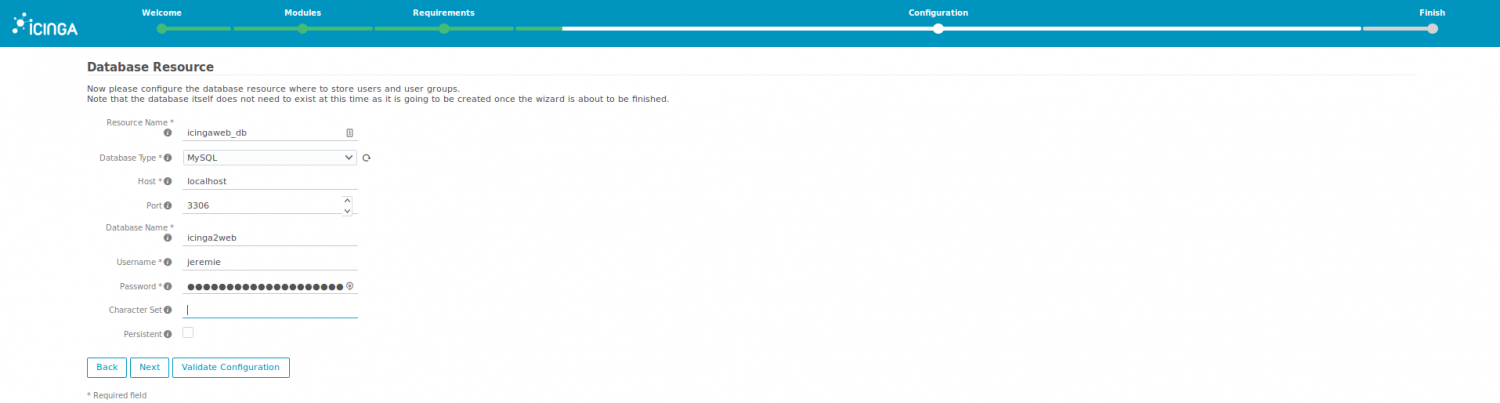
Choosing a name for the connection settings:

Choosing a name for the connection settings:

Creating the administrator account:

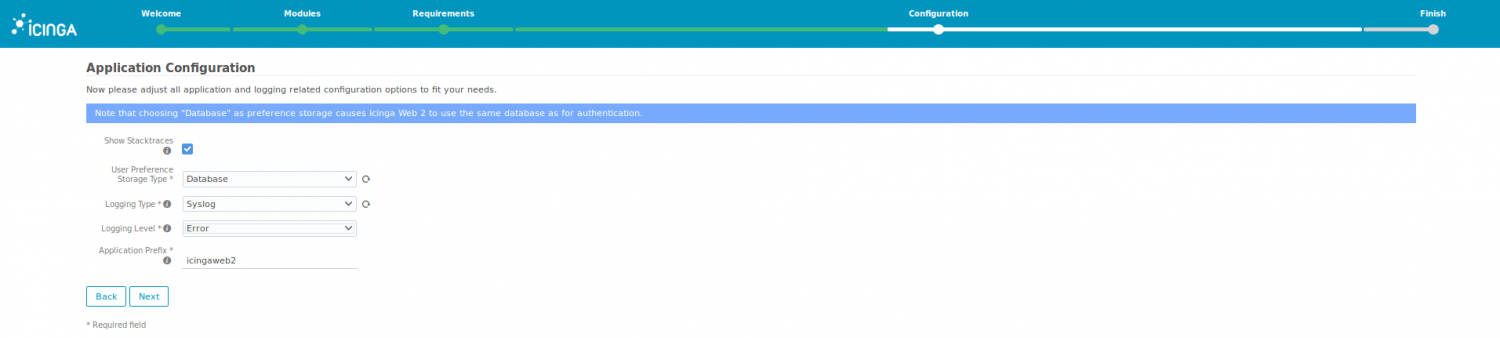
The application configuration (default):
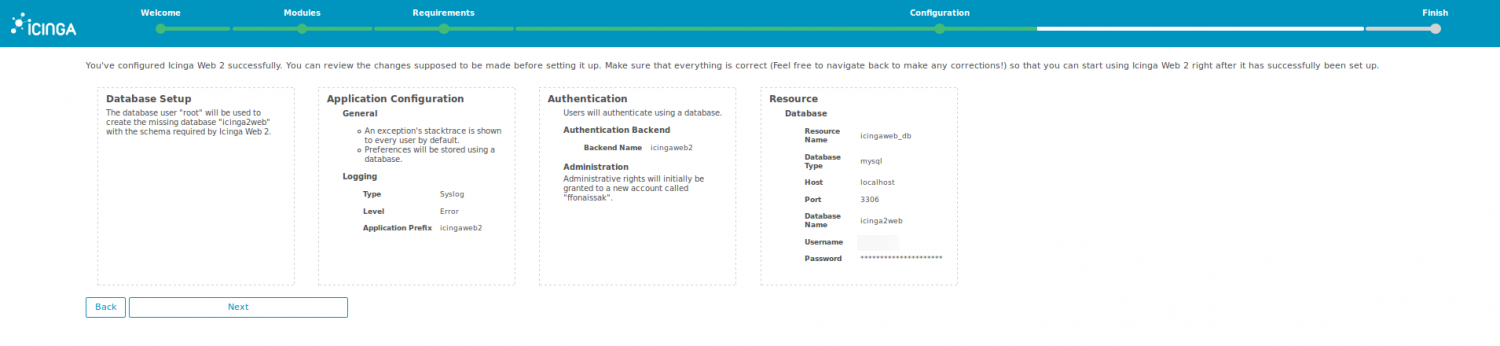
The configuration summary:
From now on, we'll configure the Monitoring Backend module:

The last step simply consists of restoring the file configuration*:*
/etc/icinga2/features-available/ido-mysql.conf
Let's finish the Icinga2web installation
The first connection to the web interface looks like the following result:
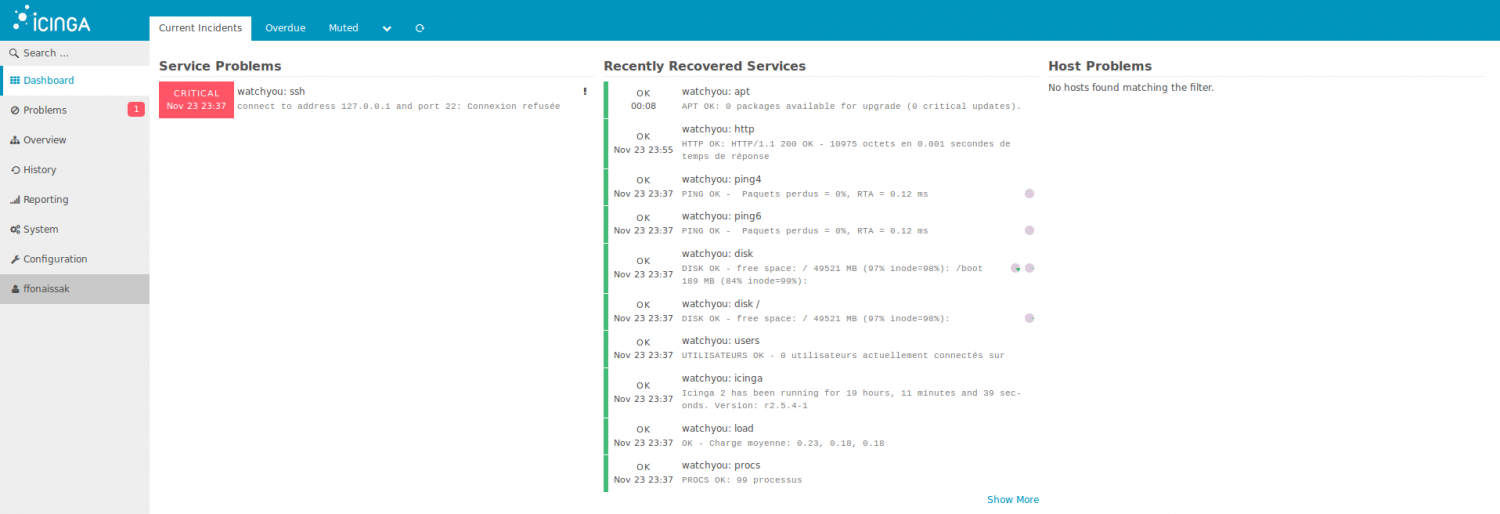
We've completed the steps needed to deploy Icinga2web.
The master server is currently monitored with default checks.
We have an SSH port listening on a different port than default; here's how to change it:
/etc/icinga2/conf.d/hosts.conf
Let's add the following variable:
vars.ssh_port = 2222
Configuring the master server
For the server to be able to monitor hosts, let's use the following command:
icinga2 node wizard
For our server to be the master, we'll follow these instructions:
Please specify if this is a satellite setup ('n' installs a master setup) [Y/n]: n

Please specifiy the common name (CN) [watchyou]:

Checking for existing certificates for common name 'watchyou'...
Certificates not yet generated. Running 'api setup' now.
information/cli: Generating new CA.
information/base: Writing private key to '/var/lib/icinga2/ca/ca.key'.
information/base: Writing X509 certificate to '/var/lib/icinga2/ca/ca.crt'.
information/cli: Generating new CSR in '/etc/icinga2/pki/watchyou.csr'.
information/base: Writing private key to '/etc/icinga2/pki/watchyou.key'.
information/base: Writing certificate signing request to '/etc/icinga2/pki/watchyou.csr'.
information/cli: Signing CSR with CA and writing certificate to '/etc/icinga2/pki/watchyou.crt'.
information/pki: Writing certificate to file '/etc/icinga2/pki/watchyou.crt'.
information/cli: Copying CA certificate to '/etc/icinga2/pki/ca.crt'.
Generating master configuration for Icinga 2.
information/cli: Adding new ApiUser 'root' in '/etc/icinga2/conf.d/api-users.conf'.
information/cli: Enabling the 'api' feature.
Enabling feature api. Make sure to restart Icinga 2 for these changes to take effect.
information/cli: Dumping config items to file '/etc/icinga2/zones.conf'.
information/cli: Created backup file '/etc/icinga2/zones.conf.orig'.
Please specify the API bind host/port (optional):
Bind Host []:
Bind Port []:
information/cli: Created backup file '/etc/icinga2/features-available/api.conf.orig'.
information/cli: Updating constants.conf.
information/cli: Created backup file '/etc/icinga2/constants.conf.orig'.
information/cli: Updating constants file '/etc/icinga2/constants.conf'.
information/cli: Updating constants file '/etc/icinga2/constants.conf'.
information/cli: Updating constants file '/etc/icinga2/constants.conf'.
Done.

Now restart your Icinga 2 daemon to finish the installation!
We restart Icinga2:
/etc/init.d/icinga2 restart
Adding a Linux server
We'll need to download the Icinga2 package on the Linux server we want to monitor.
Then, the command is the same as on the master server:
icinga2 node wizard
On a server we want to monitor, the configuration is different:
Please specify if this is a satellite setup ('n' installs a master setup) [Y/n]: Y
Please specifiy the common name (CN) [owncloud.kassianoff.ovh]: owncloud
Master Common Name (CN from your master setup): icinga
Do you want to establish a connection to the master from this node? [Y/n]: Y
Master endpoint host (Your master's IP address or FQDN): 192.168.0.3
Master endpoint port [5665]:
Add more master endpoints? [y/N]: N
Please specify the master connection for CSR auto-signing (defaults to master endpoint host):
Host [192.168.0.3]:
Port [5665]:
information/base: Writing private key to '/etc/icinga2/pki/owncloud.key'.
information/base: Writing X509 certificate to '/etc/icinga2/pki/owncloud.crt'.
information/cli: Fetching public certificate from master (192.168.0.3, 5665):
Certificate information:

Subject:     CN = icinga
Issuer:      CN = Icinga CA
Valid From:  Sep 29 18:50:46 2016 GMT
Valid Until: Sep 26 18:50:46 2031 GMT
Fingerprint: D0 6B 09 7D CB 53 3D FE A7 70 35 1A 88 77 8E 8C 60 6A A5 F5

Is this information correct? [y/N]: y

Please specify the request ticket generated on your Icinga 2 master.
(Hint: # icinga2 pki ticket --cn 'owncloud'): bfde48f974c9aac682dc19f80d47a0083be254e0information/cli:
Requesting certificate with ticket 'bfde48f974c9aac682dc19f80d47a0083be254e0'.
information/cli: Created backup file '/etc/icinga2/pki/owncloud.crt.orig'.
information/cli: Writing signed certificate to file '/etc/icinga2/pki/owncloud.crt'.
information/cli: Writing CA certificate to file '/etc/icinga2/pki/ca.crt'.
Please specify the API bind host/port (optional):
Bind Host []:
Bind Port []:
Accept config from master? [y/N]: y
Accept commands from master? [y/N]: y
During the procedure, you're asked to connect to the master server and run the command:
icinga2 pki ticket --cn 'owncloud'
bfde48f974c9aac682dc19f80d47a0083be254e0
The command generates a token that uniquely identifies the machine.
Updating the master server configuration
Now, let's go to the master server, since we need to update the configuration:
icinga2 node update-config
At this point Owncloud is present but Icinga2 needs to be restarted:
/etc/init.d/icinga2 restart
The result should appear in the Icinga2web interface.
Adding a Windows server
The Icinga2 installation procedure is graphical; go to the download repository: http://packages.icinga.org/windows/ then run the file: icinga2-snapshot-x86_64.msi and the icinga2setup wizard installation like this:
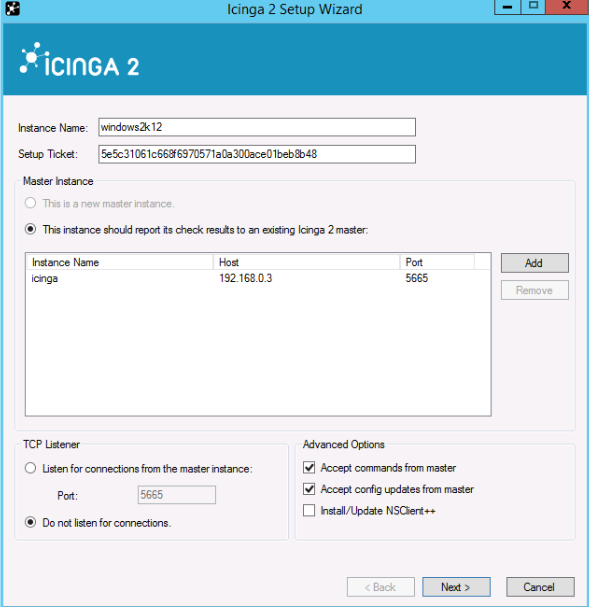
Once the installation is complete, the Icinga2 service needs to be restarted on Windows:
net stop icinga2
net start icinga2
Here again, a node update on the master server is needed:
information/cli: Updating node configuration for
Node 'windows2k12' (last seen: Sat Nov 26 17:47:34 2016)
    * Host 'windows2k12'
        * Service 'disk'
        * Service 'disk C:'
        * Service 'icinga'
        * Service 'load'
        * Service 'ping4'
        * Service 'ping6'
        * Service 'procs'
        * Service 'swap'
        * Service 'users'
information/cli: Adding host 'windows2k12' to the repository.
information/cli: Dumping changelog items to file '/var/lib/icinga2/repository/changes/1480182452.069441-Host-74c8bf8d716b8a06cb3574f1459547b5c16188ab48020bcb3fcc32e0d2b916e6.change'
information/cli: Dumping changelog items to file '/var/lib/icinga2/repository/changes/1480182452.072007-Service-1044dec7206e8d7c9fbb4ae8f766668406d2567fc7fc1a160a9d4700fcf8f8e9.change'
information/cli: Dumping changelog items to file '/var/lib/icinga2/repository/changes/1480182452.073057-Service-11cbac783763adafaf46fb769e695a9ac22afccfc9493ac485c2386252c636d1.change'
information/cli: Dumping changelog items to file '/var/lib/icinga2/repository/changes/1480182452.074116-Service-2eb9c534258d20f7c437141670d7c09d7afbab65b2ac9cd2034be27b122cbb41.change'
information/cli: Dumping changelog items to file '/var/lib/icinga2/repository/changes/1480182452.075129-Service-0cf67fc72b3c86c7a454f6d86b43ed245a8e491d0e5288d4da8c7ff43a7bcdb0.change'
information/cli: Dumping changelog items to file '/var/lib/icinga2/repository/changes/1480182452.076148-Service-571605952ba28ee6740b5a9b50f1e76393f1e4cdaf3115438bcdeddf8e473065.change'
information/cli: Dumping changelog items to file '/var/lib/icinga2/repository/changes/1480182452.077172-Service-d7535967c0481dbeb28afe542a40e2f0687f4fc5b5fc5abafacbd4c24ff0d9cf.change'
information/cli: Dumping changelog items to file '/var/lib/icinga2/repository/changes/1480182452.078285-Service-277d2f898036fa83a8f790fd6680e3c89e2cceaa4921a17b6ccb6c8f464ebb97.change'
information/cli: Dumping changelog items to file '/var/lib/icinga2/repository/changes/1480182452.079331-Service-da47c2f450a4f9d538d86d600d55149afd39d6672fdd1f30c68ad5be21cadad8.change'
information/cli: Dumping changelog items to file '/var/lib/icinga2/repository/changes/1480182452.080394-Service-7dfb4cf67742cb0660305e56ef816c53fcec892cae7f6ee39b75f34e659d672c.change'
information/cli: Adding endpoint 'windows2k12' to the repository.
information/cli: Dumping changelog items to file '/var/lib/icinga2/repository/changes/1480182452.081559-Endpoint-74c8bf8d716b8a06cb3574f1459547b5c16188ab48020bcb3fcc32e0d2b916e6.change'
information/cli: Adding zone 'windows2k12' to the repository.
information/cli: Dumping changelog items to file '/var/lib/icinga2/repository/changes/1480182452.084995-Zone-74c8bf8d716b8a06cb3574f1459547b5c16188ab48020bcb3fcc32e0d2b916e6.change'
information/cli: Committing node configuration.
Changes to be committed:

Adding host 'windows2k12'
    check_command = "cluster-zone"
    import = [ "satellite-host" ]
Adding service 'disk'
    check_command = "dummy"
    host_name = "windows2k12"
    import = [ "satellite-service" ]
    zone = "windows2k12"
Adding service 'disk C:'
    check_command = "dummy"
    host_name = "windows2k12"
    import = [ "satellite-service" ]
    zone = "windows2k12"
Adding service 'icinga'
    check_command = "dummy"
    host_name = "windows2k12"
    import = [ "satellite-service" ]
    zone = "windows2k12"
Adding service 'load'
    check_command = "dummy"
    host_name = "windows2k12"
    import = [ "satellite-service" ]
    zone = "windows2k12"
Adding service 'ping4'
    check_command = "dummy"
    host_name = "windows2k12"
    import = [ "satellite-service" ]
    zone = "windows2k12"
Adding service 'ping6'
    check_command = "dummy"
    host_name = "windows2k12"
    import = [ "satellite-service" ]
    zone = "windows2k12"
Adding service 'procs'
    check_command = "dummy"
    host_name = "windows2k12"
    import = [ "satellite-service" ]
    zone = "windows2k12"
Adding service 'swap'
    check_command = "dummy"
    host_name = "windows2k12"
    import = [ "satellite-service" ]
    zone = "windows2k12"
Adding service 'users'
    check_command = "dummy"
    host_name = "windows2k12"
    import = [ "satellite-service" ]
    zone = "windows2k12"
Adding endpoint 'windows2k12'
Adding zone 'windows2k12'
    endpoints = [ "windows2k12" ]
    parent = "watchyou"

information/cli: Writing config object 'windows2k12' to file '/etc/icinga2/repository.d/hosts/windows2k12.conf'
information/cli: Writing config object 'disk' to file '/etc/icinga2/repository.d/hosts/windows2k12/disk.conf'
information/cli: Writing config object 'disk C:' to file '/etc/icinga2/repository.d/hosts/windows2k12/disk C%3A.conf'
information/cli: Writing config object 'icinga' to file '/etc/icinga2/repository.d/hosts/windows2k12/icinga.conf'
information/cli: Writing config object 'load' to file '/etc/icinga2/repository.d/hosts/windows2k12/load.conf'
information/cli: Writing config object 'ping4' to file '/etc/icinga2/repository.d/hosts/windows2k12/ping4.conf'
information/cli: Writing config object 'ping6' to file '/etc/icinga2/repository.d/hosts/windows2k12/ping6.conf'
information/cli: Writing config object 'procs' to file '/etc/icinga2/repository.d/hosts/windows2k12/procs.conf'
information/cli: Writing config object 'swap' to file '/etc/icinga2/repository.d/hosts/windows2k12/swap.conf'
information/cli: Writing config object 'users' to file '/etc/icinga2/repository.d/hosts/windows2k12/users.conf'
information/cli: Writing config object 'windows2k12' to file '/etc/icinga2/repository.d/endpoints/windows2k12.conf'
information/cli: Writing config object 'windows2k12' to file '/etc/icinga2/repository.d/zones/windows2k12.conf'
Make sure to reload Icinga 2 for these changes to take effect.
An Icinga2 restart also needs to be done on the master server:
/etc/init.d/icinga2 restart
On the Icinga2web interface, here's the expected result:
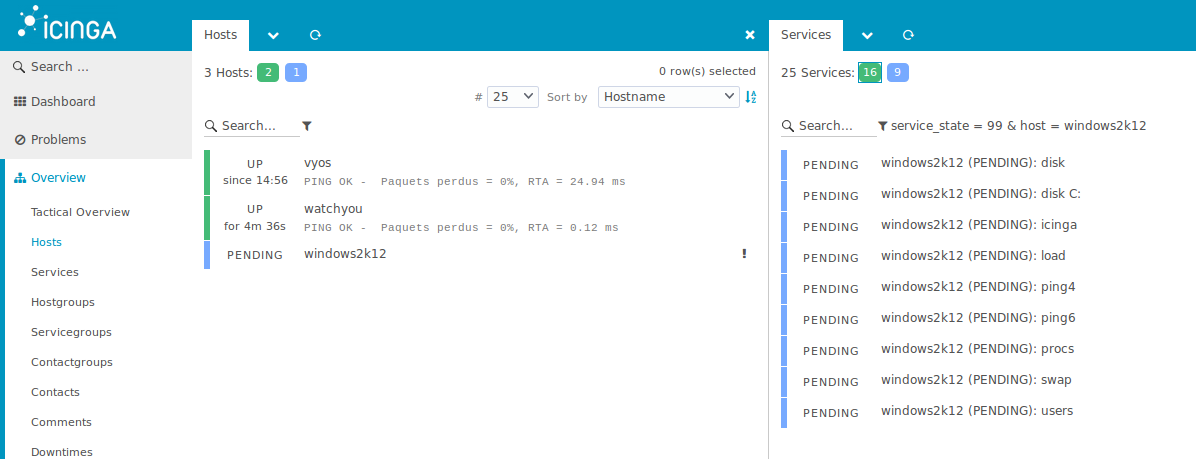
Adding an SNMP host
In our example, we'll add SNMP monitoring for VyOS.
The command instruction allows adding the public SNMP in the LAN network toward a target:
set service snmp listen-address 192.168.1.1
set service snmp listen-address 192.168.1.1 port 161
set service snmp target 192.168.1.2
set service snmp community public authorization rw
set service snmp description snmp-public
commit
save
Conclusion
This article covered the complete installation of Icinga2 and its Icinga2web interface on Debian 8, then the configuration of a master server capable of monitoring Linux and Windows hosts as well as network equipment via SNMP. The procedure involves generating certificates to secure communication between the master and the agents, as well as updating the configuration each time a node is added. This monitoring solution, independent of Nagios since its 2014 rewrite, offers a modern interface for monitoring an entire infrastructure.
We're now ready to edit the file configuration:
nano /etc/icinga2/conf.d/hosts.conf
Let's add a few checks, such as a ping to OVH or partitions:
object Host "vyos" {

 address             = "192.168.1.1"
 check_command       = "hostalive"
 vars.sla = "24x7"
 vars.fping_address = "91.121.161.184"
 vars.os = "Router-VyOS"
 vars.ssh_port = 14522
 vars.snmp_address   = "192.168.1.1"
 vars.snmp_community = "public"
 vars.snmp_v2        = "false"
 vars.snmp_v3        = "false"

vars.disks["disk /"] = {
    disk_partitions = "/",
  }

vars.disks["disk /boot"] = {
    disk_partitions = "/boot",
  }

vars.disks["disk"] = {
        vars.disk_wfree = "85%"
  }

}
The list of checks to add is available at the following link: the documentation.
Removing an Icinga2 host
Let's remove the entry of the host we want to delete: (e.g., windows2k12)
icinga2 node remove windows2k12
Then, we run the node update:
icinga2 node update-config
At this point Windows is no longer in the nodes; we restart the Icinga 2 service:
/etc/init.d/icinga2 restart
Be careful, you also need to do this on the Windows client, otherwise after a while it reappears.
For a host monitored via the agent, you need to reconfigure the host and stop the Icinga2 service.
For a host monitored via SNMP, for example, go to the configuration file:
nano /etc/icinga2/conf.d/hosts.conf
And remove the lines of the previously inserted host, then rerun the node update.
Adding checks to an Icinga2 host
We have three hosts that communicate with our Icinga2 solution in different ways:
- Localhost (master server)
- Windows2k12 (Agent)
- VyOS (SNMP)
It's now necessary to know how to manage our checks in order to add, modify, or remove them.
The important directories are:
- /etc/icinga2/repository.d/hosts: the files for hosts monitored via the Icinga2 agent.
- /etc/icinga2/conf.d/hosts.conf: the configuration file for adding hosts.
- /etc/icinga2/conf.d/groupe.conf: the configuration file for adding hosts to groups.
- /etc/icinga2/conf.d/templates.conf: the configuration file for host templates.
Nagios plugins in icinga2:
Despite Icinga2's novelty, Nagios plugins are fully compatible.
To use Nagios check scripts, we'll add the package: nagios-plugins:
apt-get install nagios-plugins
There are quite a few check probes to configure with Icinga2 that I won't cover in my article.
Here are a few addresses that might help you in your future development:
https://exchange.nagios.org/
https://exchange.icinga.com/
https://technet.microsoft.com/en-us/scriptcenter/bb410849.aspx