


Migrate a Zimbra 8.6 - Ubuntu 14.04 server to Zimbra 8.7.4 - Ubuntu 16.04. Getting started with the migration utility built into Zimbra 8.7.4.

Real-world use case
You need to upgrade an aging Zimbra server without losing any mail: here's how to migrate from Zimbra 8.6/Ubuntu 14.04 to Zimbra 8.7.4/Ubuntu 16.04.
Migrating a Zimbra server
Available for a few weeks now, the new Zimbra version and the latest Ubuntu system are compatible.
Migrating a Zimbra 8.6 server on Ubuntu 14.04 TLS to Zimbra 8.7.4 on Ubuntu 16.04.2 isn't simple.
In my case, at the start, I laid out a three-step plan like this:
- Upgrading Zimbra 8.6 to 8.7.4 on Ubuntu 14.04 (testing period).
- Migrating the Ubuntu system from 14.04 LTS to 16.04.02 LTS.
- Reinstalling Zimbra 8.7.4 on Ubuntu 16.04.02 LTS.
I quickly became disillusioned at step 2 once I understood the issues with upgrading Ubuntu 14.04 to 16.04. I decided to start over on a new server. Step 2 therefore became: setting up a Zimbra 8.7.4 server on Ubuntu 16.04.2 LTS, which led me to redefine the migration steps:
- Upgrading Zimbra 8.6 to 8.7.4 on Ubuntu 14.04 (testing period).
- Setting up a new Zimbra server on Ubuntu 16.04.2 LTS.
- Installing Zimbra 8.7.4 on Ubuntu 16.04.02 LTS.
- Migrating data from the old Zimbra 8.6.0 server to Zimbra 8.7.4.
Before starting, it's important to make one or more backups. Also, between step one and two, I gave myself a few weeks of testing to check the stability of Zimbra 8.7.4.
Upgrading Zimbra 8.6 to 8.7.4
To start a Zimbra migration to a major version, you need to know its prerequisites. Version 8.6 needs to have the following packages: memcached and proxy. If you don't have these modules in Zimbra, you'll need to reinstall them via the script for the version currently on your Zimbra server:
root@mail:/home/jeremie/zcs-8.6.0_GA_1153.UBUNTU14_64.20141215151116# ./install.sh
Here's the installation process for installing the two modules:
Operations logged to /tmp/install.log.7245
Checking for existing installation...
    zimbra-ldap...FOUND zimbra-ldap-8.6.0.GA.1153.UBUNTU14.64
    zimbra-logger...FOUND zimbra-logger-8.6.0.GA.1153.UBUNTU14.64
    zimbra-mta...FOUND zimbra-mta-8.6.0.GA.1153.UBUNTU14.64
    zimbra-dnscache...NOT FOUND
    zimbra-snmp...FOUND zimbra-snmp-8.6.0.GA.1153.UBUNTU14.64
    zimbra-store...FOUND zimbra-store-8.6.0.GA.1153.UBUNTU14.64
    zimbra-apache...FOUND zimbra-apache-8.6.0.GA.1153.UBUNTU14.64
    zimbra-spell...FOUND zimbra-spell-8.6.0.GA.1153.UBUNTU14.64
    zimbra-convertd...NOT FOUND
    zimbra-memcached...NOT FOUND
    zimbra-proxy...NOT FOUND
    zimbra-archiving...NOT FOUND
    zimbra-core...FOUND zimbra-core-8.6.0.GA.1153.UBUNTU14.64
ZCS upgrade from 8.6.0 to 8.6.0 will be performed.
Validating ldap configuration
LDAP validation succeeded.  Continuing.

Saving existing configuration file to /opt/zimbra/.saveconfig

PLEASE READ THIS AGREEMENT CAREFULLY BEFORE USING THE SOFTWARE.
ZIMBRA, INC. ("ZIMBRA") WILL ONLY LICENSE THIS SOFTWARE TO YOU IF YOU
FIRST ACCEPT THE TERMS OF THIS AGREEMENT. BY DOWNLOADING OR INSTALLING
THE SOFTWARE, OR USING THE PRODUCT, YOU ARE CONSENTING TO BE BOUND BY
THIS AGREEMENT. IF YOU DO NOT AGREE TO ALL OF THE TERMS OF THIS
AGREEMENT, THEN DO NOT DOWNLOAD, INSTALL OR USE THE PRODUCT.

License Terms for the Zimbra Collaboration Suite:
  http://www.zimbra.com/license/zimbra-public-eula-2-5.html

Do you agree with the terms of the software license agreement? [N] Y

Checking for prerequisites...
     FOUND: NPTL
     FOUND: netcat-openbsd-1.105-7ubuntu1
     FOUND: sudo-1.8.9p5-1ubuntu1.3
     FOUND: libidn11-1.28-1ubuntu2.1
     FOUND: libpcre3-1:8.31-2ubuntu2.3
     FOUND: libgmp10-2:5.1.3+dfsg-1ubuntu1
     FOUND: libexpat1-2.1.0-4ubuntu1.3
     FOUND: libstdc++6-4.8.4-2ubuntu1~14.04.3
     FOUND: libperl5.18-5.18.2-2ubuntu1.1
     FOUND: libaio1-0.3.109-4
     FOUND: resolvconf-1.69ubuntu1.1
     FOUND: unzip-6.0-9ubuntu1.5

Checking for suggested prerequisites...
     FOUND: pax
     FOUND: perl-5.18.2
     FOUND: sysstat
     FOUND: sqlite3
Prerequisite check complete.
Checking current number of databases...

Do you want to verify message store database integrity? [Y] N

Checking for installable packages

Found zimbra-core
Found zimbra-ldap
Found zimbra-logger
Found zimbra-mta
Found zimbra-dnscache
Found zimbra-snmp
Found zimbra-store
Found zimbra-apache
Found zimbra-spell
Found zimbra-memcached
Found zimbra-proxy

The Zimbra Collaboration Server appears already to be installed.
It can be upgraded with no effect on existing accounts,
or the current installation can be completely removed prior
to installation for a clean install.

Do you wish to upgrade? [Y] Y

Select the packages to install
    Upgrading zimbra-core
    Upgrading zimbra-ldap
    Upgrading zimbra-logger
    Upgrading zimbra-mta

Install zimbra-dnscache [N] N
    Upgrading zimbra-snmp
    Upgrading zimbra-store
    Upgrading zimbra-apache
    Upgrading zimbra-spell

Install zimbra-memcached [N] Y

Install zimbra-proxy [N] Y
Checking required space for zimbra-core
Checking space for zimbra-store
Checking required packages for zimbra-store
zimbra-store package check complete.

Installing:
    zimbra-core
    zimbra-ldap
    zimbra-logger
    zimbra-mta
    zimbra-snmp
    zimbra-store
    zimbra-apache
    zimbra-spell
    zimbra-memcached
    zimbra-proxy

The system will be modified.  Continue? [N] Y

Shutting down zimbra mail

Backing up the ldap database...done.

Removing existing packages

   zimbra-ldap...done
   zimbra-logger...done
   zimbra-mta...done
   zimbra-snmp...done
   zimbra-store...done
   zimbra-spell...done
   zimbra-apache...done
   zimbra-core...done

Removing deployed webapp directories
Installing packages

    zimbra-core......zimbra-core_8.6.0.GA.1153.UBUNTU14.64_amd64.deb...done
    zimbra-ldap......zimbra-ldap_8.6.0.GA.1153.UBUNTU14.64_amd64.deb...done
    zimbra-logger......zimbra-logger_8.6.0.GA.1153.UBUNTU14.64_amd64.deb...done
    zimbra-mta......zimbra-mta_8.6.0.GA.1153.UBUNTU14.64_amd64.deb...done
    zimbra-snmp......zimbra-snmp_8.6.0.GA.1153.UBUNTU14.64_amd64.deb...done
    zimbra-store......zimbra-store_8.6.0.GA.1153.UBUNTU14.64_amd64.deb...done
    zimbra-apache......zimbra-apache_8.6.0.GA.1153.UBUNTU14.64_amd64.deb...done
    zimbra-spell......zimbra-spell_8.6.0.GA.1153.UBUNTU14.64_amd64.deb...done
    zimbra-memcached......zimbra-memcached_8.6.0.GA.1153.UBUNTU14.64_amd64.deb...done
    zimbra-proxy......zimbra-proxy_8.6.0.GA.1153.UBUNTU14.64_amd64.deb...done

Setting defaults from saved config in /opt/zimbra/.saveconfig/config.save
   HOSTNAME=webmail.kassianoff.fr
   LDAPHOST=webmail.kassianoff.fr
   LDAPPORT=389
   SNMPTRAPHOST=webmail.kassianoff.fr
   SMTPSOURCE=[email protected]
   SMTPDEST=[email protected]
   SNMPNOTIFY=yes
   SMTPNOTIFY=yes
   LDAPROOTPW=xxxxxxxxxxxxxx
   LDAPZIMBRAPW=xxxxxxxxxxxxxx
   LDAPPOSTPW=xxxxxxxxxxxxxx
   LDAPREPPW=xxxxxxxxxxxxxx
   LDAPAMAVISPW=xxxxxxxxxxxxxx
   LDAPNGINXPW=xxxxxxxxxxxxxx
Restoring existing configuration file from /opt/zimbra/.saveconfig/localconfig.xml...done
Operations logged to /tmp/zmsetup12192016-195553.log
Upgrading from 8.6.0_GA_1200 to 8.6.0_GA_1153
Stopping zimbra services...done.
This appears to be 8.6.0_GA
Starting mysql...done.
Checking ldap status...not running.
Checking ldap status...not running.
Starting ldap...done.
Stopping mysql...done.
Updating from 8.7.0_BETA1
Updating from 9.0.0_BETA1
Updating global config and COS's with attributes introduced after 8.6.0_GA...done.
Stopping ldap...done.
Upgrade complete.

Checking ldap status....not running.
Starting ldap...done.
Setting defaults...done.
Setting defaults from existing config...done.
Checking for port conflicts
Setting defaults from ldap...done.
Saving config in /opt/zimbra/config.26981...done.
Operations logged to /tmp/zmsetup12192016-195553.log
Setting local config values...done.
Initializing core config...Setting up CA...done.
Deploying CA to /opt/zimbra/conf/ca ...done.
Setting replication password...done.
Setting Postfix password...done.
Setting amavis password...done.
Setting nginx password...done.
Creating server entry for webmail.kassianoff.fr...already exists.
Setting Zimbra IP Mode...done.
Saving CA in ldap ...done.
Saving SSL Certificate in ldap ...done.
Setting spell check URL...done.
Setting service ports on webmail.kassianoff.fr...done.
Setting Keyboard Shortcut Preferences...done.
Setting zimbraFeatureTasksEnabled=TRUE...done.
Setting zimbraFeatureBriefcasesEnabled=TRUE...done.
Setting TimeZone Preference...done.
Initializing mta config...done.
Setting services on webmail.kassianoff.fr...done.
Adding webmail.kassianoff.fr to zimbraMailHostPool in default COS...done.
Creating user [email protected] exists.
Creating user [email protected] exists.
Creating user [email protected] exists.
Setting spam training and Anti-virus quarantine accounts...done.
Configuring SNMP...done.
Setting up syslog.conf...done.
Starting servers...done.
Checking for deprecated zimlets...done.
Checking for network zimlets in LDAP...done.
Removing network zimlets...
Finished removing network zimlets.
Installing common zimlets...
    com_zimbra_bulkprovision...done.
    com_zimbra_viewmail...done.
    com_zimbra_email...done.
    com_zimbra_ymemoticons...done.
    com_zimbra_mailarchive...done.
    com_zimbra_clientuploader...done.
    com_zimbra_attachcontacts...done.
    com_zimbra_srchhighlighter...done.
    com_zimbra_adminversioncheck...done.
    com_zimbra_webex...done.
    com_zimbra_date...done.
    com_zimbra_attachmail...done.
    com_zimbra_cert_manager...done.
    com_zimbra_tooltip...done.
    com_zimbra_url...done.
    com_zimbra_phone...done.
    com_zimbra_proxy_config...done.
Finished installing common zimlets.
Getting list of all zimlets...done.
Updating non-standard zimlets...
Finished updating non-standard zimlets.
Restarting mailboxd...done.
Skipping creation of default domain GAL sync account - existing install detected.

You have the option of notifying Zimbra of your installation.
This helps us to track the uptake of the Zimbra Collaboration Server.
The only information that will be transmitted is:
    The VERSION of zcs installed (8.6.0_GA_1153_UBUNTU14_64)
    The ADMIN EMAIL ADDRESS created ([email protected])

Notify Zimbra of your installation? [Yes]

otify Zimbra of your installation? [Yes] Yes
Notifying Zimbra of installation via http://www.zimbra.com/cgi-bin/notify.cgi?VER=8.6.0_GA_1153_UBUNTU14_64&[email protected]

Notification complete

Setting up zimbra crontab...done.

Moving /tmp/zmsetup12192016-195553.log to /opt/zimbra/log

Configuration complete - press return to exit

zimbra@mail:/home/jeremie$ zmcontrol status
Host webmail.kassianoff.fr
    amavis                  Running
    antispam                Running
    antivirus               Running
    cbpolicyd               Running
    ldap                    Running
    logger                  Running
    mailbox                 Running
    memcached               Running
    mta                     Running
    opendkim                Running
    proxy                   Running
    service webapp          Running
    snmp                    Running
    spell                   Running
    stats                   Running
    zimbra webapp           Running
    zimbraAdmin webapp      Running
    zimlet webapp           Running
    zmconfigd               Running
Restarting the VM is recommended:
reboot
We're now ready to apply our upgrade to Zimbra 8.7.1.
Let's download it from the official Zimbra site:
https://files.zimbra.com/downloads/8.7.1_GA/zcs-8.7.1_GA_1670.UBUNTU16_64.20161025045114.tgz
The installation is launched as seen previously.
root@mail:/home/jeremie/zcs-8.7.1_GA_1670.UBUNTU14_64.20161025045105# ./install.sh
Here's the installation process for upgrading all the modules:
Operations logged to /tmp/install.log.O9eiWmaw
Checking for existing installation...
    zimbra-ldap...FOUND zimbra-ldap-8.6.0.GA.1153.UBUNTU14.64
    zimbra-logger...FOUND zimbra-logger-8.6.0.GA.1153.UBUNTU14.64
    zimbra-mta...FOUND zimbra-mta-8.6.0.GA.1153.UBUNTU14.64
    zimbra-dnscache...NOT FOUND
    zimbra-snmp...FOUND zimbra-snmp-8.6.0.GA.1153.UBUNTU14.64
    zimbra-store...FOUND zimbra-store-8.6.0.GA.1153.UBUNTU14.64
    zimbra-apache...FOUND zimbra-apache-8.6.0.GA.1153.UBUNTU14.64
    zimbra-spell...FOUND zimbra-spell-8.6.0.GA.1153.UBUNTU14.64
    zimbra-convertd...NOT FOUND
    zimbra-memcached...FOUND zimbra-memcached-8.6.0.GA.1153.UBUNTU14.64
    zimbra-proxy...FOUND zimbra-proxy-8.6.0.GA.1153.UBUNTU14.64
    zimbra-archiving...NOT FOUND
    zimbra-core...FOUND zimbra-core-8.6.0.GA.1153.UBUNTU14.64
ZCS upgrade from 8.6.0 to 8.7.1 will be performed.
Checking for existing proxy service in your environment
Checking for existing memcached service in your environment
Validating ldap configuration
LDAP validation succeeded.  Continuing.

----------------------------------------------------------------------
PLEASE READ THIS AGREEMENT CAREFULLY BEFORE USING THE SOFTWARE.
SYNACOR, INC. ("SYNACOR") WILL ONLY LICENSE THIS SOFTWARE TO YOU IF YOU
FIRST ACCEPT THE TERMS OF THIS AGREEMENT. BY DOWNLOADING OR INSTALLING
THE SOFTWARE, OR USING THE PRODUCT, YOU ARE CONSENTING TO BE BOUND BY
THIS AGREEMENT. IF YOU DO NOT AGREE TO ALL OF THE TERMS OF THIS
AGREEMENT, THEN DO NOT DOWNLOAD, INSTALL OR USE THE PRODUCT.

License Terms for this Zimbra Collaboration Suite Software:
https://www.zimbra.com/license/zimbra-public-eula-2-6.html
----------------------------------------------------------------------

Do you agree with the terms of the software license agreement? [N] Y

Checking current number of databases...

Do you want to verify message store database integrity? [Y] Y
Verifying integrity of message store databases.  This may take a while.
mysqld is alive
No errors found

Checking for installable packages

Found zimbra-core
Found zimbra-ldap
Found zimbra-logger
Found zimbra-mta
Found zimbra-dnscache
Found zimbra-snmp
Found zimbra-store
Found zimbra-apache
Found zimbra-spell
Found zimbra-memcached
Found zimbra-proxy

Use Zimbra's package repository [Y] N

The Zimbra Collaboration Server appears to already be installed.
It can be upgraded with no effect on existing accounts,
or the current installation can be completely removed prior
to installation for a clean install.

Do you wish to upgrade? [Y] Y

Scanning for any new or additional packages available for installation
Existing packages will be upgraded
    Upgrading zimbra-core
    Upgrading zimbra-ldap
    Upgrading zimbra-logger
    Upgrading zimbra-mta

Install zimbra-dnscache [N] N
    Upgrading zimbra-snmp
    Upgrading zimbra-store
    Upgrading zimbra-apache
    Upgrading zimbra-spell
    Upgrading zimbra-memcached
    Upgrading zimbra-proxy
Checking required space for zimbra-core
Checking space for zimbra-store
Checking required packages for zimbra-store
zimbra-store package check complete.

Installing:
    zimbra-core
    zimbra-ldap
    zimbra-logger
    zimbra-mta
    zimbra-snmp
    zimbra-store
    zimbra-apache
    zimbra-spell
    zimbra-memcached
    zimbra-proxy

The system will be modified.  Continue? [N] Y
Installing packages

zimbra-core will be downloaded.
zimbra-ldap will be downloaded.
zimbra-logger will be downloaded.
zimbra-mta will be downloaded.
zimbra-snmp will be downloaded.
zimbra-store will be downloaded.
zimbra-apache will be downloaded.
zimbra-spell will be downloaded.
zimbra-memcached will be downloaded.
zimbra-proxy will be downloaded.
Downloading packages. This will not modify the system. This may take some time.
Downloading Remote package zimbra-memcached version 1.4.25-1zimbra8.7b1.14.04

Saving existing configuration file to /opt/zimbra/.saveconfig

Shutting down zimbra mail

Backing up the ldap database...done.

Removing existing packages

   zimbra-ldap...done
   zimbra-logger...done
   zimbra-mta...done
   zimbra-snmp...done
   zimbra-store...done
   zimbra-spell...done
   zimbra-memcached...done
   zimbra-proxy...done
   zimbra-apache...done
   zimbra-core...done

Removing deployed webapp directories
Local packages  zimbra-core zimbra-ldap zimbra-logger zimbra-mta zimbra-snmp zimbra-store zimbra-apache zimbra-spell zimbra-proxy selected for installation
Monitor /tmp/install.log.O9eiWmaw for package installation progress
Remote package installation started
Installing zimbra-core-components  zimbra-ldap-components zimbra-mta-components zimbra-snmp-components zimbra-store-components zimbra-apache-components zimbra-spell-components zimbra-memcached zimbra-proxy-components....done
Local package installation started
Installing  zimbra-core zimbra-ldap zimbra-logger zimbra-mta zimbra-snmp zimbra-store zimbra-apache zimbra-spell zimbra-proxy...done
done

Setting defaults from saved config in /opt/zimbra/.saveconfig/config.save
   HOSTNAME=webmail.kassianoff.fr
   LDAPHOST=webmail.kassianoff.fr
   LDAPPORT=389
   SNMPTRAPHOST=webmail.kassianoff.fr
   [email protected]
   [email protected]
   SNMPNOTIFY=yes
   SMTPNOTIFY=yes
   LDAPROOTPW=*
   LDAPZIMBRAPW=*
   LDAPPOSTPW=*
   LDAPREPPW=*
   LDAPAMAVISPW=*
   LDAPNGINXPW=*
Restoring existing configuration file from /opt/zimbra/.saveconfig/localconfig.xml...done
Operations logged to /tmp/zmsetup.20161219-202104.log
Adding /opt/zimbra/conf/ca/ca.pem to cacerts
Upgrading from 8.6.0_GA_1153 to 8.7.1_GA_1670
Stopping zimbra services...done.
This appears to be 8.6.0_GA
Starting mysql...done.
Checking ldap status...not running.
Checking ldap status...not running.
Starting ldap...done.
Checking ldap status...already running.
Schema upgrade required from version 103 to 107.
Running /opt/zimbra/libexec/scripts/migrate20150401-ZmgDevices.pl
Mon Dec 19 20:21:44 2016: Verified schema version 103.
Mon Dec 19 20:21:44 2016: Verified schema version 103.
Mon Dec 19 20:21:44 2016: Updating DB schema version from 103 to 104.
Running /opt/zimbra/libexec/scripts/migrate20150515-DataSourcePurgeTables.pl
Mon Dec 19 20:21:46 2016: Verified schema version 104.
Mon Dec 19 20:22:20 2016: Verified schema version 104.
Mon Dec 19 20:22:20 2016: Updating DB schema version from 104 to 105.
Running /opt/zimbra/libexec/scripts/migrate20150623-ZmgDevices.pl
Mon Dec 19 20:22:22 2016: Verified schema version 105.
Mon Dec 19 20:22:22 2016: Verified schema version 105.
Mon Dec 19 20:22:22 2016: Updating DB schema version from 105 to 106.
Running /opt/zimbra/libexec/scripts/migrate20150702-ZmgDevices.pl
Mon Dec 19 20:22:25 2016: Verified schema version 106.
Mon Dec 19 20:22:27 2016: Verified schema version 106.
Mon Dec 19 20:22:27 2016: Updating DB schema version from 106 to 107.
Stopping mysql...done.
Updating from 8.6.1_GA
Updating from 8.7.0_BETA1
Updating mailboxd_java_options to remove deprecated PermSize and MaxPermSize java options.
Updating from 8.7.0_BETA2
Updating from 8.7.0_RC1
Updating from 8.7.0_RC2
Updating from 8.7.0_GA
Updating from 8.7.1_GA
Updating global config and COS's with attributes introduced after 8.6.0_GA...done.
Stopping ldap...done.
Upgrade complete.

Checking ldap status....not running.
Starting ldap...done.
Setting defaults...done.
Setting defaults from existing config...done.
Checking for port conflicts
Setting defaults from ldap...done.
Saving config in /opt/zimbra/config.23180...done.
Operations logged to /tmp/zmsetup.20161219-202104.log
Setting local config values...done.
Initializing core config...Setting up CA...done.
Deploying CA to /opt/zimbra/conf/ca ...done.
Setting replication password...done.
Setting Postfix password...done.
Setting amavis password...done.
Setting nginx password...done.
Creating server entry for webmail.kassianoff.fr...already exists.
Setting Zimbra IP Mode...done.
Saving CA in ldap...done.
Saving SSL Certificate in ldap...done.
Setting spell check URL...done.
Setting service ports on webmail.kassianoff.fr...done.
Setting Keyboard Shortcut Preferences...done.
Setting zimbraFeatureTasksEnabled=TRUE...done.
Setting zimbraFeatureBriefcasesEnabled=TRUE...done.
Setting TimeZone Preference...done.
Initializing mta config...done.
Setting services on webmail.kassianoff.fr...done.
Adding webmail.kassianoff.fr to zimbraMailHostPool in default COS...done.
Creating user [email protected] exists.
Creating user [email protected] exists.
Creating user [email protected] exists.
Setting spam training and Anti-virus quarantine accounts...done.
Configuring SNMP...done.
Setting up syslog.conf...done.
Starting servers...done.
Checking for deprecated zimlets...done.
Checking for network zimlets in LDAP...done.
Removing network zimlets...
Finished removing network zimlets.
Installing common zimlets...
    com_zimbra_bulkprovision...done.
    com_zimbra_viewmail...done.
    com_zimbra_email...done.
    com_zimbra_ymemoticons...done.
    com_zimbra_mailarchive...done.
    com_zimbra_clientuploader...done.
    com_zimbra_attachcontacts...done.
    com_zimbra_srchhighlighter...done.
    com_zimbra_adminversioncheck...done.
    com_zimbra_webex...done.
    com_zimbra_date...done.
    com_zimbra_attachmail...done.
    com_zimbra_cert_manager...done.
    com_zimbra_tooltip...done.
    com_zimbra_url...done.
    com_zimbra_phone...done.
    com_zimbra_proxy_config...done.
Finished installing common zimlets.
Getting list of all zimlets...done.
Updating non-standard zimlets...
Finished updating non-standard zimlets.
Restarting mailboxd...done.
Skipping creation of default domain GAL sync account - existing install detected.

You have the option of notifying Zimbra of your installation.
This helps us to track the uptake of the Zimbra Collaboration Server.
The only information that will be transmitted is:
    The VERSION of zcs installed (8.7.1_GA_1670_UBUNTU14_64)
    The ADMIN EMAIL ADDRESS created ([email protected])

Notify Zimbra of your installation? [Yes] Yes
Notifying Zimbra of installation via http://www.zimbra.com/cgi-bin/notify.cgi?VER=8.7.1_GA_1670_UBUNTU14_64&MAIL=[email protected]

Notification complete

Setting up zimbra crontab...done.

Moving /tmp/zmsetup.20161219-202104.log to /opt/zimbra/log

Configuration complete - press return to exit
We restart the Zimbra server after the upgrade:
reboot
The Zextras suite module
Having been a user of the Zextras suite module for many years, it's available for the Zimbra 8.7.4 version.
We're going to upgrade it too on the Zimbra server by downloading it:
wget http://download.zextras.com/zextras_suite-latest.tgz
We run the Zextras 2.4.2 installation script:
root@mail:/home/ffonaissak/zextras_suite-2.4.2# ./install.sh all
Here's how the installation unfolds:
-------------------------

Checking for existing installations ...

FOUND Zimbra 8.7.1

Checking whether you are installing the latest version ...

Current release: 2.4.2
Latest  release: 2.4.2

For more information check the Changelog at
http://wiki.zextras.com/wiki/Changelog

This installer is up to date: version 2.4.2

-------------------------
Checking whether the Core is already installed ...
Checking whether the ZAL is already installed ...
Checking whether the ZeXtras Suite Zimlet is already installed ...
Checking whether the ZeXtras Migration Tool Zimlet is already installed ...
-------------------------

-------------------------
Detected ZeXtras Suite Core version 2.4.0
No preexistent ZeXtras Migration Tool Zimlet installation found.
Detected ZeXtras Suite Zimlet version 2.4.0
-------------------------

----------------------------------------------------------------------
PLEASE READ THIS AGREEMENT CAREFULLY BEFORE USING THE SOFTWARE.
ZeXtras WILL ONLY LICENSE THIS SOFTWARE TO YOU IF YOU FIRST
ACCEPT THE TERMS OF THIS AGREEMENT. BY DOWNLOADING OR INSTALLING
THE SOFTWARE, OR USING THE PRODUCT, YOU ARE CONSENTING TO BE BOUND BY
THIS AGREEMENT. IF YOU DO NOT AGREE TO ALL OF THE TERMS OF THIS
AGREEMENT, THEN DO NOT DOWNLOAD, INSTALL OR USE THE PRODUCT.

License Terms for this ZeXtras Suite Software:
https://www.zextras.com/eula/
----------------------------------------------------------------------

Do you agree with the terms of the software license agreement? [N] Y

Checking for the most up-to-date version of the ZAL library...

===========================

Beginning Core installation procedure ...

****************************  Note  ****************************

In addition to the ZeXtras Suite Zimlet a command line tool
is also available, "zxsuite" .
Run it as the zimbra user in order to see the available options.

****************************************************************

Press ENTER to continue ...

************************  WARNING:  ************************

ZeXtras Suite needs to bind on TCP ports 8735 and 8736 in order
to operate, for inter-instance communication.
The ZeXtras Chat module needs to bind on TCP ports 5222 and/or
5223 in order for any XMPP feature to be functional.
Please verify no other service listens on these ports and that
ports 8735 and 8736 are properly filtered from public access
by your firewall.

************************************************************

Downloading the ZAL library. It might take a few minutes ...
** GET http://openzal.org/1.11/zal-1.11-8.7.1.jar ==> 301 Moved Permanently
** GET http://openzal.org/1.11/zal-1.11.2-8.7.1.jar ==> 200 OK (1s)
Download succeeded and validated for ZAL branch 1.11 variant 8.7.1

ZeXtras Suite Core will now be installed. Proceed? [Y] Y

The Zimbra Web Application must be restarted
in order to perform the installation.

Do you wish to stop the Zimbra Web Application (mailboxd)? [Y] Y

Stopping mailboxd...done.
ZeXtras Core installation successfully completed.

* Be warned that ZeXtras Suite needs for the
* related zimlet to be installed in order to operate.

Starting The Zimbra Web Application (mailboxd) ....

Starting mailboxd...done.

mailboxd is running.

Waiting 60s for Zimbra to initialize ...

===========================

===========================

Beginning ZeXtras Suite Zimlet installation procedure ...

The ZeXtras Suite Zimlet will now be installed. Proceed? [Y] Y

Checking whether the Core is already installed ...

ZeXtras Suite Core detected.

****************************  Note  ****************************

WARNING: Zimbra 8.x users might experience slowness and AJAX errors
when accessing the Zimbra Administration Console because of the
Zimbra DOS Filter. In this case, raising the number of Maximum Requests
per Second is suggested (see http://wiki.zextras.com/DosFilter
for further informations)

****************************************************************

Press ENTER to continue ...

Deploying zimlet ...

[] INFO: Deploying Zimlet com_zextras_zextras in LDAP.
[] INFO: Installing Zimlet com_zextras_zextras on this host.
[] INFO: Upgrading Zimlet com_zextras_zextras to 2.4.2
[] INFO: Enabling Zimlet com_zextras_zextras

The ZeXtras Suite Zimlet has been successfully installed.

===========================

After installing/uninstalling ZeXtras Suite Zimlet,
it's highly suggested to clear both your browser's and server's cache.
In order to clear your server's Zimlet cache, simply run
« zmprov fc -a zimlet »
as the zimbra user.
E.g. « su - zimbra -c 'zmprov fc -a zimlet' »

===========================
We'll enable the zimlets in Zimbra:
su - zimbra -c 'zmprov fc -a zimlet'
Our Zimbra 8.7.x server is now installed on Ubuntu 14.04 LTS.
We'll then migrate to the Ubuntu 16.04.2 LTS version; to do this, we'll use a fresh server.
Setting up a Zimbra 8.7.4 server on Ubuntu 16.04.2 LTS
We'll use the following image: https://ubuntu-fr.org/telechargement?variante=server from March 5, 2017: 16.04.2 LTS.
The virtual machine uses the following hardware configuration:
- 2vCPU
- 4096MB of RAM
- 100GB of free space
- 1 network card (1GB/s)
We won't cover the Ubuntu installation steps; they're available here in French. for anyone interested.
As for me, I adapted my installation as follows (for the KVM hypervisor):
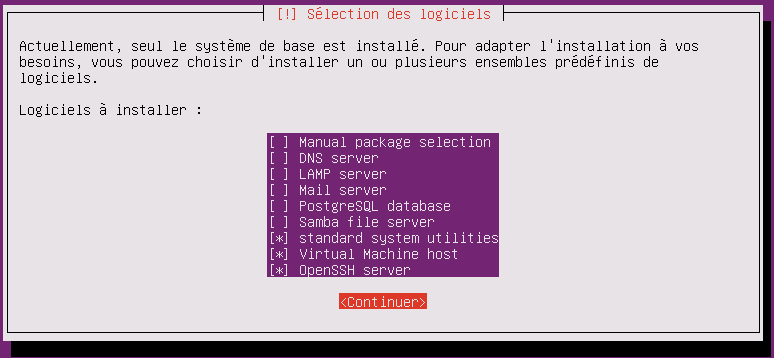
Once Ubuntu 16.04.2 LTS is in place, we'll need to carry out the following installation steps:
Let's go to the network interfaces configuration:
nano /etc/network/interface
Let's check our file with the ens3 interface (static configuration):
auto lo eth0

iface lo inet loopback

iface ens3 inet static
        address 192.168.10.10
        netmask 255.255.255.0
        broadcast 255.255.255.255
        gateway 192.168.10.1
Let's change the FQDN machine name:
nano /etc/hostname
Let's add the subdomain to the file:
webmail.kassianoff.fr
Then, let's edit the server's hosts file:
nano /etc/hosts
Let's add the name resolution, the private IP address, and the server's FQDN name to the file:
127.0.0.1       localhost.localdomain localhost
192.168.10.10   webmail.kassianoff.fr  webmail

# The following lines are desirable for IPv6 capable hosts
::1     ip6-localhost ip6-loopback
fe00::0 ip6-localnet
ff00::0 ip6-mcastprefix
ff02::1 ip6-allnodes
ff02::2 ip6-allrouters
ff02::3 ip6-allhosts
Editing resolv.conf:
nano /etc/resolv.conf
Then, let's add the following line:
nameserver 127.0.0.1
Zimbra is local; to avoid DNS resolution issues, we need to use SPLIT-DNS.
Split DNS is the solution to the issues of using the same zone name internally and externally.
Using the same domain name internally and externally causes resolution problems.
Split-DNS will be used with the Dnsmasq software for its simplicity and efficiency.
Installing Dnsmasq:
apt-get install dnsmasq
Go to the Dnsmasq configuration file:
nano /etc/dnsmasq.conf
Write the following into the Dnsmasq file:
#DNS
server=213.186.33.99
#public IP
server=188.165.54.37
domain=kassianoff.fr
mx-host=kassianoff.fr webmail.kassianoff.fr,5
listen-address=127.0.0.1
Checking the split-dns configuration:
dig webmail.kassianoff.fr
; <<>> DiG 9.3.6-P1 <<>> webmail.kassianoff.fr
;; global options: +cmd
;; Got answer:
;; ->>HEADER<<- opcode: QUERY, status: NOERROR, id: 39592
;; flags: qr aa rd ra; QUERY: 1, ANSWER: 1, AUTHORITY: 0, ADDITIONAL: 0

;; QUESTION SECTION:
;webmail.kassianoff.fr                   IN      A

;; ANSWER SECTION:
webmail.kassianoff.fr.            3564    IN      A       192.168.10.10

;; Query time: 2 msec
;; SERVER: 127.10.0.1#53(127.0.0.1)
;; WHEN: Sat Oct 26 18:17:18 2013
;; MSG SIZE  rcvd: 52
Our split-dns with Dnsmasq is ready! Don't forget to restart the network and the hostname:
/etc/init.d/hostname restart && /etc/init.d/networking restart
Installing Zimbra 8.7.4 on Ubuntu 16.04.2 LTS
We download Zimbra 8.7.4 for Ubuntu 16.0.4 LTS at the following address: https://files.zimbra.com/downloads/8.7.4_GA/zcs-8.7.4_GA_1730.UBUNTU16_64.20170227060845.tgz
We need to import the repository key for Zimbra: (port 11371)
apt-key adv --keyserver keyserver.ubuntu.com --recv-keys 9BE6ED79
If, like me, you have firewall restrictions, import it from port 80:
apt-key adv --keyserver hkp://keyserver.ubuntu.com:80 --recv-keys 9BE6ED79
Without the repository key, you'll get the following error after running the Zimbra installation:
Use Zimbra's package repository [Y] Y
Importing Zimbra GPG key
ERROR: Unable to retrive Zimbra GPG key for package validation
Please fix system to allow normal package installation before proceeding
The usual installation (proxy optional):
root@mail:~/zcs-8.7.4_GA_1730.UBUNTU16_64.20170227060845# ./install.sh

Operations logged to /tmp/install.log.GNOZl2zQ
Checking for existing installation...
    zimbra-ldap...NOT FOUND
    zimbra-logger...NOT FOUND
    zimbra-mta...NOT FOUND
    zimbra-dnscache...NOT FOUND
    zimbra-snmp...NOT FOUND
    zimbra-store...NOT FOUND
    zimbra-apache...NOT FOUND
    zimbra-spell...NOT FOUND
    zimbra-convertd...NOT FOUND
    zimbra-memcached...NOT FOUND
    zimbra-proxy...NOT FOUND
    zimbra-archiving...NOT FOUND
    zimbra-core...NOT FOUND

----------------------------------------------------------------------
PLEASE READ THIS AGREEMENT CAREFULLY BEFORE USING THE SOFTWARE.
SYNACOR, INC. ("SYNACOR") WILL ONLY LICENSE THIS SOFTWARE TO YOU IF YOU
FIRST ACCEPT THE TERMS OF THIS AGREEMENT. BY DOWNLOADING OR INSTALLING
THE SOFTWARE, OR USING THE PRODUCT, YOU ARE CONSENTING TO BE BOUND BY
THIS AGREEMENT. IF YOU DO NOT AGREE TO ALL OF THE TERMS OF THIS
AGREEMENT, THEN DO NOT DOWNLOAD, INSTALL OR USE THE PRODUCT.

License Terms for this Zimbra Collaboration Suite Software:
https://www.zimbra.com/license/zimbra-public-eula-2-6.html
----------------------------------------------------------------------

Do you agree with the terms of the software license agreement? [N] Y

Checking for installable packages

Found zimbra-core
Found zimbra-ldap
Found zimbra-logger
Found zimbra-mta
Found zimbra-dnscache
Found zimbra-snmp
Found zimbra-store
Found zimbra-apache
Found zimbra-spell
Found zimbra-memcached
Found zimbra-proxy

Use Zimbra's package repository [Y] Y
Configuring package repository

Select the packages to install

Install zimbra-ldap [Y] Y

Install zimbra-logger [Y] Y

Install zimbra-mta [Y] Y

Install zimbra-dnscache [Y] N

Install zimbra-snmp [Y] Y

Install zimbra-store [Y] Y

Install zimbra-apache [Y] Y

Install zimbra-spell [Y] Y

Install zimbra-memcached [Y] Y

Install zimbra-proxy [Y] Y
Checking required space for zimbra-core
Checking space for zimbra-store
Checking required packages for zimbra-store
zimbra-store package check complete.

Installing:
    zimbra-core
    zimbra-ldap
    zimbra-logger
    zimbra-mta
    zimbra-snmp
    zimbra-store
    zimbra-apache
    zimbra-spell
    zimbra-memcached
    zimbra-proxy

The system will be modified.  Continue? [N] Y
Installing packages

zimbra-core will be downloaded.
zimbra-ldap will be downloaded.
zimbra-logger will be downloaded.
zimbra-mta will be downloaded.
zimbra-snmp will be downloaded.
zimbra-store will be downloaded.
zimbra-apache will be downloaded.
zimbra-spell will be downloaded.
zimbra-memcached will be downloaded.
zimbra-proxy will be downloaded.
Downloading packages. This will not modify the system. This may take some time.

Removing /opt/zimbra
Removing zimbra crontab entry...done.
Cleaning up zimbra init scripts...done.
Cleaning up /etc/security/limits.conf...done.

Finished removing Zimbra Collaboration Server.

Local packages  zimbra-core zimbra-ldap zimbra-logger zimbra-mta zimbra-snmp zimbra-store zimbra-apache zimbra-spell zimbra-proxy selected for installation
Monitor /tmp/install.log.GNOZl2zQ for package installation progress
Remote package installation started
Installing zimbra-core-components  zimbra-ldap-components zimbra-mta-components zimbra-snmp-components zimbra-store-components zimbra-apache-components zimbra-spell-components zimbra-memcached zimbra-proxy-components....done
Local package installation started
Installing  zimbra-core zimbra-ldap zimbra-logger zimbra-mta zimbra-snmp zimbra-store zimbra-apache zimbra-spell zimbra-proxy...done
done
Operations logged to /tmp/zmsetup.20170305-162554.log
Installing LDAP configuration database...done.
Setting defaults...

DNS ERROR resolving MX for webmail.kassianoff.fr
It is suggested that the domain name have an MX record configured in DNS
Change domain name? [Yes] Yes
Create domain: [webmail.kassianoff.fr] kassianoff.fr
    MX: webmail.kassianoff.fr (192.168.10.10)

    Interface: 192.168.10.10
    Interface: 127.0.0.1
    Interface: ::1
    Interface: 192.168.122.1
done.
Checking for port conflicts
The main menu lets you configure all of Zimbra's modules, but in our case we'll only use certain choices:
Common configuration

   1) Hostname:                                webmail.kassianoff.fr
   2) Ldap master host:                        webmail.kassianoff.fr
   3) Ldap port:                               389
   4) Ldap Admin password:                     set
   5) Secure interprocess communications:      yes
   6) TimeZone:                                Europe/Berlin
   7) IP Mode:                                 ipv4
   8) Default SSL digest:                      sha256

Select, or 'r' for previous menu [r] r

Main menu

   1) Common Configuration:
   2) zimbra-ldap:                             Enabled
   3) zimbra-logger:                           Enabled
   4) zimbra-mta:                              Enabled
   5) zimbra-snmp:                             Enabled
   6) zimbra-store:                            Enabled
        +Create Admin User:                    yes
        +Admin user to create:                 [email protected]
******* +Admin Password                        UNSET
        +Anti-virus quarantine user:           [email protected]
        +Enable automated spam training:       yes
        +Spam training user:                   [email protected]
        +Non-spam(Ham) training user:          [email protected]
        +SMTP host:                            webmail.kassianoff.fr
        +Web server HTTP port:                 8080
        +Web server HTTPS port:                8443
        +Web server mode:                      https
        +IMAP server port:                     7143
        +IMAP server SSL port:                 7993
        +POP server port:                      7110
        +POP server SSL port:                  7995
        +Use spell check server:               yes
        +Spell server URL:                     http://webmail.kassianoff.fr:7780/aspell.php
        +Enable version update checks:         TRUE
        +Enable version update notifications:  TRUE
        +Version update notification email:    [email protected]
        +Version update source email:          [email protected]
        +Install mailstore (service webapp):   yes
        +Install UI (zimbra,zimbraAdmin webapps): yes

   7) zimbra-spell:                            Enabled
   8) zimbra-proxy:                            Enabled
   9) Default Class of Service Configuration:
   s) Save config to file
   x) Expand menu
   q) Quit

Address unconfigured (**) items  (? - help)
Choose option 1 for common configuration; the Common configuration menu appears:
Common configuration

 1) Hostname:                                webmail.kassianoff.fr
 2) Ldap master host:                        webmail.kassianoff.fr
 3) Ldap port:                               389
 4) Ldap Admin password:                     set
 5) Secure interprocess communications:      yes
 6) TimeZone:                                Africa/Algiers
 7) IP Mode:                                 ipv4
 8) Default SSL digest:                      sha1

Select, or 'r' for previous menu [r] 6
We'll change the Time Zone by selecting choice 6:
Europe/Paris isn't available in the list, so we'll use Europe/Berlin:
88 Europe/Berlin
Then select option 3 called zimbra-store in the main menu (mandatory):
Address unconfigured (**) items (? – help) 6
Store configuration

   1) Status:                                  Enabled
   2) Create Admin User:                       yes
   3) Admin user to create:                    [email protected]
** 4) Admin Password                           UNSET
   5) Anti-virus quarantine user:              [email protected]
   6) Enable automated spam training:          yes
   7) Spam training user:                      [email protected]
   8) Non-spam(Ham) training user:             [email protected]
   9) SMTP host:                               webmail.kassianoff.fr
  10) Web server HTTP port:                    8080
  11) Web server HTTPS port:                   8443
  12) Web server mode:                         https
  13) IMAP server port:                        7143
  14) IMAP server SSL port:                    7993
  15) POP server port:                         7110
  16) POP server SSL port:                     7995
  17) Use spell check server:                  yes
  18) Spell server URL:                        http://webmail.kassianoff.fr:7780/aspell.php
  19) Enable version update checks:            TRUE
  20) Enable version update notifications:     TRUE
  21) Version update notification email:       [email protected]
  22) Version update source email:             [email protected]
  23) Install mailstore (service webapp):      yes
  24) Install UI (zimbra,zimbraAdmin webapps): yes
The content of this submenu is fairly simple; we'll need to create an administrator password. We'll need to select choice 4 and confirm our password, then go back with "r". Then confirm the configuration with "a" to apply the changes:
Main menu

   1) Common Configuration:
   2) zimbra-ldap:                             Enabled
   3) zimbra-logger:                           Disabled
   4) zimbra-mta:                              Enabled
   5) zimbra-snmp:                             Enabled
   6) zimbra-store:                            Enabled
   7) zimbra-spell:                            Enabled
   8) zimbra-proxy:                            Enabled
   9) Default Class of Service Configuration:
   s) Save config to file
   x) Expand menu
   q) Quit

*** CONFIGURATION COMPLETE - press 'a' to apply
Select from menu, or press 'a' to apply config (? - help) a
Save configuration data to a file? [Yes] Yes
Save config in file: [/opt/zimbra/config.10612]
Saving config in /opt/zimbra/config.10612...done.
The system will be modified - continue? [No] Yes
Operations logged to /tmp/zmsetup.20170305-162554.log
Setting local config values...done.
Initializing core config...Setting up CA...done.
Deploying CA to /opt/zimbra/conf/ca ...done.
Creating SSL zimbra-store certificate...done.
Creating new zimbra-ldap SSL certificate...done.
Creating new zimbra-mta SSL certificate...done.
Creating new zimbra-proxy SSL certificate...done.
Installing mailboxd SSL certificates...done.
Installing MTA SSL certificates...done.
Installing LDAP SSL certificate...done.
Installing Proxy SSL certificate...done.
Initializing ldap...done.
Setting replication password...done.
Setting Postfix password...done.
Setting amavis password...done.
Setting nginx password...done.
Setting BES searcher password...done.
Creating server entry for webmail.kassianoff.fr...done.
Setting Zimbra IP Mode...done.
Saving CA in ldap...done.
Saving SSL Certificate in ldap...done.
Setting spell check URL...done.
Setting service ports on webmail.kassianoff.fr...done.
Setting zimbraFeatureTasksEnabled=TRUE...done.
Setting zimbraFeatureBriefcasesEnabled=TRUE...done.
Checking current setting of zimbraReverseProxyAvailableLookupTargets
Querying LDAP for other mailstores
Searching LDAP for reverseProxyLookupTargets...done.
Adding webmail.kassianoff.fr to zimbraReverseProxyAvailableLookupTargets
Setting TimeZone Preference...done.
Initializing mta config...done.
Setting services on webmail.kassianoff.fr...done.
Adding webmail.kassianoff.fr to zimbraMailHostPool in default COS...done.
Creating domain kassianoff.fr...done.
Setting default domain name...done.
Creating domain kassianoff.fr...already exists.
Creating admin account [email protected].
Creating root alias...done.
Creating postmaster alias...done.
Creating user [email protected].
Creating user [email protected].
Creating user [email protected].
Setting spam training and Anti-virus quarantine accounts...done.
Initializing store sql database...done.
Setting zimbraSmtpHostname for webmail.kassianoff.fr...done.
Configuring SNMP...done.
Setting up syslog.conf...done.
Starting servers...done.
Installing common zimlets...
    com_zimbra_mailarchive...done.
    com_zimbra_clientuploader...done.
    com_zimbra_srchhighlighter...done.
    com_zimbra_phone...done.
    com_zimbra_url...done.
    com_zimbra_attachmail...done.
    com_zimbra_cert_manager...done.
    com_zimbra_adminversioncheck...done.
    com_zimbra_viewmail...done.
    com_zimbra_date...done.
    com_zimbra_tooltip...done.
    com_zimbra_email...done.
    com_zimbra_bulkprovision...done.
    com_zimbra_webex...done.
    com_zimbra_attachcontacts...done.
    com_zimbra_ymemoticons...done.
    com_zimbra_proxy_config...done.
Finished installing common zimlets.
Restarting mailboxd...done.
Creating galsync account for default domain...done.

You have the option of notifying Zimbra of your installation.
This helps us to track the uptake of the Zimbra Collaboration Server.
The only information that will be transmitted is:
    The VERSION of zcs installed (8.7.4_GA_1730_UBUNTU16_64)
    The ADMIN EMAIL ADDRESS created ([email protected])

Notify Zimbra of your installation? [Yes] Yes
Notifying Zimbra of installation via http://www.zimbra.com/cgi-bin/notify.cgi?VER=8.7.4_GA_1730_UBUNTU16_64&MAIL=[email protected]

Notification complete

Setting up zimbra crontab...done.

Moving /tmp/zmsetup.20170305-162554.log to /opt/zimbra/log

Configuration complete - press return to exit
Zimbra 8.6 to Zimbra 8.7.4 Migration Tools
There's a very handy tool in Zimbra administration called the Migration Wizard.
Go to the administration web interface of your new server: https://your\_ip:7071 then: Tools & Migration > Account Migration > Migration Wizard. Zimbra Migration Tool documentation.
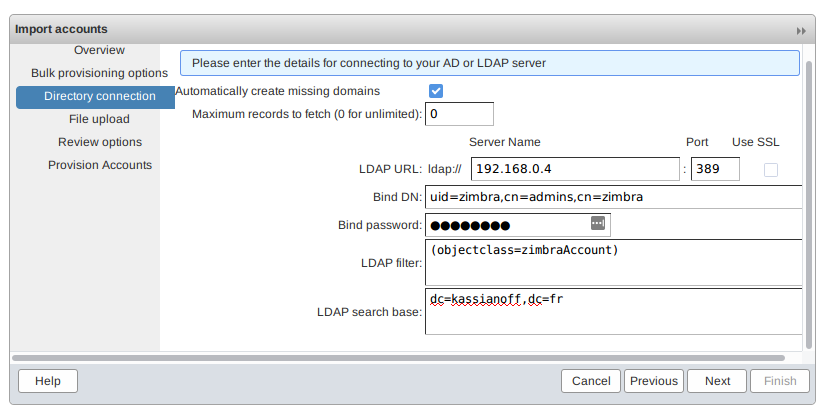
To retrieve your LDAP password on the old server:
zmlocalconfig -s zimbra_ldap_password ldap_master_url
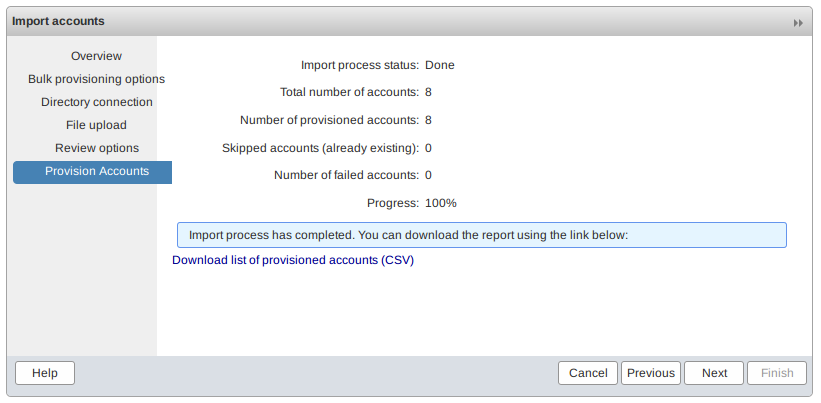
At the end of the procedure, it offers to export the account parameters to import to a CSV file:
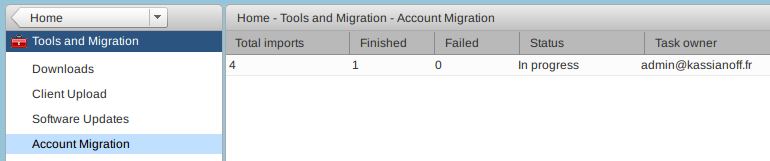
Retrieving the accounts is in progress in Account Migration (for reference, this is imapsync under the hood):
You then need to retrieve the contacts, calendars, attachments, notes, etc. via a utility.
Testing with Zmztozmig: an outdated utility?
Zimbra informs us that this utility has bugs and should be set aside.
I still tried using it with Zimbra 8.7.4 (example configuration file):
nano /opt/zimbra/conf/zmztozmig.conf
Let's edit the file on the destination server like this:
#Source ZCS server IP/name,admin user name and password, server port
SourceZCSServer=192.168.10.9
SourceAdminUser=admin
SourceAdminPwd=PASSADMIN
SourceAdminPort=7071
#Destination/Target ZCS server IP/name,admin user name and password, server port
TargetZCSServer=192.168.10.10
TargetAdminUser=admin
TargetAdminPwd=PASSADMIN
TargetAdminPort=7071
Threads=3
WorkingDirectory=/tmp/ztozmig/mailboxdumps/
FailedDirectory=/tmp/ztozmig/mailboxfailures/
SuccessDirectory=/tmp/ztozmig/successes/
LogDirectory=/opt/zimbra/log/ztozmiglogs
KeepSuccessFiles=FALSE
Domains=zimbra.local
Accounts=all
Let's run the command as the Zimbra user to retrieve our contacts, calendars, etc.:
/opt/zimbra/libexec/zmztozmig -f /opt/zimbra/conf/zmztozmig.conf
Here's the result:
INFO|Thread-1:15| 03/05/2017 18:20:13]: [INFO:]   % Total    % Received % Xferd  Average Speed   Time    Time     Time  Current
[INFO|Thread-1:15| 03/05/2017 18:20:13]: [INFO:]                                  Dload  Upload   Total   Spent    Left  Speed
[INFO|Thread-1:15| 03/05/2017 18:20:13]: [INFO:]
[INFO|Thread-1:15| 03/05/2017 18:20:13]: [INFO:]   0     0    0     0    0     0      0      0 --:--:-- --:--:-- --:--:--     0
[INFO|Thread-1:15| 03/05/2017 18:20:15]: [INFO:]   6  353M    0     0    6 22.9M      0  28.6M  0:00:12 --:--:--  0:00:12 28.8M
[INFO|Thread-1:15| 03/05/2017 18:20:16]: [INFO:]   8  353M    0     0    8 31.6M      0  13.6M  0:00:25  0:00:02  0:00:23 13.7M
[INFO|Thread-1:15| 03/05/2017 18:20:17]: [INFO:]   8  353M    0     0    8 31.6M      0  9781k  0:00:36  0:00:03  0:00:33 9808k
[INFO|Thread-1:15| 03/05/2017 18:20:18]: [INFO:]   8  353M    0     0    8 31.6M      0  8105k  0:00:44  0:00:04  0:00:40 8120k
[INFO|Thread-1:15| 03/05/2017 18:20:19]: [INFO:]   9  353M    0     0    9 33.5M      0  6809k  0:00:53  0:00:05  0:00:48 6821k
[INFO|Thread-1:15| 03/05/2017 18:20:20]: [INFO:]  16  353M    0     0   16 57.4M      0  9852k  0:00:36  0:00:05  0:00:31 6832k
[INFO|Thread-1:15| 03/05/2017 18:20:21]: [INFO:]  16  353M    0     0   16 57.5M      0  8444k  0:00:42  0:00:06  0:00:36 5677k
[INFO|Thread-1:15| 03/05/2017 18:20:22]: [INFO:]  16  353M    0     0   16 57.5M      0  7384k  0:00:48  0:00:07  0:00:41 5677k
[INFO|Thread-1:15| 03/05/2017 18:20:23]: [INFO:]  16  353M    0     0   16 57.7M      0  6494k  0:00:55  0:00:09  0:00:46 5230k
[INFO|Thread-1:15| 03/05/2017 18:20:24]: [INFO:]  17  353M    0     0   17 61.6M      0  6295k  0:00:57  0:00:10  0:00:47 5773k
[INFO|Thread-1:15| 03/05/2017 18:20:24]: [INFO:]  17  353M    0     0   17 62.7M      0  5724k  0:01:03  0:00:11  0:00:52 1030k
[INFO|Thread-1:15| 03/05/2017 18:20:25]: [INFO:]  19  353M    0     0   19 70.0M      0  6065k  0:00:59  0:00:11  0:00:48 2641k
[INFO|Thread-1:15| 03/05/2017 18:20:26]: [INFO:]  21  353M    0     0   21 76.2M      0  6093k  0:00:59  0:00:12  0:00:47 3968k
[INFO|Thread-1:15| 03/05/2017 18:20:27]: [INFO:]  21  353M    0     0   21 77.5M      0  5720k  0:01:03  0:00:13  0:00:50 4246k
[INFO|Thread-1:15| 03/05/2017 18:20:28]: [INFO:]  27  353M    0     0   27 96.5M      0  6677k  0:00:54  0:00:14  0:00:40 7477k
[INFO|Thread-1:15| 03/05/2017 18:20:29]: [INFO:]  31  353M    0     0   31  109M      0  7109k  0:00:50  0:00:15  0:00:35 10.2M
[INFO|Thread-1:15| 03/05/2017 18:20:30]: [INFO:]  37  353M    0     0   37  133M      0  8131k  0:00:44  0:00:16  0:00:28 12.7M
[INFO|Thread-1:15| 03/05/2017 18:20:31]: [INFO:]  39  353M    0     0   39  139M      0  8021k  0:00:45  0:00:17  0:00:28 12.6M
[INFO|Thread-1:15| 03/05/2017 18:20:32]: [INFO:]  42  353M    0     0   42  150M      0  8171k  0:00:44  0:00:18  0:00:26 14.6M
[INFO|Thread-1:15| 03/05/2017 18:20:34]: [INFO:]  51  353M    0     0   51  183M      0  9485k  0:00:38  0:00:19  0:00:19 17.3M
[INFO|Thread-1:15| 03/05/2017 18:20:34]: [INFO:]  52  353M    0     0   52  184M      0  8990k  0:00:40  0:00:21  0:00:19 14.3M
[INFO|Thread-1:15| 03/05/2017 18:20:35]: [INFO:]  53  353M    0     0   53  188M      0  8812k  0:00:41  0:00:21  0:00:20 10.7M
[INFO|Thread-1:15| 03/05/2017 18:20:36]: [INFO:]  58  353M    0     0   58  206M      0  9250k  0:00:39  0:00:22  0:00:17 13.3M
[INFO|Thread-1:15| 03/05/2017 18:20:38]: [INFO:]  61  353M    0     0   61  218M      0  9369k  0:00:38  0:00:23  0:00:15 13.6M
[INFO|Thread-1:15| 03/05/2017 18:20:38]: [INFO:]  64  353M    0     0   64  228M      0  9316k  0:00:38  0:00:25  0:00:13 8684k
[INFO|Thread-1:15| 03/05/2017 18:20:39]: [INFO:]  65  353M    0     0   65  229M      0  9085k  0:00:39  0:00:25  0:00:14 9494k
[INFO|Thread-1:15| 03/05/2017 18:20:40]: [INFO:]  65  353M    0     0   65  230M

INFO|ZTOZThread1:9| 03/05/2017 18:20:52]: File Upload Exit value: 0
[INFO|ZTOZThread1:9| 03/05/2017 18:20:52]: File Upload Finished.null
[INFO|ZTOZThread1:9| 03/05/2017 18:20:52]: Upload TarredMailBox Finsihed ([email protected]).
[INFO|ZTOZThread1:9| 03/05/2017 18:20:52]: Moved /tmp/ztozmig/mailboxdumps//[email protected] to /tmp/ztozmig/successes//[email protected]
[INFO|ZTOZThread1:9| 03/05/2017 18:20:52]: Total Time Taken (in seconds): 141.437
[INFO|main:1| 03/05/2017 18:20:52]: ****************SUMMARY**************************
[INFO|main:1| 03/05/2017 18:20:52]: Total Accounts processed         :    1
[INFO|main:1| 03/05/2017 18:20:52]: Successfull Accounts             :    1
[INFO|main:1| 03/05/2017 18:20:52]: Failed accounts                  :    0
[INFO|main:1| 03/05/2017 18:20:52]: Total Migration Time(seconds)    :    141.437
[INFO|main:1| 03/05/2017 18:20:52]: *************************************************
However, one of the best methods remains rsync, via the following doc: ZCS to ZCS rsync Migration.
List all the accounts and their status with:
zmaccts
Conclusion
This article covered migrating a Zimbra 8.6 server on Ubuntu 14.04 to Zimbra 8.7.4 on Ubuntu 16.04.2: gradually upgrading Zimbra, installing the Zextras module, then setting up a new server on which accounts were retrieved via the built-in Migration Wizard. The initial plan had to be revised along the way due to difficulties upgrading the Ubuntu system, illustrating the importance of leaving room to maneuver during a complex migration. In the end, the rsync method remains the most reliable solution for transferring all the data from one Zimbra server to another.