


Can't back up a VM without powering it off? GhettoVCB is the essential solution! It performs hot backups of your ESXi VMs.
Real-world use case
You need to back up an ESXi VM without powering it off or paying for a license: discover GhettoVCB, the free solution.
The free version of VMware ESXi doesn't offer hot backup of virtual machines.
A script developed by Virtuallyghetto, called GhettoVCB, lets you get around this problem!
GhettoVCB's GitHub page is available at this address: GhettoVCB
In this article, we'll stick to the essentials.
Preparing ghettoVCB
Download all the files by clicking Download ZIP.
Then go to your hypervisor to transfer ghettoVCB-master.zip.
Now, connect to your hypervisor via SSH.
Our working directory will be: /vmfs/volumes/datastore1/ghettoVCB.
It's strongly recommended to put it on a local datastore and copy it into a folder.
ghettoVCB in the ESXi 5 hypervisor
Unzip your zip file:
unzip ghettoVCB-master.zip
Make your script executable:
chmod +x ghettoVCB.sh
Edit your ghettoVCB.sh file:
vi ghettoVCB.sh
Edit the following variables:
VM_BACKUP_VOLUME=/vmfs/volumes/52304bd6-af562afc-e5fa-08606ee5bd47/backups
VM_BACKUP_ROTATION_COUNT=2
"52304bd6-af562afc-e5fa-08606ee5bd47" corresponds to my datastore 2.
Create a listvm file:
touch listvm
Add the VM names:
core.vyatta.master
core.vyatta.slave
srv.owncloud
srv.zimbra
srv.zpush
Look for the "crond" process:
ps | grep crond | grep -v grep
==> 3255 23255 crond                crond
Kill the cron process:
kill 3255
Update the cron permissions:
chmod 644 /var/spool/cron/crontabs/root
chmod +t /var/spool/cron/crontabs/root
Schedule the cron job:
vi /var/spool/cron/crontabs/root
Add this line to the cron:
0 0 * * 1 /vmfs/volumes/5230458e-84f00e58-8db6-08606ee5bd47/ghettoVCB/ghettoVCB.sh -f /vmfs/volumes/5230458e-84f00e58-8db6-08606ee5bd47/ghettoVCB/listvm
Go to the rc.local file:
vi /etc/rc.local
For version 5.1:
vi /etc/rc.local.d/local.sh
Add this:
/bin/echo "0 0 * * 1 /vmfs/volumes/5230458e-84f00e58-8db6-08606ee5bd47/ghettoVCB/ghettoVCB.sh -f /vmfs/volumes/5230458e-84f00e58-8db6-08606ee5bd47/ghettoVCB/listvm" >> /var/spool/cron/crontabs/root
Restart cron:
crond
To test the script works correctly:
/vmfs/volumes/5230458e-84f00e58-8db6-08606ee5bd47/ghettoVCB/ghettoVCB.sh -f /vmfs/volumes/5230458e-84f00e58-8db6-08606ee5bd47/ghettoVCB/listvm
Check my datastore2:
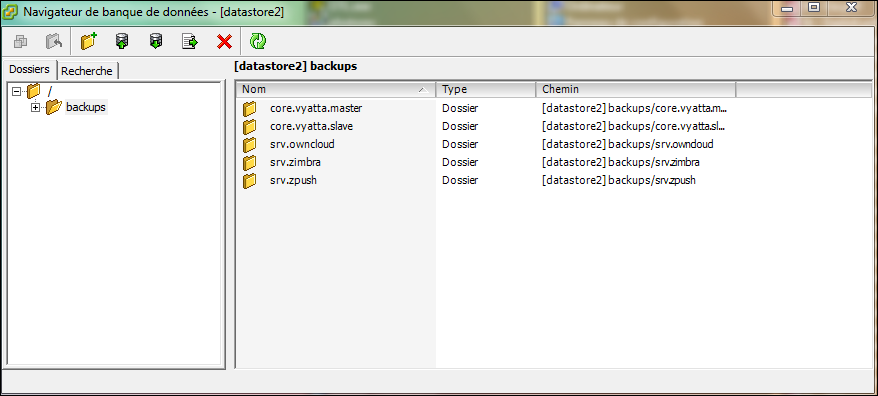
For more details on the commands: GhettoVCB.
Conclusion
I detailed here how to set up GhettoVCB to work around the lack of hot backup for virtual machines in the free version of VMware ESXi. Configuring the script, from the list of VMs to back up to scheduling via cron and automatic startup when the hypervisor boots, provides a simple, free backup solution. It's a valuable alternative for ESXi environments that don't have a license enabling native backups.