


Create your own gaming server on Linux. Configure a Counter-Strike GO server simply and quickly.

Real-world use case
You want to host your own games with friends: here's how to configure a Counter-Strike GO server on Linux.
Configuring a Counter-Strike GO server on Linux
Creating a multiplayer server is a good way to build a new community around a game. Accessible to everyone, creating a game server is easy to achieve. Together, let's discover how to easily create a Counter-Strike GO server. The goal is to have a stable, performant server for all of your players. We'll use the Game Server Managers script. This article can also serve as a base for configuring other game servers offered in the following list.
Discover for yourself:
- Preparing the server: prerequisites.
- Installing the Counter-Strike GO server.
- Installing the addons: metamod and sourcemod.
- Starting the CS:GO server.
Preparing the server: prerequisites
It's important to have a dedicated Linux machine before moving on to the rest of this article:
- I invite you to use Online's dedicated server range: Dédibox XC.
- A recommended Linux distribution is needed: Debian 8, CentOS 6, or Ubuntu 12.04.
- A Steam account created for the occasion, preferably (in case of a hack), with the CS GO game on the account.
Info! My article is based on the Debian 8 x86_x64 distribution and the scripted method from https://linuxgsm.com/
Start by installing the prerequisites for the LGSM installation script:
dpkg --add-architecture i386; apt-get update; apt-get install tmux mailutils postfix ca-certificates curl lib32gcc1 libstdc++6 libstdc++6:i386
Add a user:
adduser csgoserver
Change the csgoserver user's password:
passwd csgoserver
Head to its home directory:
su - csgoserver
Info: My article is old, and the installation method has changed, you need to follow the new instructions:
https://linuxgsm.com/lgsm/csgoserver/#gettingstarted
Get the server installation script from LGSM's website:
wget https://linuxgsm.com/dl/linuxgsm.sh && chmod +x linuxgsm.sh && bash linuxgsm.sh csgoserver
Then run the script with the install argument:
./csgoserver install
To be able to use it, make it executable:
chmod +x csgoserver
Once done, edit the script:
nano csgoserver
The variables to change with your information are steamuser, steampass, ip, and gslt:
# Steam login
steamuser="YOUR_LOGIN"
steampass="YOUR_PASSWORD"

# Start Variables
ip="YOUR_IP"

# Required: Game Server Login Token
# GSLT is required for running a public server.
# More info: http://gameservermanagers.com/gslt
gslt="YOUR_TOKEN"
Help finding your information
Get your dedicated server's IP address:
ipconfig eth0

inet addr:YOUR_IP
Get the token ID to identify your account:
Head to the following address: http://steamcommunity.com/dev/managegameservers.
Your Steam account's various conditions are:
- It must not be banned.
- It must have made an initial transaction of a few euros (€5 minimum).
- Two-factor authentication with a registered phone number must be set up.
- The Steam account that will run the server needs to have the game in its list.
- The Steam account can create 1000 game servers.
Now, we need to continue creating the Counter-Strike GO game server by generating the token ID:
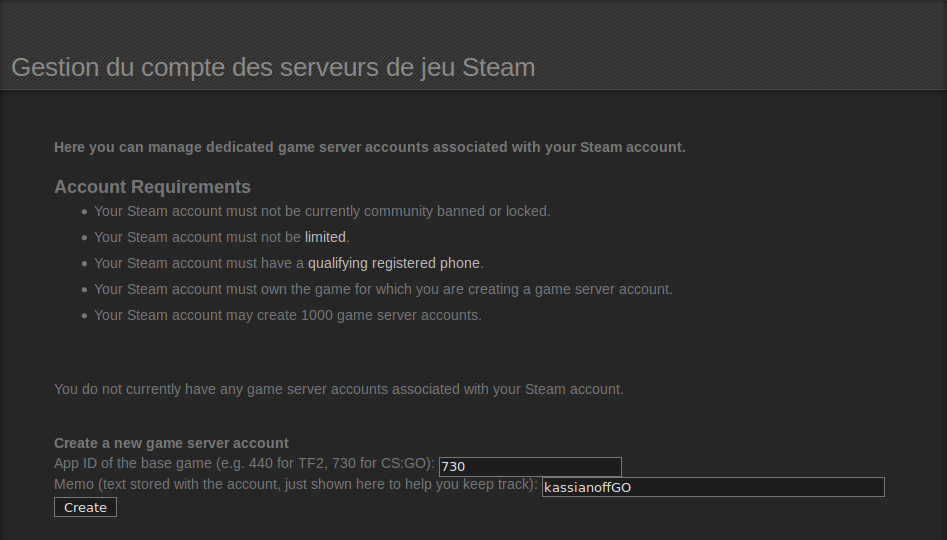
Once the conditions are met, click Create, and the following result should appear:
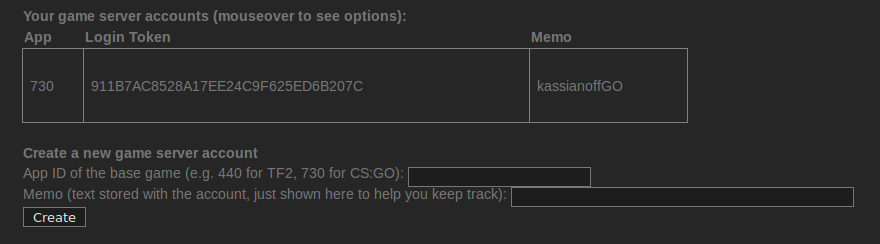
You're all set to start installing Counter-Strike GO with the gameservermanagers.com script.
Installing the Counter-Strike GO server
Know that you've now done the hardest part. Install the server like this:
./csgoserver install
The end of the Counter-Strike GO server installation gives the following result:
Success! App '740' fully installed.

=================================
Was the install successful? [Y/n]y
    fetching functions/fix.sh...OK
    fetching functions/fix_glibc.sh...OK
    fetching functions/install_logs.sh...OK

Creating log directorys
=================================
mkdir: created directory `/home/csgoserver/log'
mkdir: created directory `/home/csgoserver/log/script'
mkdir: created directory `/home/csgoserver/log/console'
`/home/csgoserver/log/server' -> `/home/csgoserver/serverfiles/csgo/logs'
`/home/csgoserver/log/steamcmd' -> `/home/csgoserver/Steam/logs'
    fetching functions/install_gsquery.sh...OK

GameServerQuery
============================
Do you want to install GameServerQuery? [Y/n]y
downloading gsquery.py...OK
    fetching functions/install_config.sh...OK

Creating Configs
=================================
downloading lgsm-default.cfg...OK
creating csgo-server.cfg config file.
`/home/csgoserver/serverfiles/csgo/cfg/lgsm-default.cfg' -> `/home/csgoserver/serverfiles/csgo/cfg/csgo-server.cfg'
creating server.cfg.
creating redirect.
server.cfg > csgo-server.cfg.

Configuring Counter Strike: Global Offensive Server
=================================
Enter server name: Enter rcon password: changing hostname.
changing rconpassword.

    fetching functions/install_gslt.sh...OK

Game Server Login Token
============================
GSLT is required to run a public Counter Strike: Global Offensive server
Get more info and a token here:
http://gameservermanagers.com/gslt

Enter token below (Can be blank).
GSLT TOKEN: The GSLT can be changed by editing csgoserver.

    fetching functions/install_complete.sh...OK
=================================
Install Complete!

To start server type:
./csgoserver start
You still need to configure the file named csgo-server.cfg:
nano /home/csgoserver/serverfiles/csgo/cfg/csgo-server.cfg
At the very least, to make it playable, change and add the following settings:
// Server Name hostname

hostname "Counter-Strike - Classic Competitive Server [FR/EN]"

// RCON Password | server management via console
rcon_password "YOUR_PASSWORD"

// Server Password | No access password
sv_password ""

// Server Logging | EUROPE region
sv_region 3

// Server accessible online | Or 1 = LAN only
sv_lan 0
Now start your game server:
cd /home/csgoserver && ./csgoserver start
You can stop here if you like, though it can be worthwhile to add a few basic features.
Installing the addons: metamod and sourcemod
Want to perform quick actions like: kicking, banning, or reloading a round? It's possible with two tools:
- Metamod: an API manager that allows certain modifications or additions of events on the game engine.
- Sourcemod: server administration with scripts and new feature additions.
Download metamod & sourcemod on the command line from your server:
wget http://www.metamodsource.net/mmsdrop/1.10/mmsource-1.10.7-git951-linux.tar.gz
wget http://www.sourcemod.net/smdrop/1.7/sourcemod-1.7.3-git5290-linux.tar.gz
Then, extract both archives:
tar xvzf mmsource-1.10.7-git951-linux && tar xvzf sourcemod-1.7.3-git5290-linux
Two folders are now available: addons and cfg, move the folders to the root of the CS server:
mv addons /home/csgoserver/serverfiles/csgo/
Now you need to move sourcemod's cfg folder:
mv cfg/sourcemod /home/csgoserver/serverfiles/csgo/cfg/
Your server is now ready to use its new features. A simple restart is enough:
cd /home/csgoserver && ./csgoserver restart
Starting the CS:GO server
I invite you to enable the console in CS:GO, then connect to your server. Then all you need to do is:
- Open the console
- Type: meta list
The following result appears:
] meta list
  [01] SourceMod (1.7.3-dev+5290) by AlliedModders LLC
  [02] CS Tools (1.7.3-dev+5290) by AlliedModders LLC
  [03] SDK Tools (1.7.3-dev+5290) by AlliedModders LLC
In the console, to become an admin:
rcon_password YOUR_PASSWORD
For sourcemod, in the game's chat you need to type the command: !admin
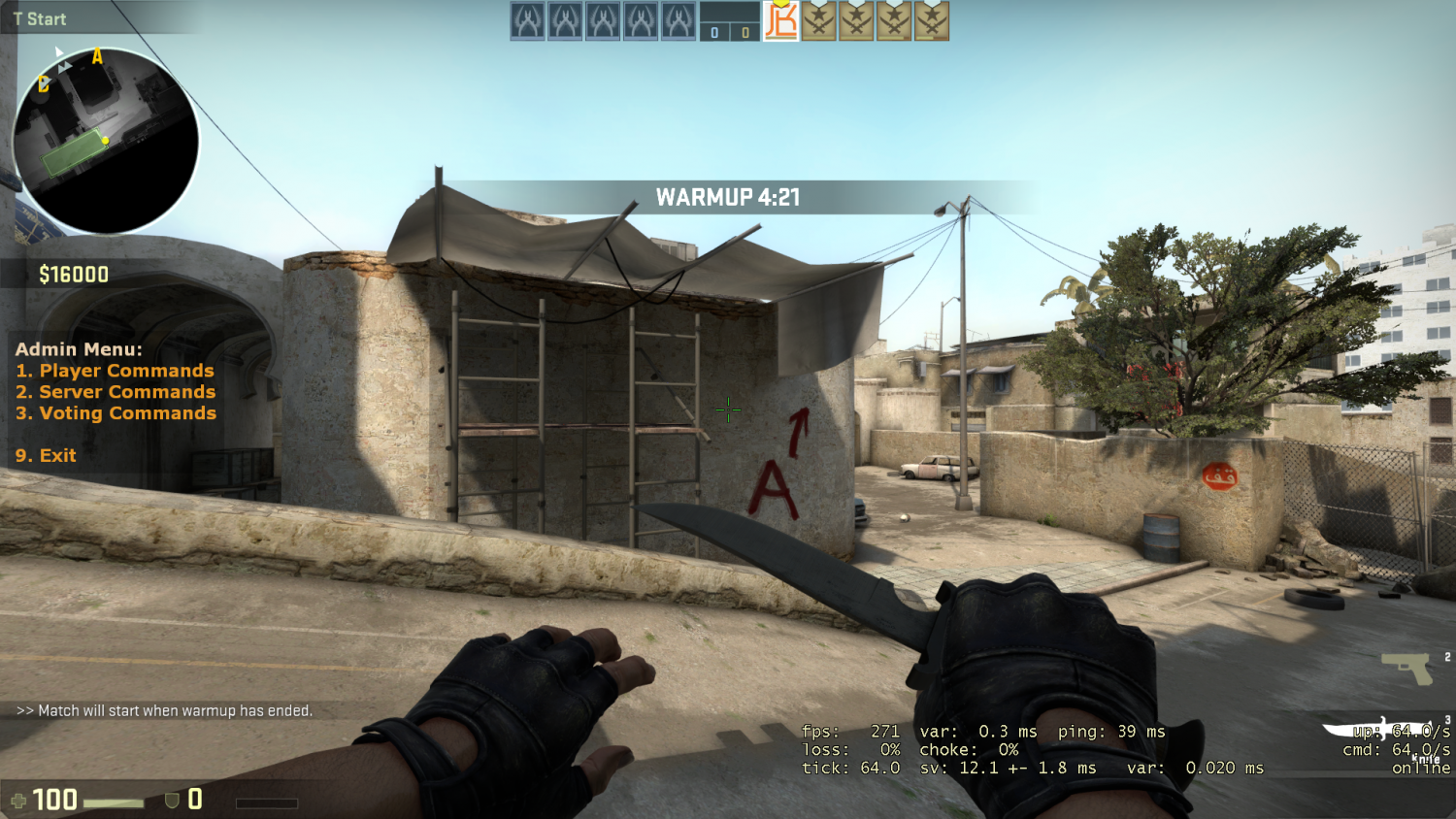
Congratulations, your Counter-Strike GO server is now perfectly set up. Have fun!
Conclusion
I've detailed here the complete setup of a Counter-Strike GO server on Linux using the LinuxGSM script: preparing the server, getting the GSLT token, installing the game, then adding Metamod and Sourcemod for in-game administration. This base can just as well be used to host CS:GO as it can be adapted to other games supported by Game Server Managers. The result is a stable, customizable community server that's easy to administer.