

Microsoft 365 is much more than a simple collaboration tool; it integrates advanced security and compliance solutions.
Real-world use case
Your management expects more than just a simple collaboration tool from Microsoft 365: here's how I integrate its security and compliance building blocks.
Collaborative transformation with Microsoft 365
We helped a small business set up its collaborative environment with Microsoft 365. We built the entire strategy, from renting the domain name to configuring and implementing all of the Microsoft CIS practices across the four pillars: identity, devices, applications, and data.
The client's context
A specialist in car washing, the client had no collaborative solution and was heavily using consumer products: Google Mail, Microsoft (personal, free, or low-cost). Data was scattered across iCloud, OneDrive, Google Drive, and the user's devices. None of the environments were backed up, and it wasn't possible to rely on single-identity concepts for the organization. Protection against any type of malicious activity wasn't a practice in place on devices and applications. Data governance was an unknown topic in the client's context, and no alerts were raised in case internal rules weren't followed.
The assessment
The company's digital productivity was significantly slowed down; we very often found duplicate tools and false best practices around applications (very common on the internet). Unfortunately, there were also preconceived notions about the security and compliance practices to put in place. In reality, it turned out that the organization's overall management wasn't in step with what today's digital solutions can offer, and that the risks in the face of threats were effectively being ignored.
It wasn't feasible to evolve the environment as it stood; the company was paralyzed by its own practices. Design work was necessary; the goal was to gather the existing needs and usage patterns, then adapt them toward modern, agile, and secure practices. The client also wanted to understand the four strategic pillars that would let them reach their goals, which we explained to them down to the smallest technical and organizational details, so they could take ownership of the processes and best practices they'd be able to apply every day in their company.
The methodology
We started by listing the applications, managed solutions, and devices in place. This helped guide our choices, and internal considerations weren't overlooked either. Microsoft's solution, Microsoft 365, and Microsoft Business Premium licenses, would cover all the organization's operational goals.
The company specifically wanted collaborative email with a shared mailbox: Microsoft Exchange, a personal cloud workspace: OneDrive, a document management tool: SharePoint, a video conferencing tool: Teams, and a defense-in-depth solution with: Microsoft Defender Endpoint and Microsoft Defender for Cloud.
The bundle offered by Microsoft would ensure that the security posture across all the company's applications, data, devices, and identities in the organization is able to fight against today's threats. Management would also be greatly simplified, while adherence to the CIS standard would have an impact on maintaining overall governance and security.
Data migration
Google Mail from Thunderbird to Microsoft Outlook
The client wanted to keep the history of their Google emails stored across two different mailboxes and in Thunderbird. It was therefore necessary to find a free add-on that would let them export (not without difficulty) the items in EML format. We then guided them through creating a folder structure in the Microsoft Outlook account, then helped them import the previously exported data into the Microsoft Outlook folders.
The goal was clear: no longer have business data in the Google mailboxes (@gmail.com) that had until then been used for both personal and professional purposes. They would need to be used exclusively for personal purposes or deleted after a period of time.
We set up an automatic message to everyone, asking them to only communicate using the company's contact address "[email protected]".
Scattered data moved to Microsoft OneDrive
The strategy of consolidating all the data scattered across devices (iPhone, MacBook Pro) and across iCloud, Google Drive, and personal OneDrive tools was the second goal. We explained the methodology to them, as well as the possible folder structure to set up in order to centralize the data in their Business OneDrive. It would then be easier to back up the data and ensure governance and security policies are enforced.
Once done, they would get back in touch with us to organize and move the data shared across the organization into the SharePoint document management system.
Meeting Microsoft CIS rules
Setting up the domain and adding the first users to the console is a step to be done at the start.
It's strongly recommended to do this using infrastructure as code, as stated by Azure's cloud adoption framework.
Unfortunately, the client's budget didn't allow for that, so we'll accumulate technical debt as resources evolve (users, groups, applications, etc.). It's also worth noting that Intune wasn't implemented, since it requires a somewhat larger budget.
So we did the steps manually; the schedule was split into four days:
- Day 1: Identity
- Day 2: Devices
- Day 3: Applications
- Day 4: Data
To meet Microsoft 365 CIS requirements:
- Advice ahead of the migration and structuring of the organization. Identities were protected first, since that's the first pillar enabling authentication and access to devices, applications, and data.
- Next, we manually secured the user's devices (iPhone and MacBook Pro) with Microsoft Defender for Endpoint. A basic test was performed afterward to verify that protection and alerting work properly.
- We then continued by implementing application protection mechanisms to ensure the tools stay resilient against attacks, in order to better protect the organization from risk.
- The final goal will be to protect the company's data with encryption and data loss prevention measures, particularly in the case of malicious activity.
We started on March 10, 2025, and completed the third day on April 1, 2025. We still have one day left to schedule for data. The client is now operational since the data migration; they're autonomous with their identities and access to their applications. They also know how to check their security score, understand the associated regressions, and understand when a compliance or security alert arrives in their inbox. Protection is in place on their devices, and if in doubt, they can get technical expertise from us.
Conclusion
The client had never before centralized their organization's data in a way that ensured a single backup covering their entire organization. There are many improvements: protecting all their devices with the market-leading solution, guaranteeing a single-identity mechanism across all their third-party applications, encrypting and preventing loss of critical data, and significantly increasing productivity with colleagues, partners, and clients.
They came to understand that Microsoft 365 was much more than a simple collaboration tool; their security and compliance improved, and their company didn't spend a fortune implementing IT protection, even though these solutions are used by CAC40 companies. To maintain this level, they were advised to audit their environment at least once a year. They can do this on demand, or they can rely on our Cybernetics software: https://docs.cybernetics.fr/en/ to audit it continuously, and in case of a gap, we advise them, it's more cost-effective and, above all, they keep full visibility of their entire IT environment: users, devices, applications, and data status.
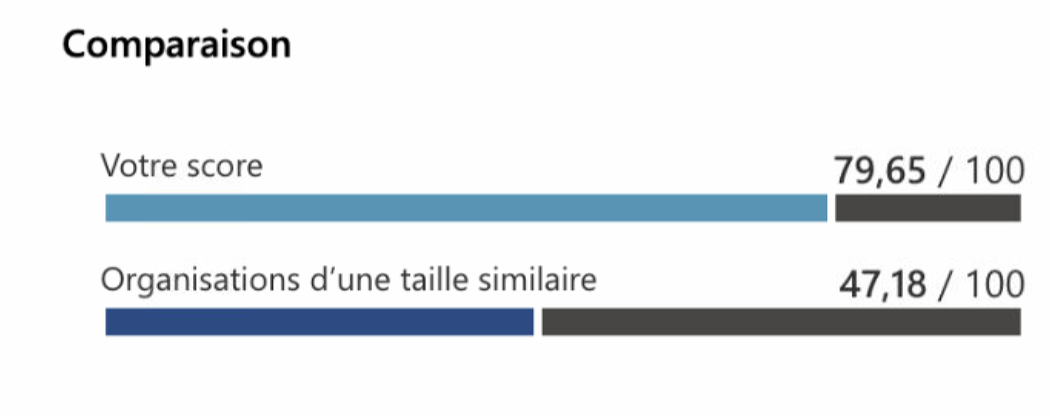
Assessment of the client's secure score, on our 3rd day, compared to a similar company:
Assessment of the client's secure score, on our 3rd day, by category:
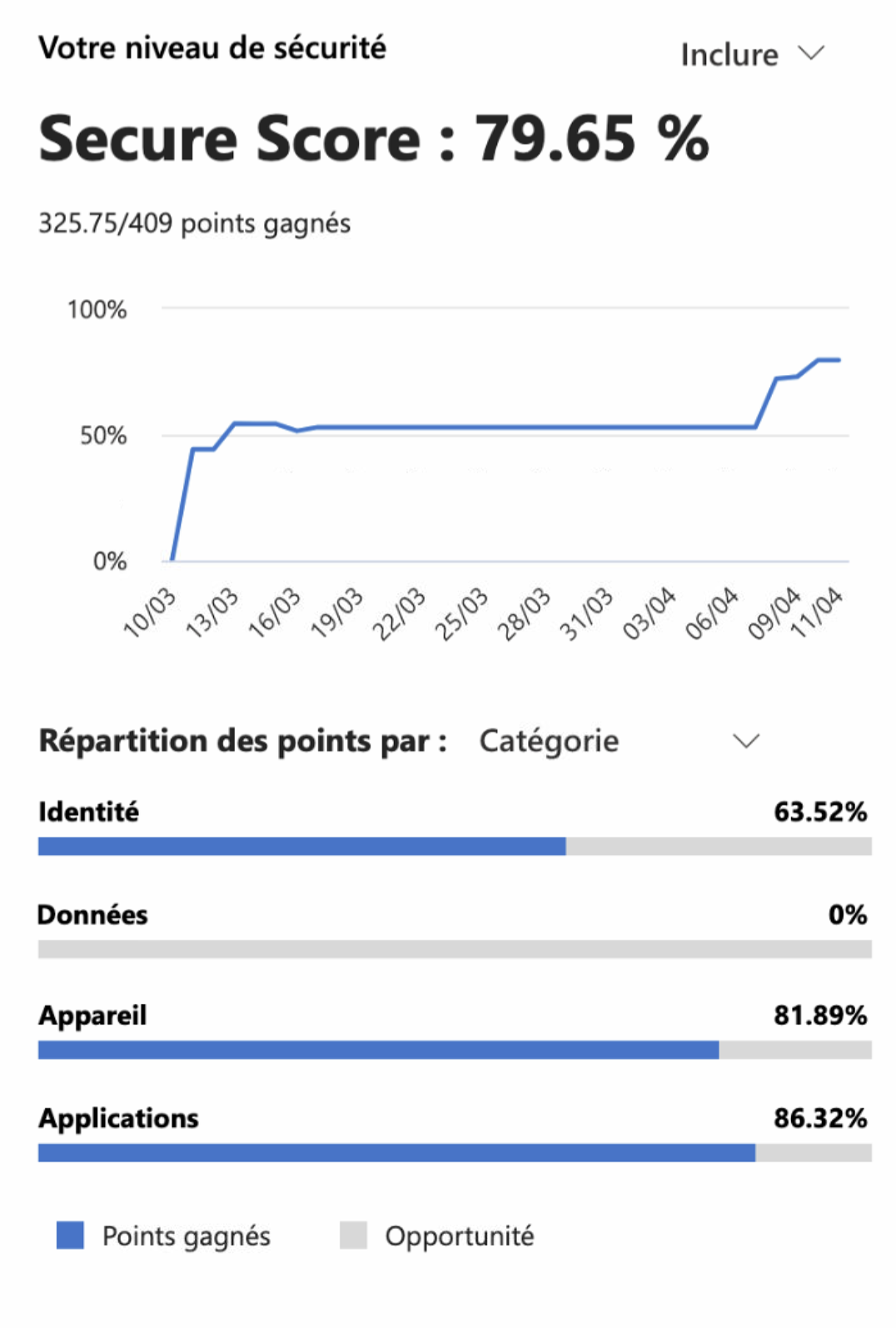
The identity secure score may seem low, because Microsoft sometimes includes points to earn even when the required licenses aren't available, or when a shared mailbox is counted for obtaining two-factor authentication. This should then be adjusted manually to get a score more in line with the client's context. For now, we haven't manually adjusted the secure score points, in order to stay aligned with the result of Microsoft's algorithm.
The day after this article, we manually adjusted the following points:
- Enable Microsoft Entra ID Identity Protection sign-in risk policies
(The client doesn't have the required license) - Enable Microsoft Entra ID Identity Protection user risk policies
(The client doesn't have the required license) - Start deploying Defender for Identity by installing sensors on domain controllers and other eligible servers.
(The client doesn't have an internal Active Directory domain) - Create an OAuth app policy to inform yourself about new OAuth apps
(The client doesn't have the required license) - Create a custom activity policy to receive alerts on suspicious usage patterns
(The client doesn't have the required license) - Check that the customer lockbox feature is enabled
(The client doesn't have the required license) - Set "Maximum password age" to 90 days or fewer, but not 0, on macOS
(The client accepts the risk and doesn't want to implement it, why doesn't Microsoft apply this on Windows?) - Set "Enforce password history" to 24 passwords or more on macOS
(The client accepts the risk and doesn't want to implement it, why doesn't Microsoft apply this on Windows?) - Secure home folders on macOS
(The client considers the values proposed by Apple to be sufficient, another mitigation) - Deploy a log collector to discover shadow IT activity
(The client isn't able to implement this measure)
In our view, Microsoft incorrectly flags the following point:
- Ensure multifactor authentication is enabled for all users
(the shared mailbox is the one counted as a user and doesn't have two-factor authentication).
We didn't make a manual change on this point because we want to keep it as is, and we accept not having every single point. Here's the score, after manually correcting the errors introduced by Microsoft: