


ESET ERA (ESET Remote Administrator) orchestrates monitoring and centralization of the devices present on an IT network.

Real-world use case
You need to centralize supervision of your Linux fleet: here's how to install ESET Remote Administrator on Ubuntu 16.04 LTS.
ESET Remote Administrator on Ubuntu 16.04 LTS
The ESET ERA v6 solution is fully compatible with Linux (Kernel version 2.6.x or later).
In the following article, we'll discover installing the product on Ubuntu 16.04 LTS, which is an alternative to installing it on Windows Server or via the VMware template. For my part, I can only recommend deploying ERA on an Ubuntu LTS.
//www.youtube.com/embed/uxb_84KuHF0
Table of contents:
- Installing ESET ERA Remote Administrator
- Installing an SSL certificate on Tomcat7
Installing ESET ERA Remote Administrator
Let's start by updating our distribution:
apt-get update && apt-get upgrade
For ERA to work, we need the following dependencies:
apt-get install default-jdk tomcat7 mysql-server unixodbc libodbc1 xvfb cifs-utils libqtwebkit4 krb5-user winbind ldap-utils snmp ldap-utils
We change a value in the MySQL.ini configuration file:
max_allowed_packet = 33M
We download the MySQL ODBC connector:
wget https://dev.mysql.com/get/Downloads/Connector-ODBC/5.3/mysql-connector-odbc-5.3.9-linux-ubuntu16.04-x86-64bit.tar.gz
We extract it:
tar xvzf mysql-connector-odbc-5.3.9-linux-ubuntu16.04-x86-64bit.tar.gz
Let's head to its directory:
cd mysql-connector-odbc-5.3.9-linux-ubuntu16.04-x86-64bit
We copy the libmyodbc5* files to the odbc directory:
cp mysql-connector-odbc-5.3.9-linux-ubuntu16.04-x86-64bit/lib/libmyodbc5* /usr/lib/x86_64-linux-gnu/odbc/
We edit the odbc configuration file:
nano /etc/odbcinst.ini
[MySQL]
Description = ODBC for MySQL
Driver = /usr/lib/x86_64-linux-gnu/odbc/libmyodbc5w.so
Setup = /usr/lib/x86_64-linux-gnu/odbc/libodbcmyS.so
FileUsage = 1
We now need to force the configuration file update:
odbcinst –i -d -f /etc/odbcinst.ini
We restart the MySQL server:
service mysql restart
We download the server's webconsole script:
wget https://download.eset.com/com/eset/apps/business/era/webconsole/latest/era.war
We copy the file to the tomcat server's directory:
cp era.war /var/lib/tomcat7/webapps/
We restart the web service:
sudo service tomcat7 restart
We download the server installation script:
wget https://download.eset.com/com/eset/apps/business/era/server/linux/latest/server-linux-x86_64.sh
We make it executable:
chmod +x server-linux-x86_64.sh
Now we start installing the ERA server:
/server-linux-x86_64.sh
> --skip-license
> --db-driver=MySQL
> --db-hostname=127.0.0.1
> --db-port=3306
> --db-admin-username=root
> --db-admin-password=your_password
> --server-root-password=your_password
> --db-user-username=root
> --db-user-password=your_password
> --cert-hostname="your.ip.x.x;esetmanager;esetmanager.local"
The result should be as follows:
ESET Remote Administrator Server Installer (version: 6.5.417.0), Copyright © 1992-2017 ESET, spol. s r.o. - All rights reserved.

Extracting archive, please wait...
Archive extracted to /tmp/tmp.nMgKKPp78N.
Checking OpenSSL ... done [OpenSSL 1.0.2g 1 Mar 2016]
Reading previous installation settings ... failure
Checking installed version... done
Status of current installation is: NEW
Checking database connection ... done
Loading GUID ... done [GUID = d363a1e8-4243-433c-943f-df02c0562637]
Inserting root password ... done
Generating certificates ... done
Skipping static groups synchronization scheduling.
Stopping service... ./server-linux-x86_64.sh: 1689: ./server-linux-x86_64.sh: initctl: not found
Creating database ... done
Storing ports into configuration ... done
Storing server peer certificate to configuration ... done
Moving scripts from '/tmp/tmp.nMgKKPp78N/setup/Scripts' to /var/opt/eset/RemoteAdministrator/Server/Scripts/... done
Moving ESET Modules from '/tmp/tmp.nMgKKPp78N/setup/Modules' to /var/opt/eset/RemoteAdministrator/Server/Modules/... done
Creating 'config' directory path: /etc/opt/eset/RemoteAdministrator/Server
Creating 'libs' directory path: /opt/eset/RemoteAdministrator/Server
Creating 'data' directory path: /var/opt/eset/RemoteAdministrator/Server
Creating 'logs' directory path: /var/log/eset/RemoteAdministrator/Server
Moving LangData.dat to /var/opt/eset/RemoteAdministrator/Server/Localization/LangData.dat... done
Extracting ReportPrinter files... done
Creating startup configuration file /etc/opt/eset/RemoteAdministrator/Server/StartupConfiguration.ini ... done
Creating config file /etc/opt/eset/RemoteAdministrator/Server/config.cfg ... done
Backing up contents of /opt/eset/RemoteAdministrator/Server
Copying files to target destination: /opt/eset/RemoteAdministrator/Server
Copying installer to target destination: /opt/eset/RemoteAdministrator/Server/setup/installer_backup.sh
File ownership set to: root:root
Setting auto-start service...
Failed to get unit file state for eraserver.service: No such file or directory
Created symlink from /etc/systemd/system/multi-user.target.wants/eraserver.service to /etc/systemd/system/eraserver.service.
Skipping SELinux policy installation.
Removed backup directory: /opt/eset/RemoteAdministrator/.Server-205050466
Product installed.
We download the server agent's script:
wget https://download.eset.com/com/eset/apps/business/era/agent/latest/agent-linux-x86_64.shc
We make it executable:
chmod +x agent-linux-x86_64.sh
We start installing the ERA agent:
./agent-linux-x86_64.sh --skip-license --hostname=your.ip.x.x --port=2222 --webconsole-hostname=your.ip.x.x --webconsole-port=2223 --webconsole-user=administrator --webconsole-password="your_password" --cert-auto-confirm
The result should be as follows:
Initialized log file: /var/log/eset/RemoteAdministrator/EraAgentInstaller.log

ESET Remote Administrator Agent Installer (version: 6.5.417.0), Copyright © 1992-2017 ESET, spol. s r.o. - All rights reserved.

Creating directories...
Creating 'install' directory path: /opt/eset/RemoteAdministrator/Agent
Creating 'config' directory path: /etc/opt/eset/RemoteAdministrator/Agent
Creating 'data' directory path: /var/opt/eset/RemoteAdministrator/Agent
Creating 'logs' directory path: /var/log/eset/RemoteAdministrator/Agent
Creating 'libs' directory path: /opt/eset/RemoteAdministrator/Agent
Directories created
The archive will be extracted to: /opt/eset/RemoteAdministrator/Agent
Extracting, please wait...
Checking OpenSSL ... done [OpenSSL 1.0.2g 1 Mar 2016]
Checking installed version ...
Status of current installation is: NEW
New connection settings are 'hostname': 'your_ip.x.x', 'port': 2222
Getting certificate from server...

Received Server certificate details:
Subject: CN=Server at your_ip.x.x and esetmanager and esetmanager.local;C=US;
Issuer: CN=Server Certification Authority;C=US;
Fingerprint: XX:XX:XX:XX:XX:XX:XX:XX:XX:XX:XX:XX:XX:XX:XX:XX:XX:XX:XX:XX

Adding computer to group...
Loading correct GUID...
Loading of GUID was successful (new GUID = xxxxxxxx-xxxx-xxxx-xxxx-xxxxxxxxxxxx)
Checking peer certificate ... done
Creating config file: /etc/opt/eset/RemoteAdministrator/Agent/config.cfg ...
Creating 'modules' directory path: /var/opt/eset/RemoteAdministrator/Agent/Modules/
Moving ESET Modules from '/opt/eset/RemoteAdministrator/Agent/setup/Modules' to /var/opt/eset/RemoteAdministrator/Agent/Modules/...
Reading database status...
Database read successfully.
Database status is 'DB_MISSING'
Database status is 'DB_MISSING'. Database does not exists - it will be created
Inserting certificate authority into database...
Certificate authority inserted successfully.
Creating database.
Database created.
Setting connection into config...
Connection set successfully.
Resetting replication interval...
Replication interval reset was successful.
Setting peer certificate into config...
Peer certificate set successfully.
Copying installer to target destination: /opt/eset/RemoteAdministrator/Agent/setup/installer_backup.sh
File ownership set to: root:root
Setting auto-start service...
Failed to get unit file state for eraagent.service: No such file or directory
Created symlink from /etc/systemd/system/multi-user.target.wants/eraagent.service to /etc/systemd/system/eraagent.service.
Skipping SELinux policy installation.
Service started.
Product installed.
We've installed ERA's server module and the ERA agent on our Ubuntu server. It's now possible to access the Eset ERA webconsole interface via: http://your\_ip.x.x/era
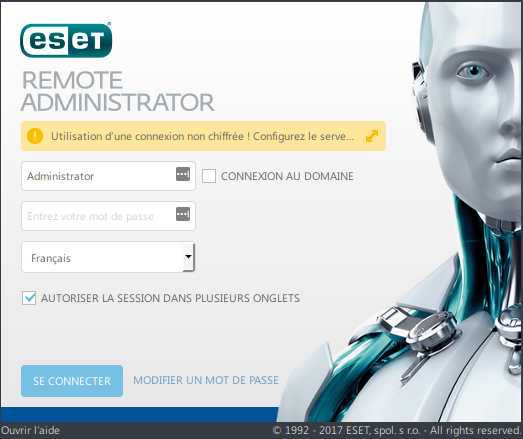
The problem is that we're on HTTP (unencrypted), a yellow message appears: "Using an unencrypted connection! Configure the Web server to use the HTTPS protocol". So I recommend following the procedure below to use the console over HTTPS.
Installing an SSL certificate on Tomcat7
We use the tomcat7 tool and generate our certificate:
keytool -genkey -alias tomcat -keylalg RSA -keystore /etc/tomcat7/SSL/esetcert
You can test the certificate like this:
keytool -list -keystore /etc/tomcat7/ssl/esetcert
Enter the keystore password:

Keystore type: JKS
Keystore provider: SUN

Your keystore contains 1 entry

tomcat, Nov 1, 2017, PrivateKeyEntry
Certificate fingerprint (SHA1): XX:XX:XX:XX:XX:XX:XX:XX:XX:XX:XX:XX:XX:XX:XX:XX:XX:XX:XX:XX
We then edit our tomcat7 configuration file:
nano /etc/tomcat7/server.xml
We need to uncomment the following line, and add keystoreFile and keystorePass:
<Connector port="8443" protocol="org.apache.coyote.http11.Http11Protocol"
               maxThreads="150" SSLEnabled="true" keystoreFile="/etc/tomcat7/ssl/esetcert" keystorePass="your_password" scheme="https" secure="true"
               clientAuth="false" sslProtocol="TLS" />
We restart our tomcat7 service:
/etc/init.d/tomcat7 restart
We can now connect over https: https://your\_ip::8443/era/.