


Vyatta is a router distribution. A clever package combining Linux and XORP. The perfect system to get started with SDN.
Table of contents
Real-world use case
You need to quickly configure a software router: here's the basic configuration of a Vyatta distribution.
Vyatta Core Software
Vyatta Core is a routing-oriented distribution that centralizes network traffic on a VM.
It thus implements a component of Software-Defined Networking (SDN).
Forget about distributions like SmoothWall, pfSense, or IPCop, which aren't suited to virtualization since none of them has an SDN component.
Also, the web interface isn't available in Vyatta Core Software.
There are two versions, and here are the differences between them: available here
Getting started with basic configuration on Vyatta
Example of the basic steps:
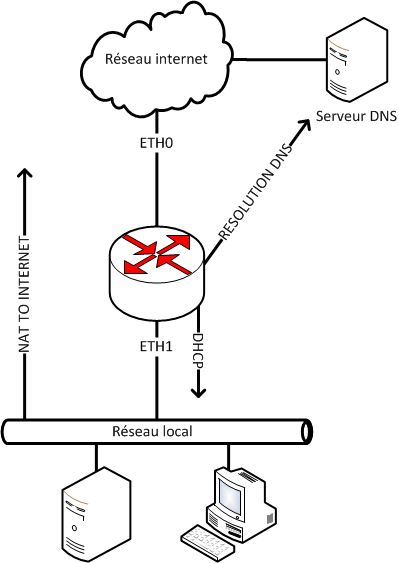
- Configuring interfaces (eth0, eth1).
- Adding a "forward" and "resolv DNS".
- Setting up a static route.
- Creating a DHCP pool for the local network.
- Creating a firewall rule in our LAN.
- Connecting the local network to the internet (NAT).
Useful commands:
To enter configuration mode on Vyatta:
configure
To save the changes:
commit
To save the changes to a file:
save
To find other Vyatta commands: use the tab key.
Configuring interfaces
set interfaces ethernet eth0 address X.X.X.X/X
set interfaces ethernet eth0 description internet_network

set interfaces ethernet eth1 address 192.168.1.1/24
set interfaces ethernet eth1 description local_network
Adding DNS resolution
set system name-server 8.8.8.8
Adding DNS forwarding (optional)
set service dns forwarding listen-on eth0
set service dns forwarding system
Setting up a static route (optional)
set protocols static interface-route X.X.X.X/X next-hop-interface eth0
Be careful, this command is particularly notorious on OVH's network.
It causes ARP storms. This is a known bug on the Vyatta forum.
The suggested temporary fix is to undo this command and then fall back on standard Debian commands (route, ifconfig, etc.)
To undo the command:
delete protocols static interface-route X.X.X.X/X next-hop-interface eth0
Setting up an OVH static route (optional)
For this, you need to leave Vyatta's configuration mode and make these changes as root.
route add X.X.X.254 dev eth0
route add default gw X.X.X.254
DHCP pool for the local network
set service dhcp-server shared-network-name pool_lan1
set service dhcp-server shared-network-name pool_lan1 subnet 192.168.1.0/24
set service dhcp-server shared-network-name pool_lan1 subnet 192.168.1.0/24 start 192.168.1.10 stop 192.168.1.15
set service dhcp-server shared-network-name pool_lan1 subnet 192.168.1.0/24 default-router 192.168.1.1
set service dhcp-server shared-network-name pool_lan1 subnet 192.168.1.0/24 dns-server 8.8.8.8
Creating a firewall rule
set firewall name internet_network
set firewall name internet_network rule 10 action accept
set firewall name internet_network rule 10 state established enable
Applying the firewall rule to the interface
set interfaces ethernet eth0 firewall in name internet_network
set interfaces ethernet eth0 firewall local name internet_network
Connecting the local network to the internet (NAT)
set nat source rule 10 source address 192.168.1.0/24
set nat source rule 10 outbound-interface eth0
set nat source rule 10 translation address masquerade
Your network is now functional, the basic configuration on Vyatta is complete!
If you're still struggling after this introduction, feel free to contact me.
Conclusion
This basic Vyatta configuration covers the essential elements of a functional router: network interfaces, DNS resolution, static route, DHCP pool, firewall rule, and source NAT to the internet. It provides a simple foundation to reproduce in order to quickly have a working SDN router, before moving on to more advanced topics like VPN remote access. One point of caution concerns static routes on OVH's network, which can trigger ARP storms.