

Microsoft · Security
Achieving a 0% Exposure Score with Microsoft Defender Vulnerability Management
0% exposure score and 100% Secure Score: how MDVM automates vulnerability scanning, asset inventory, and compliance.

Real-world use case
You need to prove to an auditor that your vulnerabilities are under control: discover how Microsoft Defender Vulnerability Management let me achieve a 0% exposure score.
Vulnerability management is a fundamental IT security activity: it involves ensuring proactive defense by systematically identifying known and unknown weaknesses (CVEs, zero-days), assessing their impact and exploitability (CVSS, EPSS), prioritizing remediation, and continuously adapting to emerging threats.
To get a handle on the threat landscape within my organization, I use Microsoft Defender Vulnerability Management.
It lets me manage all my critical vulnerability management tasks: identification, assessment, prioritization, and remediation. Learn more about the solution.
Asset inventory
Asset inventory is the first phase, obviously essential to know our assets in detail. To do this, I developed Cybernetics, a tool that connects to all our data to dynamically map the fleet and its risk level, learn more.
Next comes deploying solutions, such as Microsoft Defender XDR. In our case, it protects our systems on our devices:
- Microsoft Windows 11 (25H2 - 26200.6901)
- macOS 26.0.1 (25A362)
- iOS 26.0.1 (23A355)
I haven't (yet) entrusted the protection and vulnerability management of my servers (Linux and Windows) to Microsoft Defender.
The second phase begins with Microsoft Defender Vulnerability Management, which collects the following data:
- Device information
- Software applications
- Digital certificates
- Browser extensions
- Firmware assessments
The software inventory now correctly retrieves all CPEs; the default filter shows all software with official Common Platform Enumerations (CPE). The view includes details such as vendor name, number of weaknesses, threats, and the number of exposed devices.
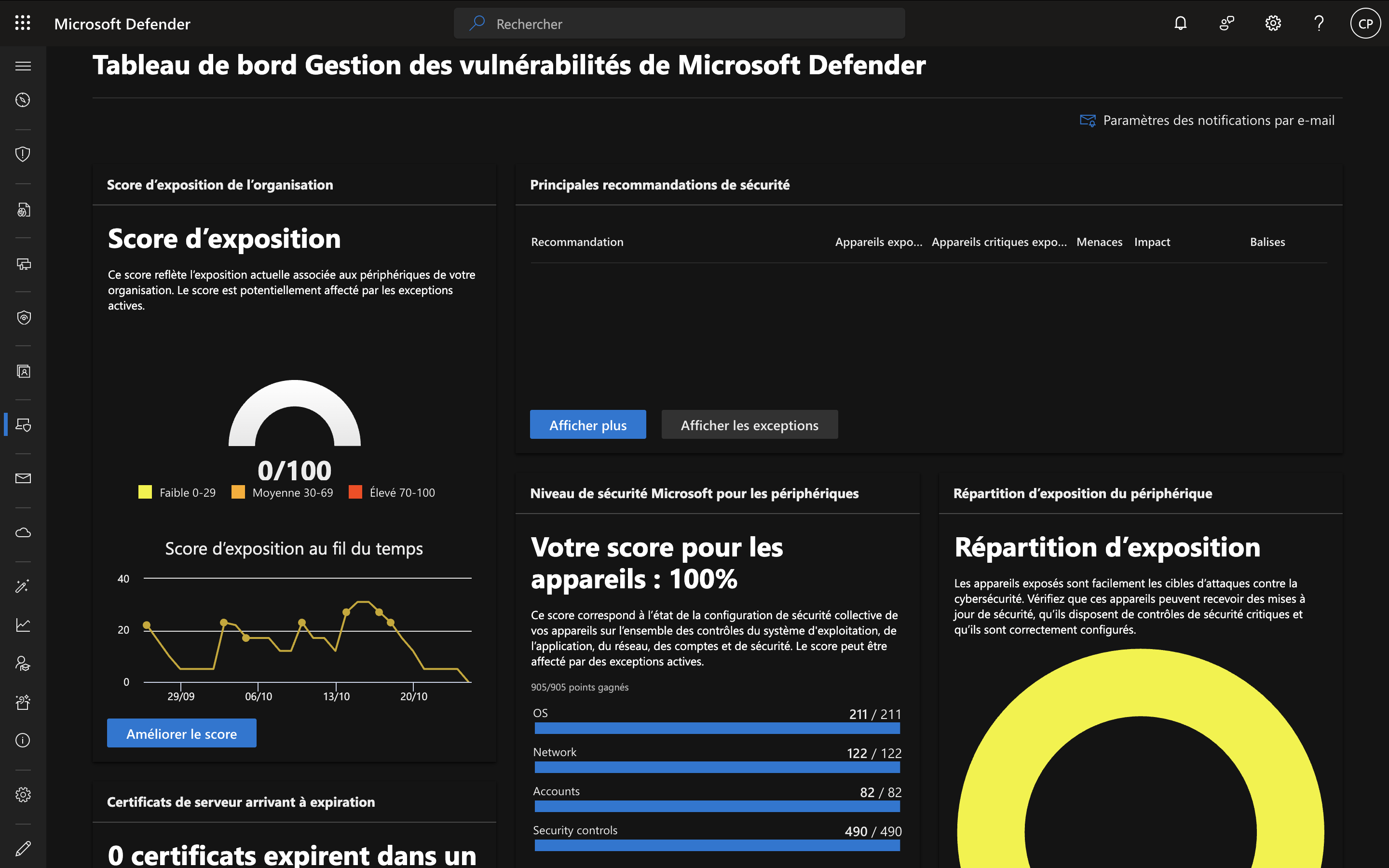
The dashboard
Here's our current exposure score: 0/100, as of October 25, 2025:
Security recommendations
In our previous article, I mentioned our known vulnerability issue with "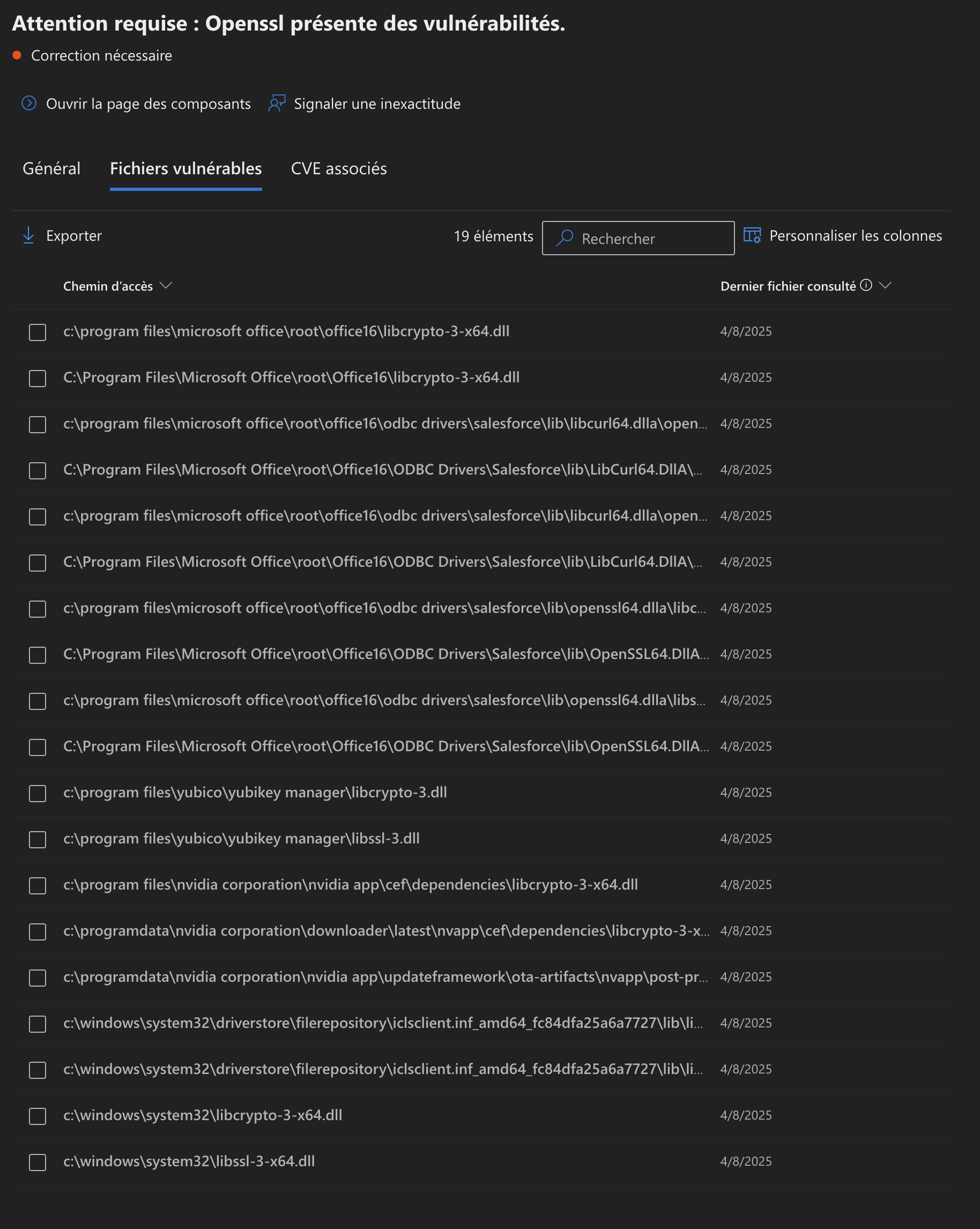 ". I took the time (manually) to do what was needed to no longer be exposed. Clicking "improve score", the default "active" filter now shows no issues. However, if I remove the filter:
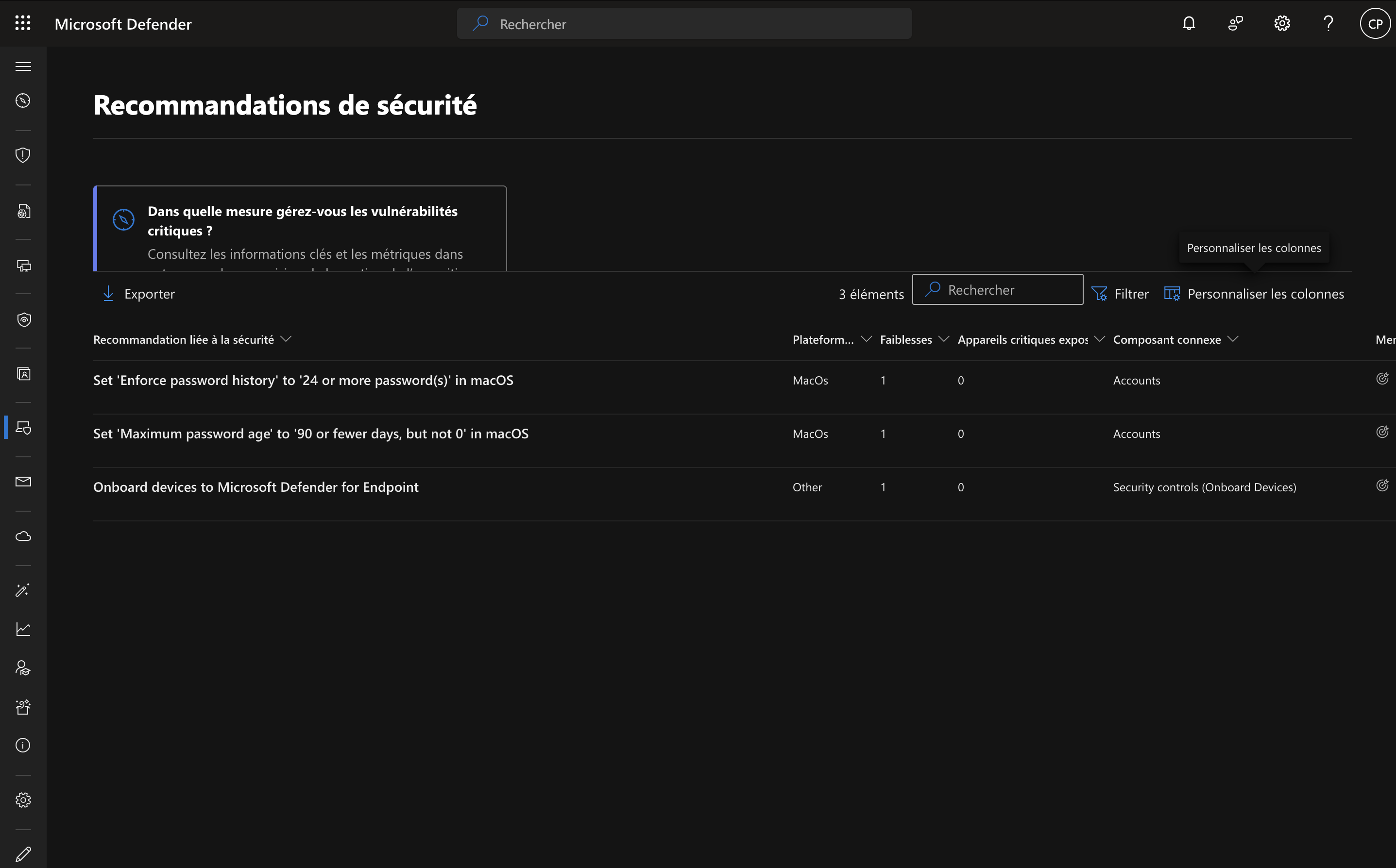
These are security recommendations, with no impact on the exposure score.
We find three exceptions out of the 5 in place in our tenant regarding the security score.
Focus on one device
Despite a 0/100 exposure score, let's look at the data the solution has gathered on my Windows 11 machine.
Vulnerable components
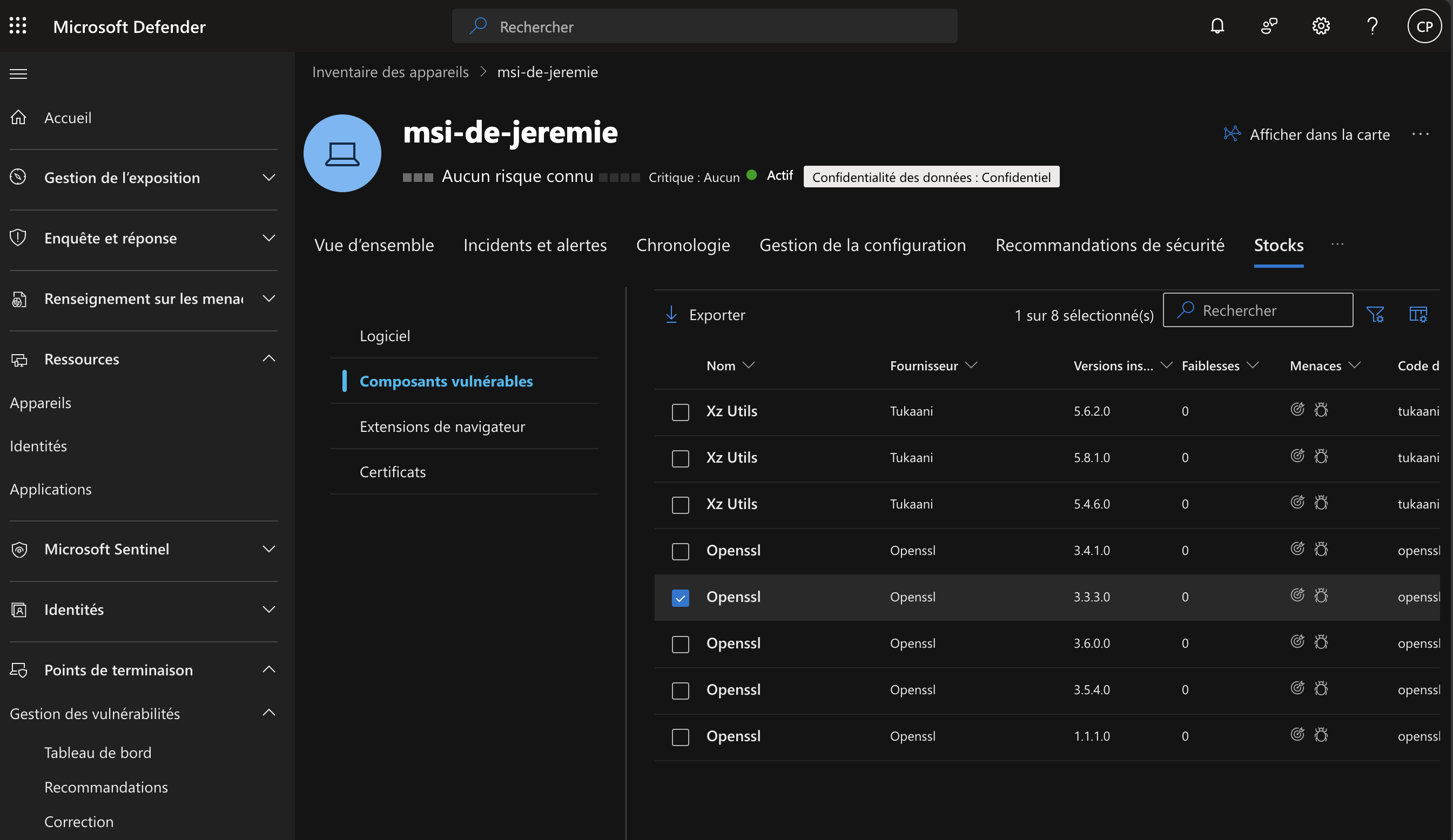
Surprisingly, there are still so-called "vulnerable" components: these are libraries used notably by OneDrive or third-party tools. They have no identified weaknesses currently, but MDVM monitors them because they have a history of known CVEs.
So I'll need to keep analyzing these components regularly. That said, be careful: manually removing these libraries can destabilize the applications that depend on them (like OneDrive).
Best practice is instead to:
- Regularly check whether new CVEs emerge for these components
- Monitor updates to the parent applications (OneDrive, etc.)
- Accept the risk if the component is needed and up to date
- Document these "false positives" in MDVM
This will become a routine regular review for me, but one focused more on monitoring than on systematically removing vulnerable components.
At-risk certificates
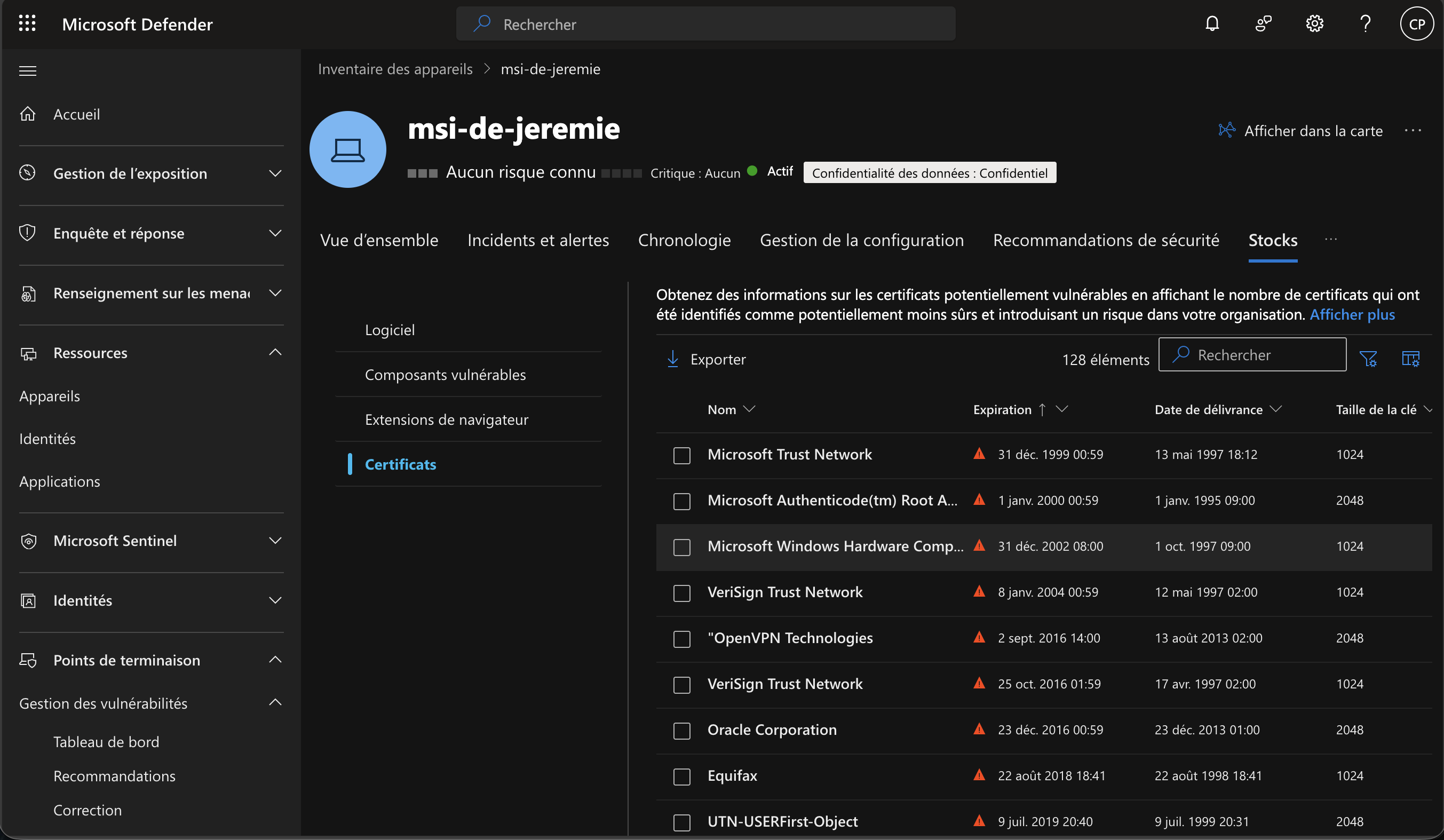
Here too, I need to take corrective action to limit expired or less trustworthy certificates on the machine.
I'm not including a specific screenshot, but there's also a view for browser extensions, under "Browser extensions". The extensions and their permissions are visible, in my case for Edge and Firefox, which is quite handy for understanding the associated risks.
Additional information
Rather than relying solely on raw severity scores (like CVSS), MDVM uses a risk-based approach to decide where to focus efforts. The system quickly and continuously prioritizes the main vulnerabilities detected on our resources.
I also appreciate being able to get alerted (via webhook or email) when a new vulnerability is detected.
It's also possible to use a key feature: blocking vulnerable applications. You can proactively block known vulnerable versions of applications or alert users via custom desktop notifications.
Of course, evidence and traceability elements are included; the tool lets you track progress and trends in real time thanks to remediation tracking and device reports.
Microsoft Defender Vulnerability Management Add-On
I had never taken the time to go "beyond" standard baseline vulnerability management. And yet, under "Vulnerability management" there's "Security baselines assessment", and that's where things become (in my view) more interesting, provided you accept paying an extra per-user fee.
It then becomes possible to create continuous device audits tied to reference standards: STIG or CIS.
It seems to me that this is the only place where a posture of excellence really comes into play, despite our current secure score of 100% (based on the CIS M365 Foundations Benchmark) and our 0% exposure score. More information
CIS level 2
For this, the profile I now want to standardize across my Microsoft Windows environment is:
- CIS Level 2 (L2) - High Security/Sensitive Data Environment (limited functionality) - Benchmark: 3.0.0-windows_11
Here's the score on the Windows 11 25H2 device, obtained on October 26, 2025:
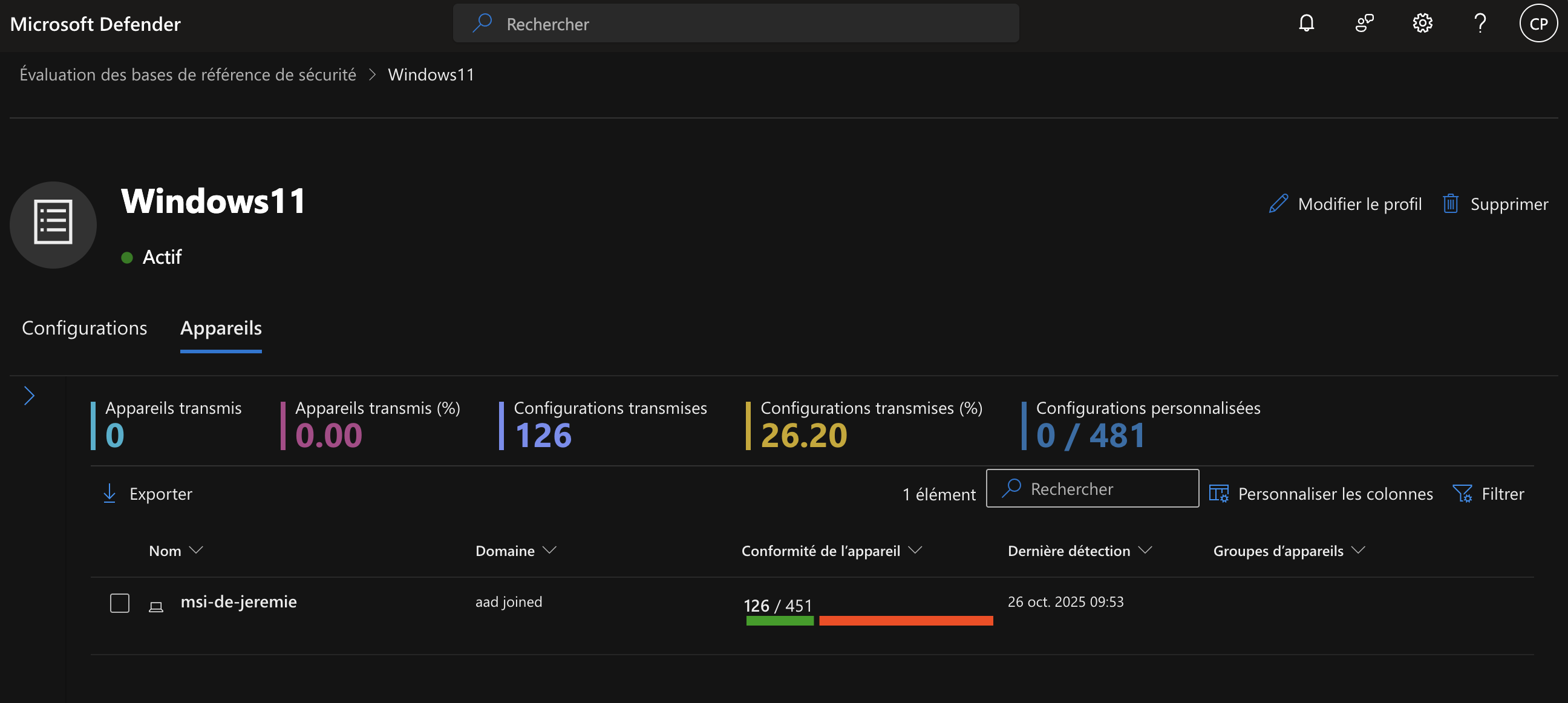
I now know how much ground I still have to cover to meet the most widely recognized protection standards.
And you, how do you manage your inventory, your CPEs, and the associated CVEs/CVSS? Are you proactively reducing risk to secure your data?