

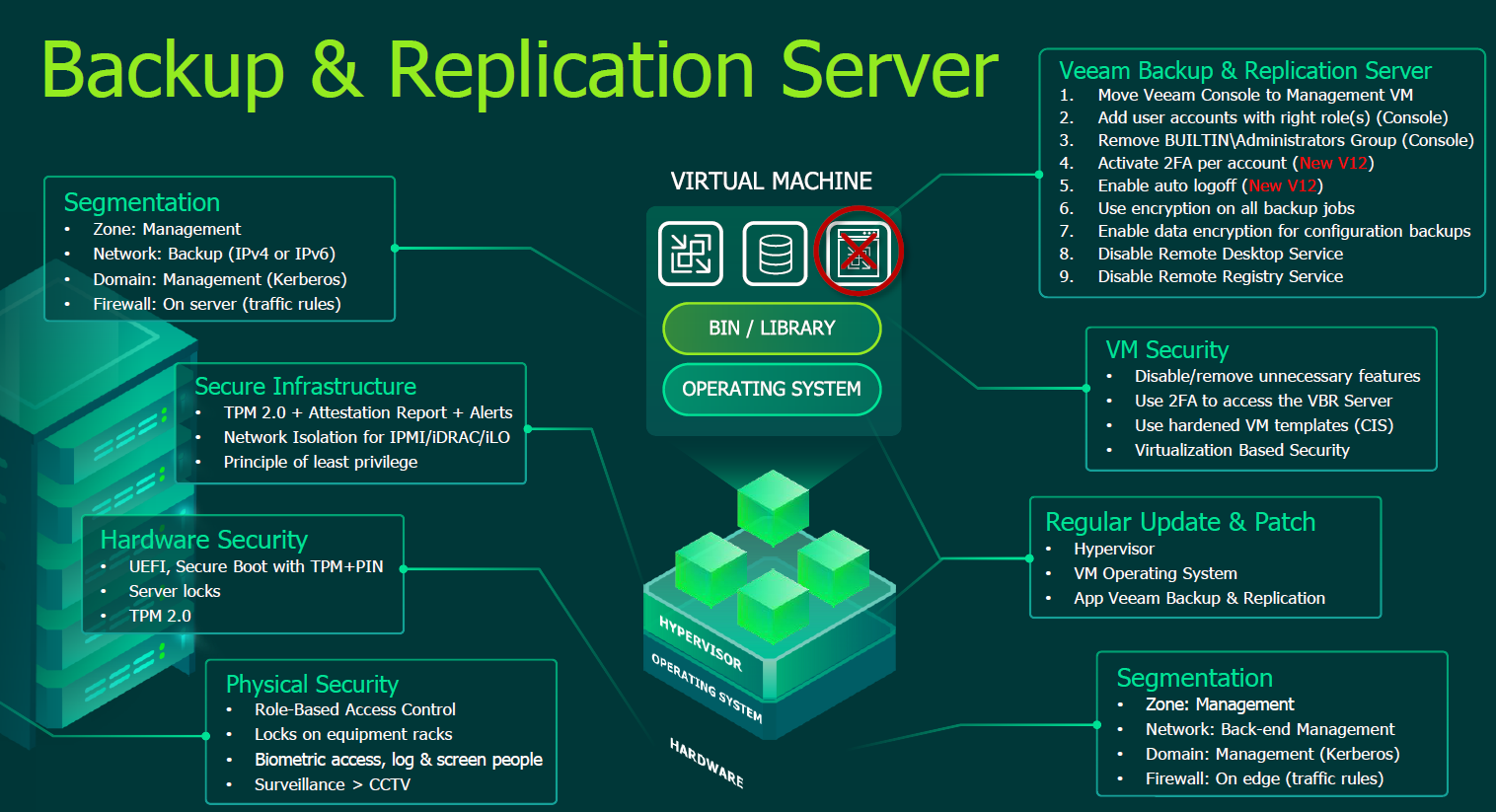
Veeam Analyzer recommendations and additional improvements: from a simple architecture to a hardened security posture for Veeam v12.

Real-world use case
You want to make your Veeam backups more reliable beyond the default settings: here are the Veeam Analyzer's recommendations and my additional improvements.
As an administrator and user of Veeam Backup & Replication since 2011, I've developed deep expertise in data protection best practices. Securing Veeam Backup & Replication v12 (version 12.3.1.3617) is a strong recommendation from the vendor, which provides a built-in security and compliance tool.
This security approach revolves around two main areas:
Securing the infrastructure
Infrastructure security measures follow standard Windows hardening practices, including:
- Secure operating system configuration
- Access management
Secure product configuration
Configuration measures specifically focus on protecting the Veeam B&R application itself, covering:
- Secure configuration of Veeam components
- Data and communication encryption
- Identity management and authentication
Fundamental prerequisites
Before implementing this, it was essential to make sure that:
- Access to the server is locked down to prevent unauthorized physical access
- The server still has Microsoft support (this ensures access to security patches)
- The server has sufficient resources
- The server has dedicated bandwidth for data transfers (backup and restore)
- The server is either in a dedicated management domain OR in a workgroup (standalone).
- The server is protected by a security solution (ideally an XDR-type solution)
- The server is dedicated to Veeam software (uninstall unnecessary third-party tools or Veeam plugins)
- The server is in a separate broadcast domain (physical or virtual)
- The server is filtered by a physical firewall and only allows what's strictly necessary
- The server is only accessible via the server's management console AND via a third-party bastion-type solution (no RDP), with logging
- The server is monitored for connections (Veeam console), via syslog (for the SIEM).
- Secret management (encryption key) is handled in a dedicated, externalized KMS
Some of these principles are part of the Zero Trust model; Veeam illustrates this perfectly at the following link. For a Windows installation, the Security Compliance Toolkit (SCT) tool can help you meet Veeam's recommendations more quickly.
From that point on, I implemented the measures below, to reach our 100% score:
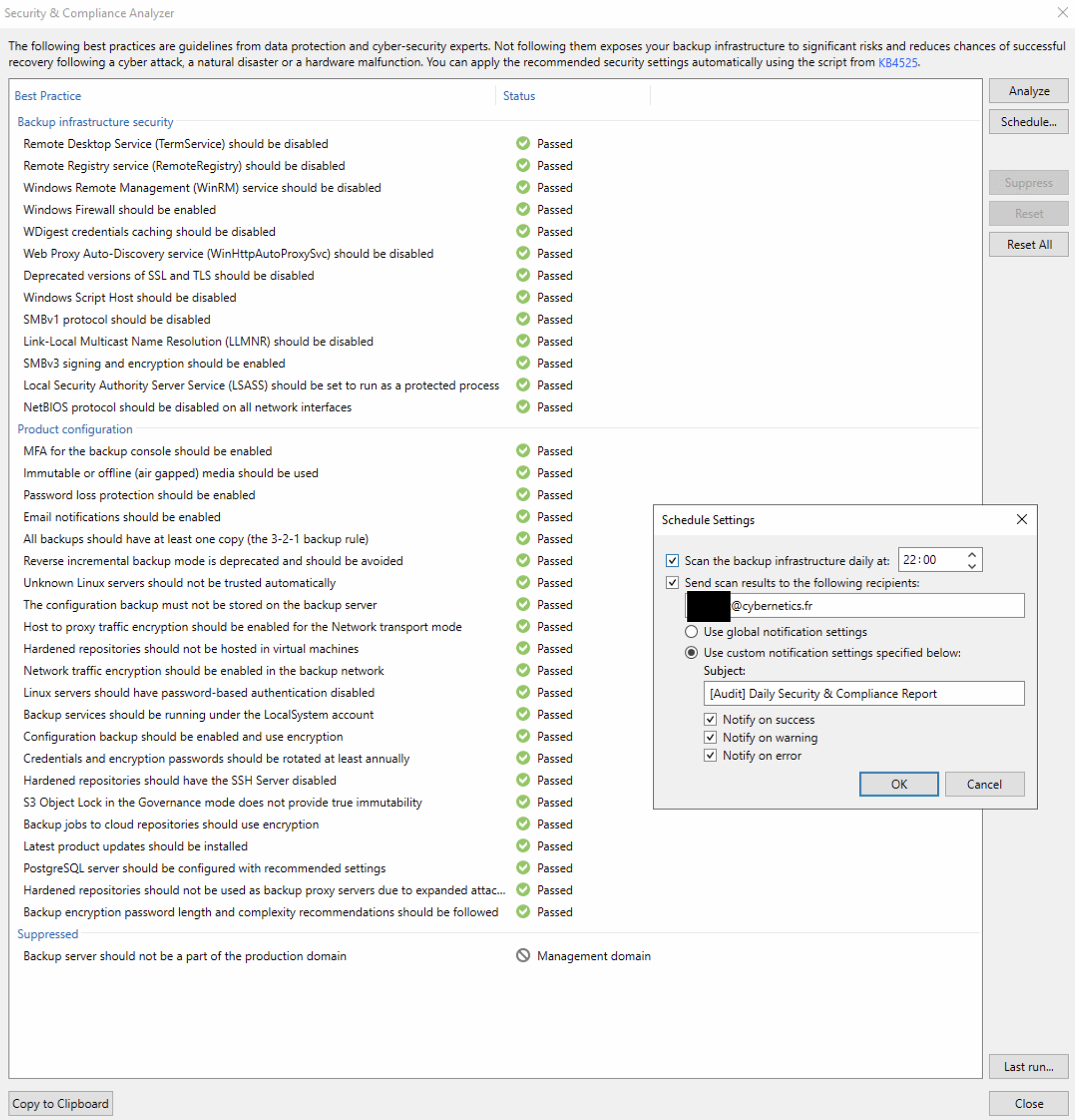
Summary of the Analyzer's best practices
Here are the 35 remediation steps I deployed via GPO:
🔐 Backup infrastructure security
- The Remote Desktop Service (TermService) service is disabled.
- The Remote Registry (RemoteRegistry) service is disabled.
- The Windows Remote Management (WinRM) service is disabled.
- The Windows firewall is enabled.
- SMBv3 signing and encryption are enabled.
- WDigest credential caching is disabled.
- The Web Proxy Auto-Discovery (WinHttpAutoProxySvc) service is disabled.
- Outdated versions of SSL and TLS are disabled.
- Windows Script Host is disabled.
- The SMBv1 protocol is disabled.
- The LLMNR protocol is disabled.
- The LSASS service is enabled/configured to run as a protected process.
- The NetBIOS protocol is disabled on all network interfaces.
⚙️ Product configuration
- MFA is enabled for the backup console.
- Immutable or offline (air-gapped) media are used.
- Password loss protection is enabled.
- Email notifications are enabled.
- Configuration backup is enabled and encrypted.
- All backups follow the 3-2-1 rule.
- Reverse incremental backup mode is avoided.
- Backups to cloud repositories are encrypted.
- Unknown Linux servers are not automatically trusted.
- The configuration backup is not stored on the backup server.
- Host-to-proxy traffic encryption is enabled in network transport mode.
- Hardened repositories are not hosted on virtual machines.
- Network traffic encryption is enabled on the backup network.
- Password authentication is disabled on Linux servers.
- Backup services run under the LocalSystem account.
- Encryption credentials and passwords are renewed at least once a year.
- The SSH server is disabled on hardened repositories.
- S3 Object Lock's Governance mode doesn't guarantee true immutability.
- The latest product updates are installed.
- The PostgreSQL server is configured according to recommendations.
- Hardened repositories are not used as backup proxy servers.
- Recommendations on encryption password length and complexity are followed.
🚫 Recommendation not applied
- The backup server should not be part of the production domain.
→ Waived (justification): Uses a dedicated management domain.
All the explanations are available at the following link.
Veeam One can also help you, as can the best practices site.
Conclusion
Adopting Veeam's recommendations fits well with a simple but well-controlled architecture. The backup server's criticality warrants special attention, since it's essential in the event of an incident. We could also mention recommendations not covered by the Veeam Analyzer:
- Externalizing the database: Migration to a dedicated PostgreSQL server
- Database hardening: Changing default credentials and restricting access
- Proxy isolation: Deployment on a separate machine (non-Windows environment)
- Network hardening: Stronger filtering with restricted access to critical resources only via the proxy
- Stronger encryption at rest: Encrypting all volumes (not just Veeam files).
- Advanced backup strategy: Implementing the 3-2-1-1-0 rule, complemented by SureBackup (systematically and manually testing backups if SureBackup isn't feasible)
- Air-gapped backup: Storage physically disconnected from the network (tapes, rotating offline storage)
- Smart card authentication: Strengthening account authentication (YubiKey)
- Documentation and procedures: Detailed disaster recovery plan (DRP) with documented restore procedures (Veeam failover).
The architecture would become more complex but would significantly strengthen the security posture and resilience of the backup system. It's perhaps only after adapting this architecture that my score would truly be 100%…